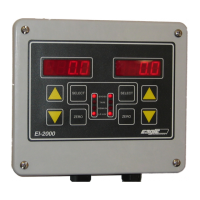
EI-1000 & 2000: Setup, Calibration and Troubleshooting.
Page 13 of 19
8. Use the arrows to set the output to 20.00 mA on your meter.
9. Press select on the EI-1000 to stop the flashing and save the
value.
10. If needed, now hook your meter to CH2 output.
11. Go up to “Ao.2 4”
12. Repeat steps 3 through 9 using the Ao.2 prameters to set the
channel 2 output.
13. Use the left SELECT button or the right pointing arrow on the
EI-1000 to exit all the way back to the weight reading to save
the new calibration.
Setting the zero and full scale on your remote readout:
Enter the configuration as shown on page 9.
• Use the arrows to get to “AOUT”. Press SELECT.
• “Ao.test” (EI-1000) or “Ao T 4.00” (EI-2000) will be displayed.
• If using an EI-1000 press SELECT and “4.00” will start to flash.
• Go to 4.00 mA. Zero your remote readout if needed.
• Go to 20.00 mA. Set your remote readout to full scale.
• On the EI-1000 press SELECT when done to return to Ao.TEST.
4-20 mA troubleshooting:
Go through the output testing as shown above.
• If you find any trouble when using a DMM, check your meter against a
known good 4-20 output to verify it is functioning properly. Worn test leads
may not make a good connection and cause low readings. We’ve also
found some low cost digital meters do not read low DC currents properly.
• If there is no current output, set your meter to volts DC. Measure the
output. If you have a reading of 10 VDC or higher the current fuse in your
meter may be bad.
Remote readout isn’t working:
• The EI1000/2000 is an active or sourcing output. Check that your remote
is set as a passive input.
• Disconnect the loop and hook a meter up to the output directly. Check the
4,12, and 20 mA points again. If the output works now any problems are in
the remote readout or the wiring.



 To Next Page