153
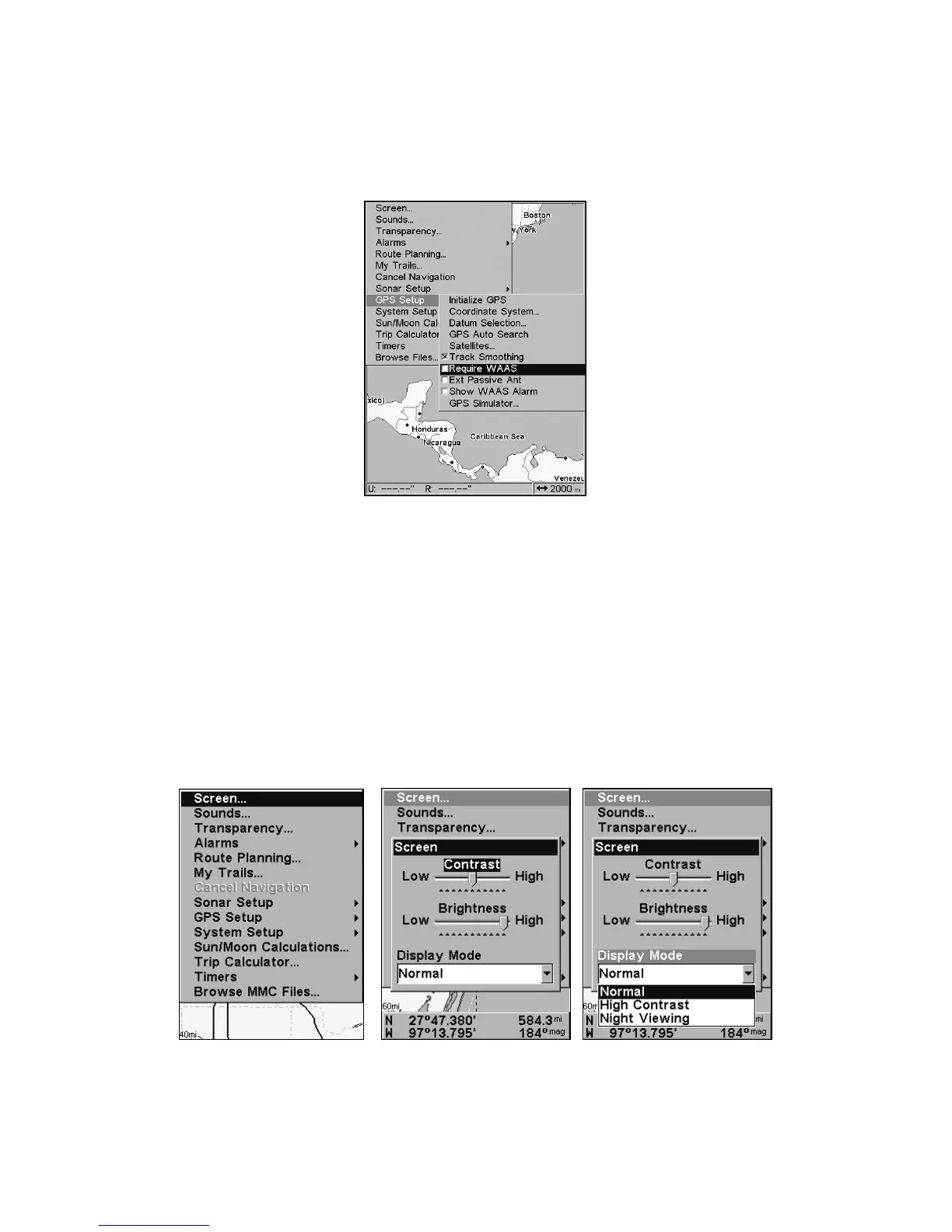
To Require WAAS:
1. Press
MENU|MENU|↓ to GPS SETUP|ENT|↓ to REQUIRE WAAS|ENT.
2. To return to the main page display, press
EXIT|EXIT.
3. Repeat Step 1 to turn off WAAS requirement.
Require WAAS command on GPS Setup Menu.
Screen Contrast and Brightness
To access the Screen menu, press MENU|MENU|ENT.
The
CONTRAST slider bar is already selected. Press ← → to adjust the
contrast.
To adjust the display's brightness:
Press ↓ to
BRIGHTNESS. Use ← → to adjust the brightness of the display.
To adjust the screen's display mode:
Press ↓ to
DISPLAY MODE|ENT. Press ↑ ↓ to select mode|EXIT.
Screen Command (left). Screen menu with Contrast selected (center).
Normal highlighted on Display Mode menu (right).



 To Next Page