EBS Ink Jet Systeme GmbH D-51588 Nümbrecht, Germany, Alte Ziegelei 19-25 ++49 (0)2293/939-0 ++49 (0)2293/939-3 e-mail: mail@ebs-inkjet.de
20 20140417#2.2 edited on 2014.04.17 15
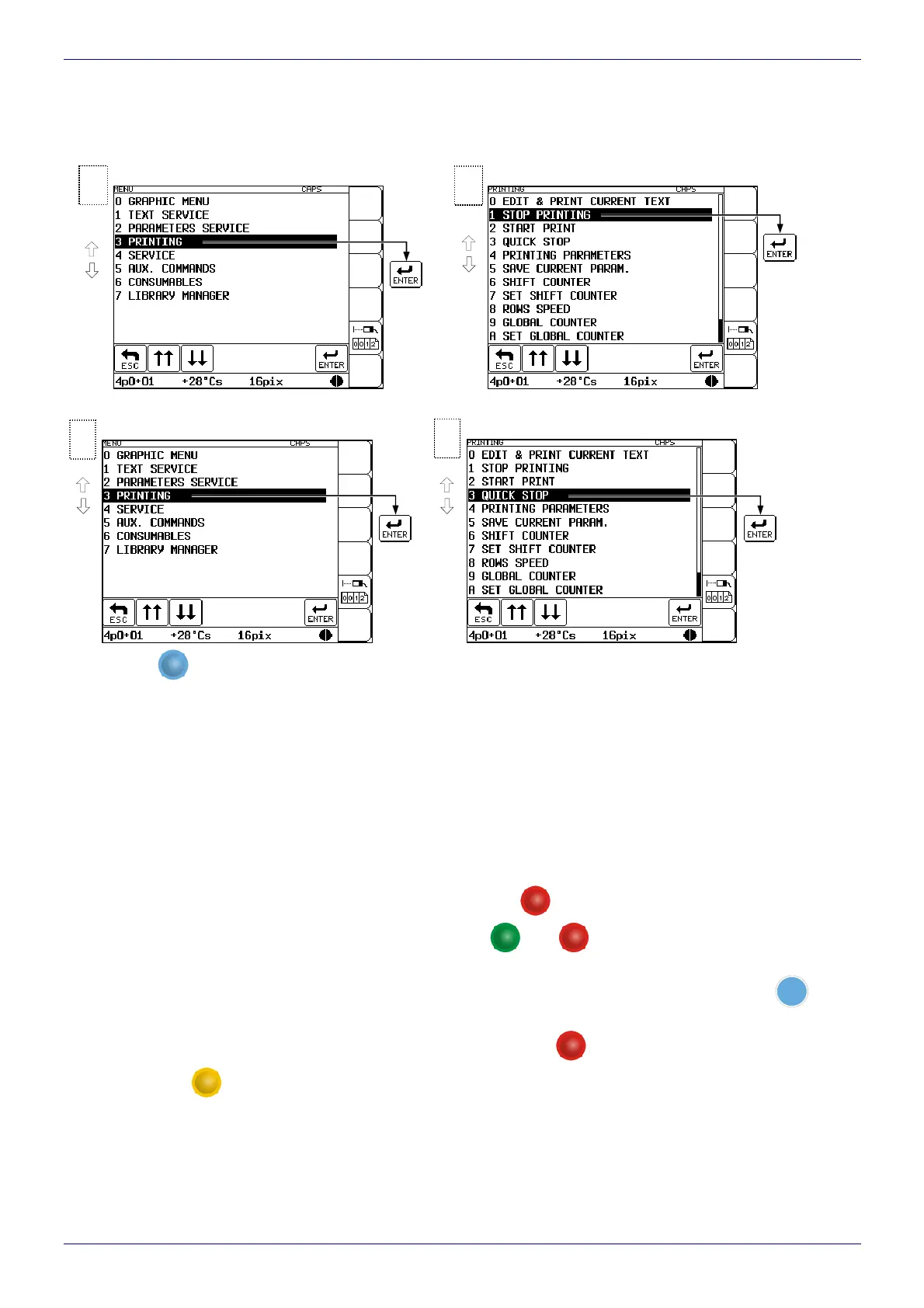
4.6.3. Stopping Printing
Printing can be terminated in three ways:
With the STOP PRINTING command.
With the QUICK STOP command.
With the
PRINT
ON / OFF
key on the operation-panel function pad (when the key is pressed, the QUICK STOP command
is executed). This key can be used no matter where the cursor is positioned within the control menu (for exam-
ple, you can stop the printing while editing a sub file).
4.7. Switching the Printer Off
There are several modes of switching the printer off:
regular mode (to switch the printer off for a period of up to 1 week),
emergency mode (for no longer than a 1-hour period),
service mode (for no longer than a 1-hour period),
switching off in the regular mode with additional rinsing of valve V3 – a precise description is given in
The
BOLTMARK
®
-series Printer User’s Manual.
Switching the printer off in the regular mode - press the
OFF
key on the operation panel and wait a few
minutes for the printer to turn off. Then the LED between the
ON
and
OFF
keys changes color from green to red.
The SWITCHING THE PRINTER OFF ..... message is displayed on the terminal and the time remaining until
the end of the switching off procedure is displayed in the status window. Also the green LED above the
INK
ON
/
OFF
key on
the operation panel flashes indicating that the flow of ink to and in the head is being stopped.
Switching the printer off in the emergency mode - press the
OFF
key and while holding it down press
and release the
CLEAR
ALARM
key. Or alternatively, you can cut off the supply of electricity to the printer with
the master switch
(see Fig. 2.1). This type of switching off is allowed only in the event of an evident
printer failure, especially when the failure to switch the printer off in the regular mode may cause more
extensive or additional damage (such as an ink spill).
Switching the printer off in the service mode - follow the same procedure as for the emergency mode.
The service mode is used to switch the printer off quickly (without rinsing) for a few minutes in order to perform
The printing of
the current text
file is interrupted
2
Printing menu
1
Main menu
The current
text file is
printed to
the end
and the printi
ng is stopped.
2
Printing menu
1
Main menu



 To Next Page