EBS Ink Jet Systeme GmbH D-51588 Nümbrecht, Germany, Alte Ziegelei 19-25 ++49 (0)2293/939-0 ++49 (0)2293/939-3 e-mail: mail@ebs-inkjet.de
20 20140417#2.2 edited on 2014.04.17 3
1. General Information
The BOLTMARK
®
series consists of the following INK-JET printer models:
EBS-6500
- the low investment printer for common applications.
EBS-6800
- the all-round model printer with full printing options.
EBS-7200
- the new standard in high-speed marking solutions.
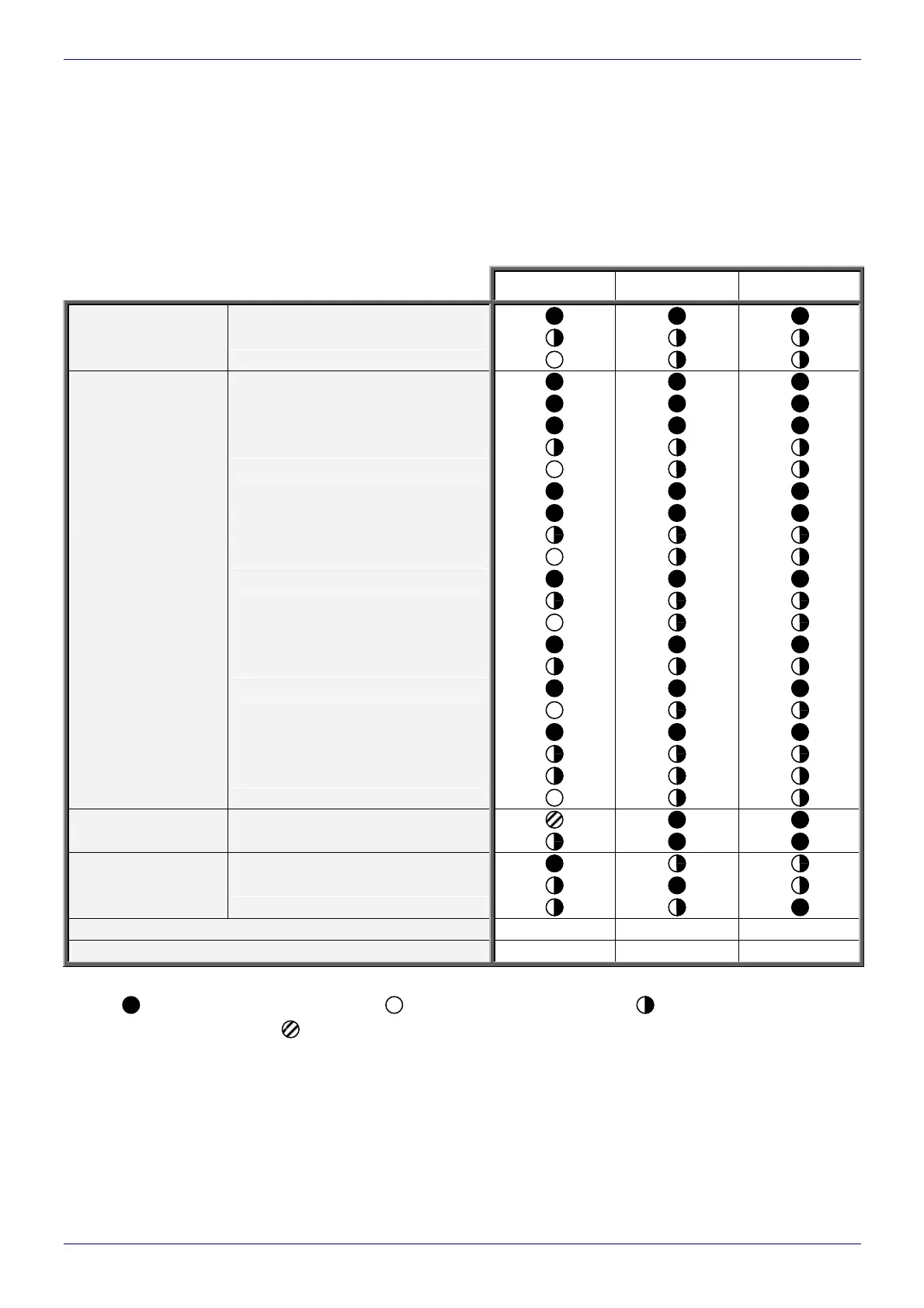
The table below shows a comparison of the primary parameters of the BOLTMARK
®
-series models men-
tioned above.
Tab. 1.1
EBS-6500 EBS-6800 EBS-7200
MINI / 16 dots
MIDI / 25 dots
Maximum height of
vertical row (H
max
)
MAXI / 32 dots
One 5x5 line
Two 5x5 lines
Three 5x5 lines
Four 5x5 lines
Five 5x5 lines
One 7x5 line
Two 7x5 lines
Three 7x5 lines
Four 7x5 lines
One 9x5 line
Two 9x5 lines
Three 9x5 lines
One 11x7 line
Two 11x7 lines
One 14x9 line
Two 14x9 lines
One 16x10 line
One 21x15 line
One 25x15 line
Examples of matrices
(The matrices listed are
available for
the EBS-6500 MIDI
printers as well as
EBS-6800
and EBS-7200 MAXI
printers)
One 32x18 line
1D codes
Bar codes available
2D code (Data Matrix)
to run over 4000 hours (18 months)
to run over 6000 hours (18 months)
Type of iModule
®
to run over 8000 hours (18 months)
Print height [mm]
1.4 - 12 1.4 - 12 1.2 - 9
Distance between the head and product [mm]
0 - 30 0 - 30 0 - 15
The symbols used in the above given table have the following meanings:
- YES (available) - NO (unavailable) - available as an option
- YES (available as standard but with limitations)
The complete information on the printer’s features; installation, configuration and operation is contained in
The
BOLTMARK
®
-series Printer User’s Manual. This document contains only the basic information on how to
start and stop the BOLTMARK
®
-series printer, enter a text to be printed, print the text, exchange a (solvent or
ink) bottle, replace iModule
®
as and when necessary, and keep the head clean.



 To Next Page