EBS Ink Jet Systeme GmbH D-51588 Nümbrecht, Germany, Alte Ziegelei 19-25 ++49 (0)2293/939-0 ++49 (0)2293/939-3 e-mail: mail@ebs-inkjet.de
20 20140417#2.2 edited on 2014.04.17 17
5.2. Replacing iModule
®
iModule
®
is a basic subassembly of the BOLTMARK
®
-series printer ink system. It contains component
parts on which the reliability of printer operation and also print quality largely depend. For this reason the iModule
®
must be replaced from time to time so that faultless operation of the printer is ensured. Every iModule
®
is equipped
with a transponder, where the data such as the type of module, its use-by date, the limit of running hours assigned
to it and also its expiry date is saved. This information is available in the CONSUMABLES/
iMODULE INFORMATION menu and also on the iModule
®
label.
The iModule
®
should be replaced periodically before the time limit assigned to it expires or before the iModule
®
is past its expiry date (both of the settings can be viewed with the OPERATING TIME command in
the CONSUMABLES/ iMODULE INFORMATION menu), otherwise printing is disabled. The level of use of
the iModule
®
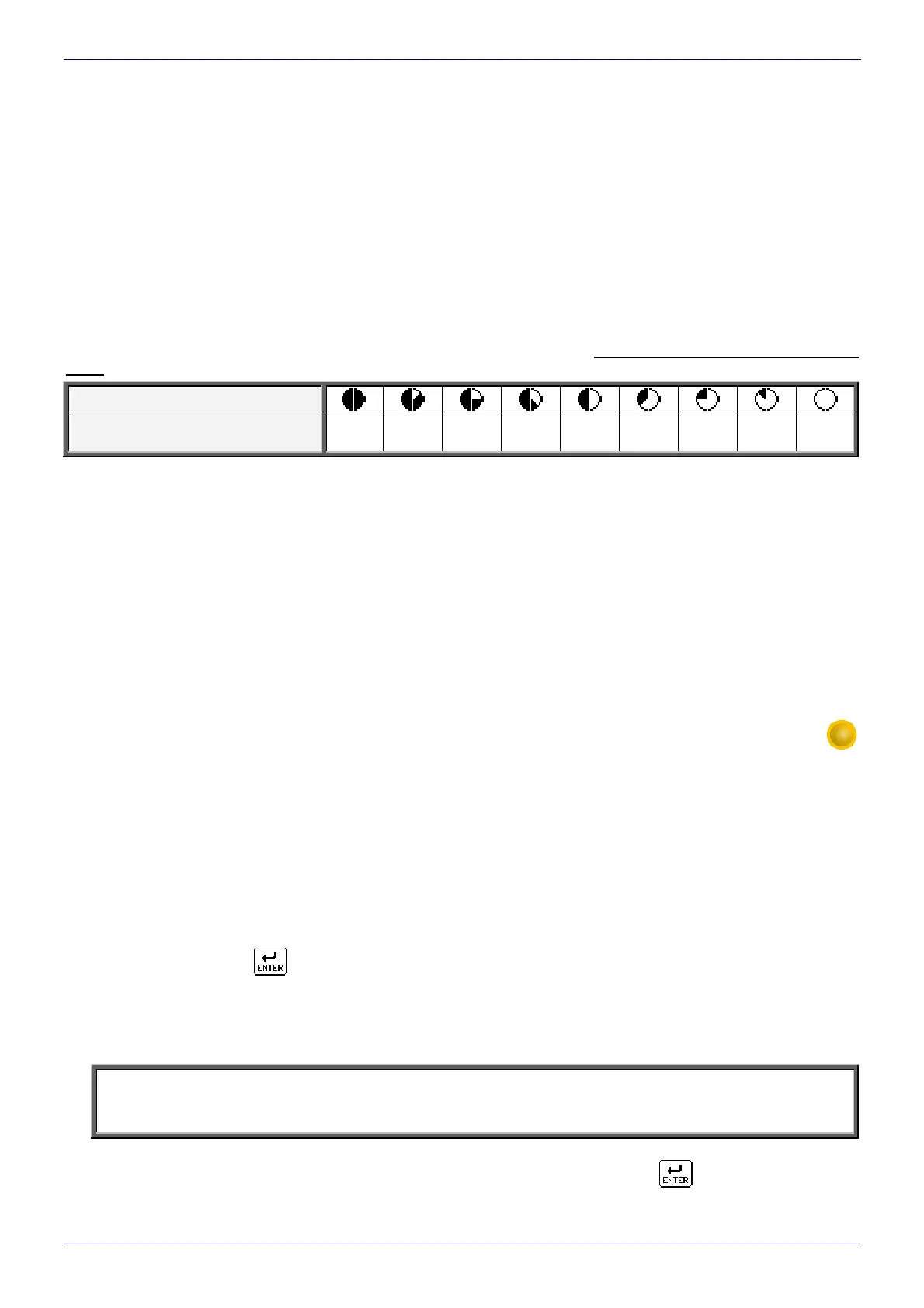
is also presented in the printer status window in graphical format. Such a graphical indication shows
(approximately) the remaining running time of the iModule
®
or the time to the end of the iModule
®
expiry date.
The table below shows successive graphical symbols indicating the remaining running times of the iModule
®
or
the time to the end of the iModule
®
expiry date, whichever comes sooner. The symbols are shown in a negative
color.
Symbol
Remaining running time or time to
the end of expiry date [%]
100-88 87-76 75-63 62-51 50-38 37-26 25-13 12-1 <1
The approaching date of replacement of the iModule
®
is indicated with one of the below given messages:
iModule running time
is below 10%
CALL SERVICE PLEASE
iModule running time expires
in less than 300 hours
CALL SERVICE PLEASE
iModule expires within
1 month
CALL SERVICE PLEASE
- if the printer runs over a limited number of hours and the iModule
®
expiry date comes before the time limit assigned to the module elapses.
The above-given messages are repeated cyclically (and also each time when the printer is started) until
the time limit assigned to the iModule
®
elapses (or the expiry date elapses) or until the iModule
®
is replaced with
a new one. The message displayed is accompanied by an acoustic signal, which can be turned off with the
CLEAR
LARM
key.
The iModule
®
replacement procedure consists of the following steps:
1. Start the printer and wait until it reaches the ready condition (the yellow READY LED starts emitting continuous
light).
2. Choose the iMODULE REPLACEMENT command from the SERVICE/ SERVICE COMMANDS menu.
The following message appears on the display:
iModule replacement procedure.
ARE YOU SURE (Y,N)?
(Y=ENTER, N=ESC)
3. After the ”Y” key or the
icon has been pressed as confirmation, the following message is displayed:
Prepare a new iModule.
Make sure that there is minimum
3cm of ink in the bottle
ENTER - continue, ESC - abort
NOTE:
While the iModule
®
filling procedure is being followed, the level of ink in the bottle must be 3 cm mini-
mum - such an amount of ink is needed to fill the iModule
®
.
4. Follow the above request and prepare a new iModule
®
, make sure that there is a sufficient amount of ink in
the bottle, and then confirm your readiness for replacement by pressing the
icon. At that moment



 To Next Page