15
UNDERSTANDING & USING YOUR ECO SPA TOPSIDE CONTROLLER
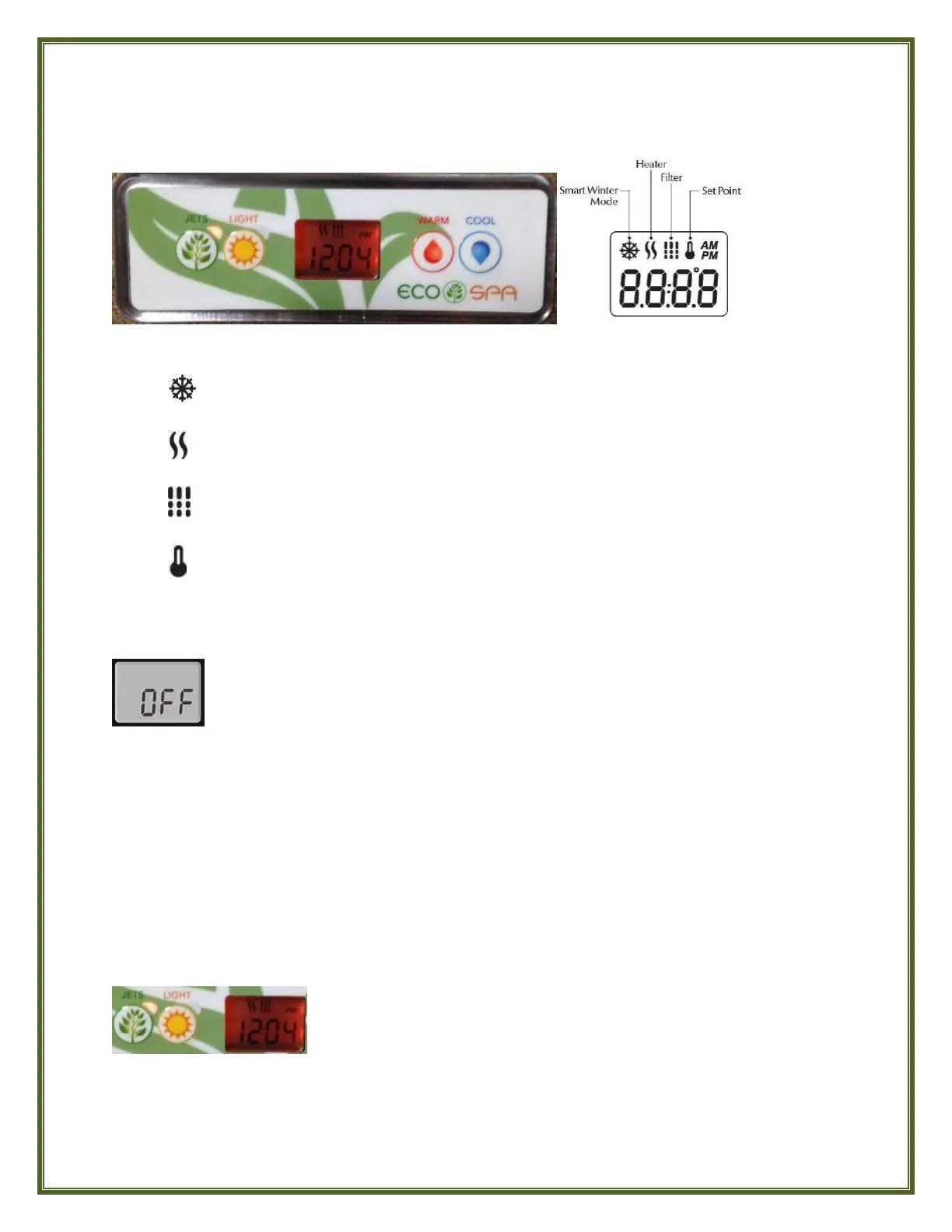
What The Icons In The Window Mean
Smart Winter Mode: appears only when the spa has automatically activated its
Smart Winter Mode.
Heater: Flashes when taking a reading of the current water temperature or if calling
for heat. Shows solid when the heater is on.
Filter Cycle: Shows solid when Filter Cycle is active. Flashes when Filter Cycle cannot
activate or is suspended because the Jets are not on at Low Speed.
Set Point: Flashes when reading the spa’s current water temperature; shows solid
when displaying the desired water Temperature Set Point
SPA FUNCTIONS
OFF Mode
Press & hold the JETS button for 5 seconds to enable the OFF Mode. Once the OFF Mode is
active, the display will toggle between the “OFF” message, the Clock and the current Water
Temperature. The spa light will flash for a few seconds before the end of the 30 minutes to warn
you that the system is about to resume its normal operation.
Press the JETS button again once to exit the OFF Mode and restart the system before the
expiration of the OFF Mode’s 30 minute delay. When the system resumes its normal operation,
the display shows “ON” for 3 seconds, then resumes toggling between the Clock and current
Water Temperature.
JETS Button
The OFF Mode allows you to temporarily stop all outputs including automatic
functions such as Filter cycle, Heat request, Economy and Smart Winter mode for
30 minutes to perform quick spa maintenance without having to disconnect the
electrical power to your spa.
Press the JETS button ONCE to turn Pump on at LOW Speed. The
indicator light will be flashing red to indicate Low Speed. Press the JETS
Button a SECOND time to switch the pump to HIGH Speed. The indicator
light adjacent to the button will be lit solid red to indicate High Speed.
Press the JETS Button a THIRD time to turn the pump OFF.
NOTE: A built-in timer automatically turns pump Off after 20 minutes of continuous operation to
conserve energy as well as to safeguard against the spa possibly having been left operating unattended.
Simply press the JETS button once again to resume operation.



 To Next Page