|1
About this Manual
DISCLAIMER
Read this user manual carefully before using the product to ensure that you
completely understand the product and can correctly use it. After reading
this user manual, keep it properly for future reference. Improper use of this
product may cause serious injury to yourself or others, or cause product
damage and property loss. Once you use this product, it is deemed that you
understand, approve and accept all the terms and content in this document.
EcoFlow is not liable for any loss caused by the user's failure to use this
product in compliance with this user manual.
In compliance with laws and regulations, EcoFlow reserves the right to
final interpretation of this document and all documents related to this prod-
uct. This document is subject to changes (updates, revisions, or termination)
without prior notice. Please visit EcoFlow's official website to obtain the
latest product information.
INTENDED USE
This User Manual complements the product's Installation Guide. While the
Installation Guide offers instructions for the installation and initial setup
of the product, this manual provides a general understanding of product
functions and features.
Please note that all illustrations in this manual are for demonstration only
and may vary from the actual product due to regions and firmware versions.
INTENDED USER
This manual is intended for qualified persons and end users. Please
note that only qualified persons are allowed to perform professional or
skilled work on the equipment, such as installation, maintenance, or other
electrical operations.
Safety Instructions
SYMBOL CONVENTIONS
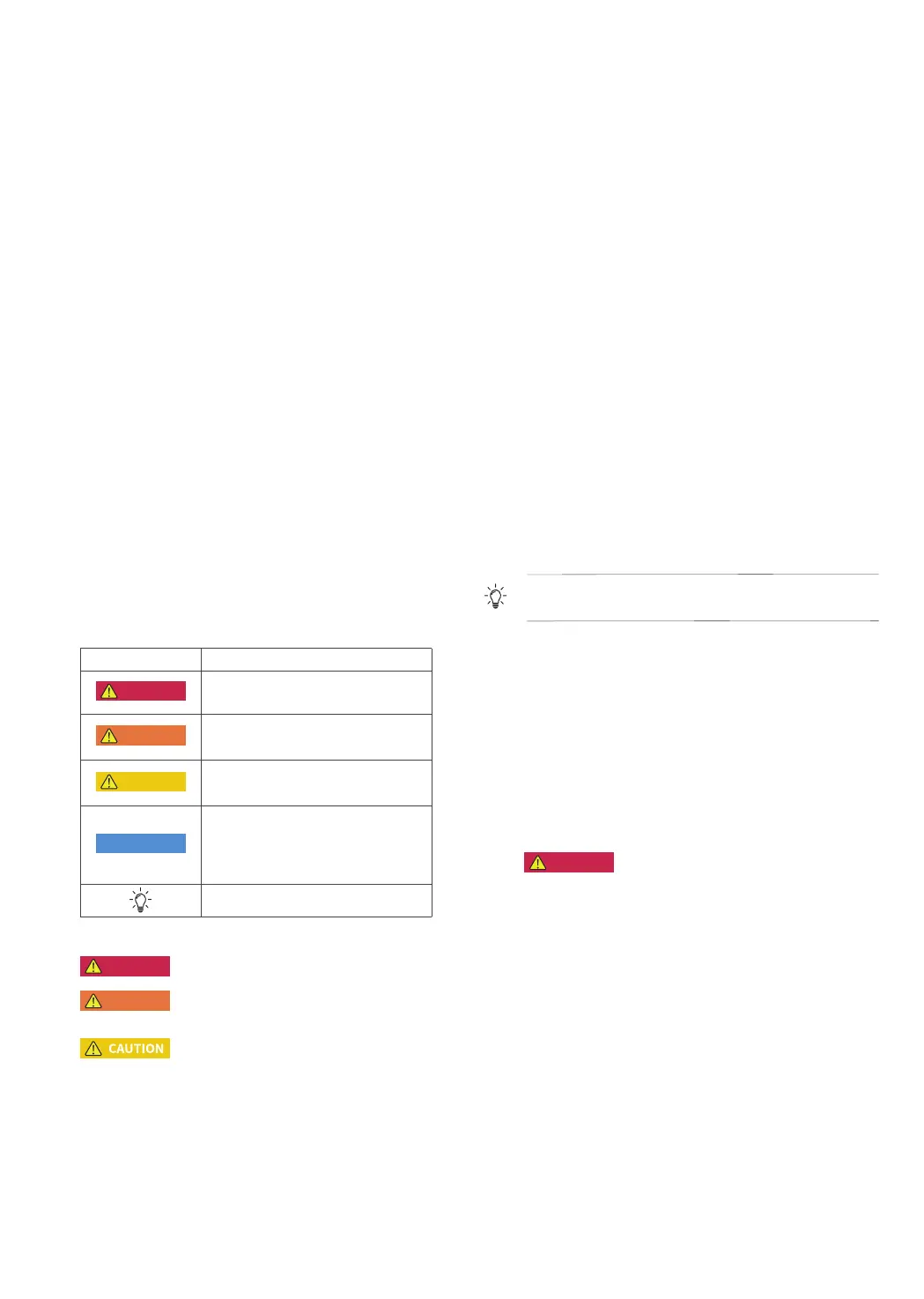
The following table describes the symbol conventions used in this
document. Please note that all the instructions and cautions on the
equipment or in related documents are only supplements to local laws and
regulations.
Symbol Description
DANGER
Indicates a hazard with a high level of risk
which, if not avoided, will result in death or
serious injury.
WARNING
Indicates a hazard with a medium level of risk
which, if not avoided, could result in death or
serious injury.
CAUTION
Indicates a hazard with a low level of risk
which, if not avoided, could result in minor or
moderate injury.
NOTICE
Indicates a potentially hazardous situation
which, if not avoided, could result in equipment
damage, data loss, performance deterioration,
or unanticipated results.
NOTICE is used to address practices not
related to personal injury.
Indicates additional information that promotes
understanding of the product or a topic.
GENERAL REQUIREMENTS
DANGER
• Do not work with power on during installation.
WARNING
• When the photovoltaic array is exposed to light, it supplies a d.c. voltage to
the PCE.
• The product must only be operated with PV modules of protection class II
in accordance with IEC 61730, application class A. The PV modules must
be compatible with this product. Do not ground the PV array positive/nega-
tive hole.
1. If the power cord of this equipment is damaged, it must be replaced by
the manufacturer, customer service department or qualified personnel to
prevent a safety hazard.
2. Do not touch the exposed cable with your hands.
3. Make sure the cables, connectors and ports are dry before starting up the
equipment. Make sure all three are connected securely.
4. Do not install, use, or operate outdoor equipment and cables in harsh
weather conditions such as lightning, rain, snow, and level 6 or stronger
wind.
5. Tighten the screws to the specified torque using tools when installing the
equipment.
6. After installing the equipment, remove the remnants of the device
installation area, such as cardboard boxes, foam, plastic, wire ties, stripped
insulation materials, etc.
7. All warning label and nameplates on the equipment should be visible after
installation is complete. Do not scrawl, damage, or block any warning label
on the device.
8. Understand the components and functioning of a grid-tied PV power
system and relevant local standards.
9. Do not open the host panel of the equipment without permission.
10. Do not reverse engineer, decompile, disassemble, adapt, add code to the
device software or alter the device software in any other way. Any other
operation that violates the original design specifications of the device
hardware and software is not allowed.
11. If there is a probability of personal injury or equipment damage during
operations on the equipment, immediately stop the operations, take
feasible protective measures.
12. Use tools correctly to avoid hurting people or damaging the equipment.
13. Do not touch the energized equipment, as the enclosure is hot.
14. Use insulated tools when operating equipment and wear personal
protective equipment to ensure personal safety. Wear anti-static gloves,
clothing and wristbands when touching electronic devices to protect
equipment from damage.
15. Prior to performing any work on the equipment, always disconnect it from
all voltage sources as described in this section. Always adhere to the
prescribed sequence.
16. Before installing PV modules, please read its user manual carefully.
17. The system is not suitable for power supplying life-sustaining medical
devices. It cannot guarantee backup power in all circumstances.
18. Do not connect loads between the inverter and the AC switch that directly
connects to the inverter.
PERSONNEL REQUIREMENTS
1. Personnel who plan to install or maintain EcoFlow equipment must receive
thorough training, understand all necessary safety precautions, and be able
to correctly perform all operations.
2. Only qualified professionals are allowed to install, operate, and maintain
the equipment.
3. Personnel who will operate the equipment, including operators, trained
personnel, and professionals, should possess the local national required
qualifications in special operations such as high-voltage operations,
working at heights, and operations of special equipment.
Professionals: personnel who are trained or experienced in equipment
operations and are clear of the sources and degree of various potential
hazards in equipment installation, operation, and maintenance.
ELECTRICAL SAFETY
GROUNDING
1. For the equipment that needs to be grounded, install the ground cable first
when installing the equipment and remove the ground cable last when
removing the equipment.
2. Ground the PE hole of GRID connector, BACKUP connector and the
equipment enclosure.
3. Do not damage the ground conductor.
4. Do not operate the equipment in the absence of a properly installed ground
conductor.
5. Ensure that the equipment is connected permanently to the protective
ground. Before operating the equipment, check its electrical connection to
ensure that it is securely grounded.
GENERAL REQUIREMENTS
DANGER
• Before connecting cables, ensure that the equipment is intact. Otherwise,
electric shocks or fire may occur.
1. Ensure that all electrical connections comply with local electrical standards.
2. Obtain approval from the local electric utility company before using the
equipment in grid-tied mode.
3. Ensure that the cables installer prepared meet local regulations.
4. Use dedicated insulated tools when performing high-voltage operations.
5. Before connecting a power cable, check that the label on the power cable
is correct. When fabricating cables and installing connectors on site, follow
the respective instructions in this manual and the requirements of local
laws and regulations.
6. Before operating the equipment, disconnect all power to the equipment
and wait for the corresponding delayed discharge time to ensure that the
equipment is completely deenergized.
CABLING
1. The cabling path must avoid the equipment cooling system and parts.
2. When routing cables, ensure that a distance of at least 30 mm exists
between the cables and heat-generating components or areas. This
prevents damage to the insulation layer of the cables.
3. Bind cables of the same type together. When routing cables of different
types, ensure that they are at least 30 mm away from each other. Mutual
entanglement or cross-deployment is not allowed.
4. Ensure that the cables used in a grid-tied PV power system are properly
connected and insulated and meet specifications.
INSTALLATION ENVIRONMENT REQUIREMENTS
1. Ensure that the equipment is installed in a well ventilated environment.
2. To prevent fire due to high temperature, ensure that the ventilation vents



 To Next Page