|5
Utility grid recovers:
The backup operation is disabled automatically and the loads are supplied
with energy from the power grid and PV system.
Backup switching time
:
Under normal circumstances, the back up switching time during grid outage
is less than 20 ms, which will be more than 20ms when low-voltage ride-
through function is enabled by default based on local electrical code.
You can set charging and discharging limit in the EcoFlow app
.
BACK-UP OVERLOAD PROTECTION
When single overload protection occurs, the inverter can restart
automatically. However, the restarting time will be extended (5 min at
most) if it repeats. For a faster restarting, try it via app. Try removing the
loads which may cause very high start-up current surges.
OPTIMIZE SOLAR AGAINST SHADE
The system will optimize solar generation in shaded conditions at your
setup intervals to track the maximum power point. Solar generation may
fluctuate under this condition.
This Function is disabled by default.
To enable it, switch on Commissioning > Optional setup > Optimize solar
generation in the EcoFlow Pro app when the installer performs system
commissioning.
RCR OR DRM DETECTION
Ripple control receiver (RCR) is an interface between a PV system and
power grid company that enables the grid operator to reduce the feed-
in power, required in Germany and some European regions for more than
25kW inverters.
Demand Response Mode (DRM) which enables the inverter to respond to
signals sent to it remotely, is required in Australia.
Generally, if the grid is overloaded, the utility company will specify whether
the PV system should reduce the feed-in power to 0%, 30%, 60% of the
rated power.
This Function is enabled by default.
To disable it, switch on Commissioning > Testing > DI active scheduling in
the EcoFlow Pro app when the installer performs system commissioning.
Or custom the DI values.
CUSTOM PARAMETER
You can custom the following parameters in Commissioning > Device
settings > Customize settings in the EcoFlow Pro app when the installer
performs system commissioning.
• Connection parameters
• Voltage Protection parameters
• Frequency Protection parameters
• Reactive Power parameters
• Other parameters
System Maintenance &
Replacement
WARNING
• Turn off the AC and DC switches of the inverter and the battery junction
box when maintaining the electric equipment or power distribution
equipment connected the equipment.
• Wear proper PPE before any operations.
• Place temporary warning signs or erect fences to prevent unauthorized
access to the maintenance site.
ROUTINE MAINTENANCE
Recommended maintenance interval for the following item is once every 6
months. Troubleshoot if there is any abnormality.
Check
Item
Check Method
System
cleanliness
Check periodically that the heat sinks are free from obstacles
and dust.
If there is any stain or dirt on the surface, use a dry, soft cloth
to wipe it off and prohibit the use of stain removing powder,
any liquid, coarse brush, abrasives or hard objects to clean
the equipment.
Ensure equipment ventilation and heat dissipation.
If you need to remove the air inlet baffle for cleaning, contact
the installer.
System
running
status
Check that the equipment is not damaged or deformed.
Check that the equipment operates with no abnormal sound.
Check that all equipment parameters are correctly set during
operation.
Electrical
connection
Check that cables are secured.
Check that cables are intact.
Grounding
reliability
Check that ground cables are securely connected.
Seal ability
Check that unused terminals, ports, waterproof covers are
locked as delivered.
Fan
Check whether the fan generates abnormal noise during
operation, whether the fan is covered by some objects
nearby.
If any, remove foreign objects from or beside the fan.
If the abnormal noise persists, replace the fan. For details,
see Replacing the Inverter Fan.
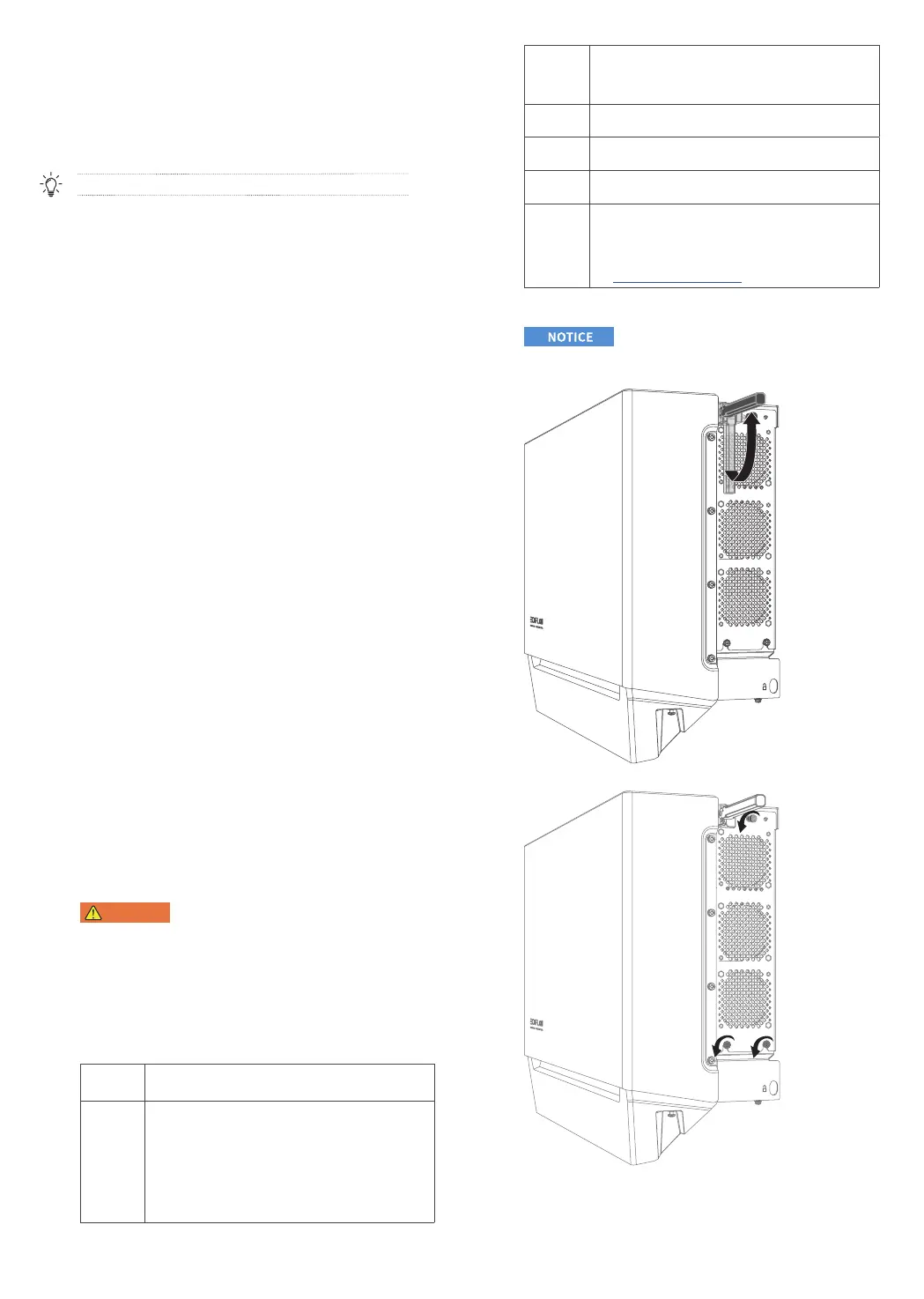
REPLACING THE INVERTER FAN
• You can only replace the whole fan module instead of the individual fan.
To remove the inverter fan:
1. Lift up the handle.
2. Loosen the bottom screws, and then the top screw, using a Phillips
screwdriver.


 To Next Page