4|
System Operation
SYSTEM POWER-ON
PROCEDURE (PV MODULE CONFIGURED)
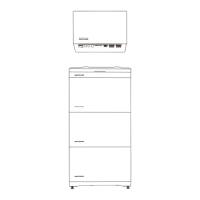
1. Set the BATTERY SWITCH on top of the Junction Box to ON position.
2. Turn on the AC switch between the inverter and the power grid.
3. Set the PV SWITCH at the bottom of the inverter to ON position.
4. Observe the LED to check the inverter operating status.
PROCEDURE (NO PV MODULE CONFIGURED)
1. Set the BATTERY SWITCH on top of the Junction Box to ON position.
2. Turn on the AC switch between the inverter and the power grid.
3. Set the PV SWITCH at the bottom of the inverter to ON position.
4. After commissioning, press and hold for three seconds the BATTERY ON/
OFF button on top of the battery junction box.
5. Observe the LED to check the inverter operating status.
SYSTEM POWER-OFF
WARNING
• After the inverter powers off, the remaining electricity and heat may still
cause electric shocks and body burns. Therefore, put on protective gloves
and begin operating the equipment five minutes after the power-off.
1. Tap shutdown command via the app.
2. Turn off the AC switch between the inverter and the power grid.
3. Set the PV SWITCH at the bottom of the inverter to OFF position.
4. (Optional) Secure the PV SWITCH with a lock to prevent accidental startup.
The lock is prepared by the customer.
5. Set the BATTERY SWITCH on top of the Junction Box to OFF position.
6. (Optional) Secure the BATTERY SWITCH with a lock to prevent accidental
startup. The lock is prepared by the customer.
7. Press and hold the BATTERY ON/OFF button of the junction box for 10
seconds, until the indicator is off.
APP DOWNLOAD
EcoFlow provides thorough support for the system. Both the home owner
and installer benefit from our comprehensive guides and resources.
• For home Owner
Effortlessly manage, monitor, and control your PowerOcean devices through
a sleek, user-friendly interface via app or web management. Access real-time
energy data, detailed power generation, storage and energy bills savings
anytime and anywhere. Professional technical support is also readily
available when needed.
Scan the QR code or download at https://download.ecoflow.com/app
EcoFlow App
• For Installer
Streamline the commissioning process, monitor device status in real-time,
access detailed troubleshooting solutions for system faults and also offer
customer support from EcoFlow professional support team.
Scan the QR code or download at
https: //download.ecoflow.com/ecoflowproapp
EcoFlow Pro
OPERATION MODE
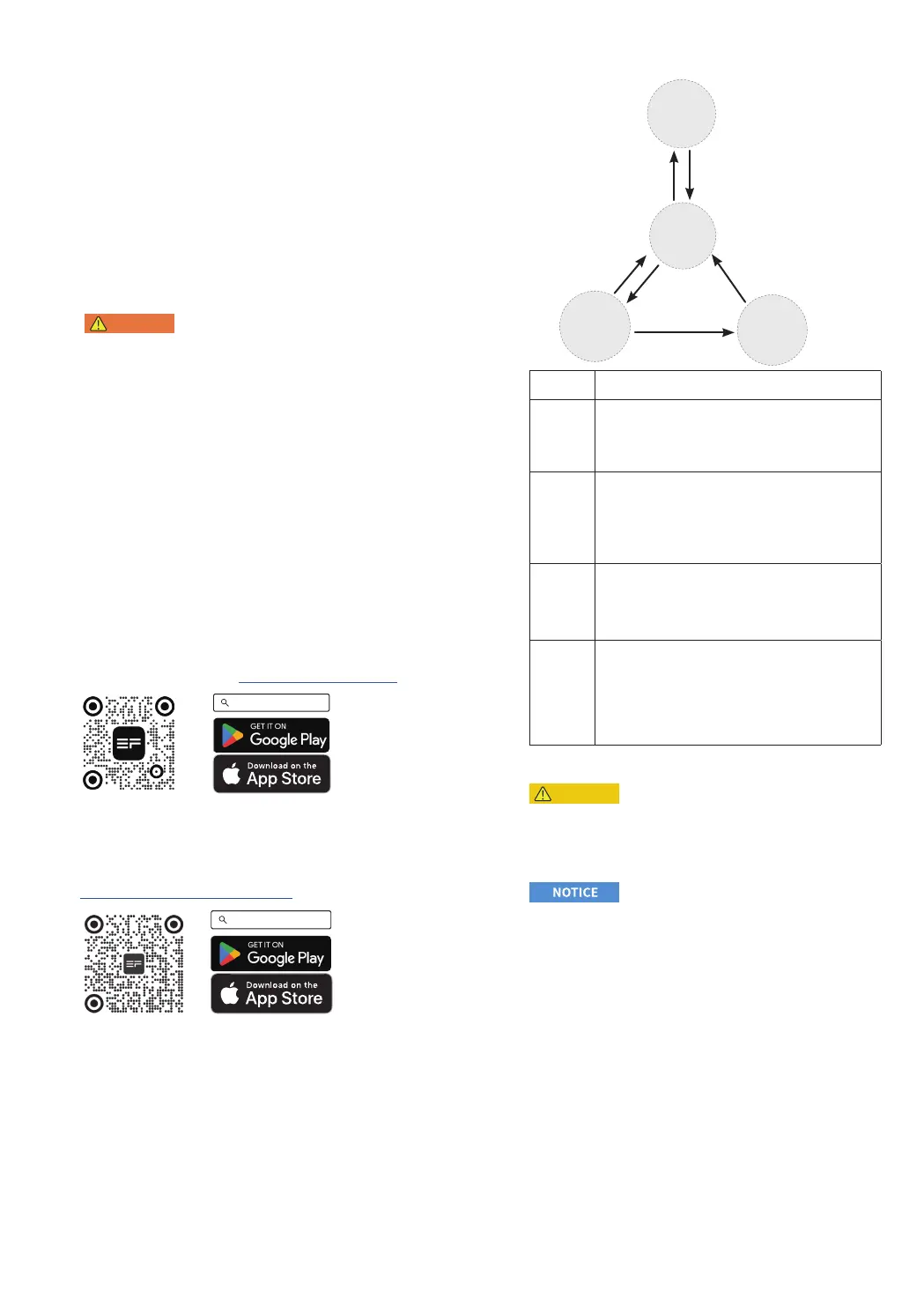
The PowerOcean Plus energy storage system can work in shutdown,
standby, self-check or operating mode.
Shutdown
mode
Standby
mode
Self-check
mode
Insufficient power from
PV string, power outage,
battery level: 0%
Fault detected,
Shutdown command
from app, self-check
failure
Self-check passed
Power-on
command
detected
Fault detected,
Shutdown command
from app
Sufficient power from PV string
(system restarts automatically),
grid power detected, battery
switch turned on
Operating
mode
Working
mode
Description
Shutdown
mode
The internal auxiliary power source, hybrid inverter and
DC-DC converter of the battery do not work.
If the grid is detected, or the power from PV string is
sufficient, the system will restart automatically and enter
Standby mode.
Standby
mode
The internal auxiliary power source works, but hybrid
inverter and DC-DC converter of the battery do not work.
If the inverter detects a power-on command, the system
will enter Self-check mode.
If there is a power outage, the power from PV string is
insufficient, or the battery level is 0% and the PV cables are
disconnected, the system will enter Shutdown mode.
Self-check
mode
The internal auxiliary power source works, but hybrid
inverter and DC-DC converter of the battery do not work.
If self check is passed, the system enters Operating mode.
If the self-check is not passed, a fault or a shutdown
command is detected, the system will enter Standby mode.
Operating
mode
The internal auxiliary power source works, hybrid inverter
and DC-DC converter of the battery start working.
The inverter converts DC power from PV strings into AC
power and feeds the power to the power grid.
The inverter tracks the maximum power point to maximize
the PV string output power.
If a fault or a shutdown command is detected, the system
will enter Standby mode.
BACK-UP FUNCTION
CAUTION
• For hybrid inverters, both PV modules and batteries need to be configured
in the system installation typically and there is sufficient power from
batteries or PV modules in backup mode, otherwise, the backup power
supply will be automatically terminated. EcoFlow shall hold no liability for
any consequences arising from failing to observe this instruction.
To prevent the power backup function from failing, instructions as below
must be observed:
• The system is not suitable for powering life-sustaining medical devices. It
cannot guarantee backup power in all circumstances.
• Do not connect any loads that require an uninterrupted energy supply.
• Do not connect the loads whose total capacity is greater than the maximum
Back-Up capacity.
The backup function ensures that the inverter forms a three-phase battery-
backup grid that uses energy from the battery and the PV system that is
directly connected to the inverter to power the household loads in the event
of a utility grid outage. The backup function is enabled by default.
When a utility grid outage occurs:
The backup loads connected to the AC-BACKUP terminal are connected
and supplied to the AC-GRID terminal via an integrated bypass contactor.
The contactor opens when a utility grid outage occurs. Thehe backup loads
are switched to be supplied by the energy stored in the battery and the PV
modules connected directly to the inverter.
Batteries keep being charged by the existing PV system during backup
operation.
However, the inverter is able to create a stable battery-backup grid only
when sufficient power is available in the battery. Battery-backup operation
starts automatically when sufficient energy is available from the PV
system.


 To Next Page