16|
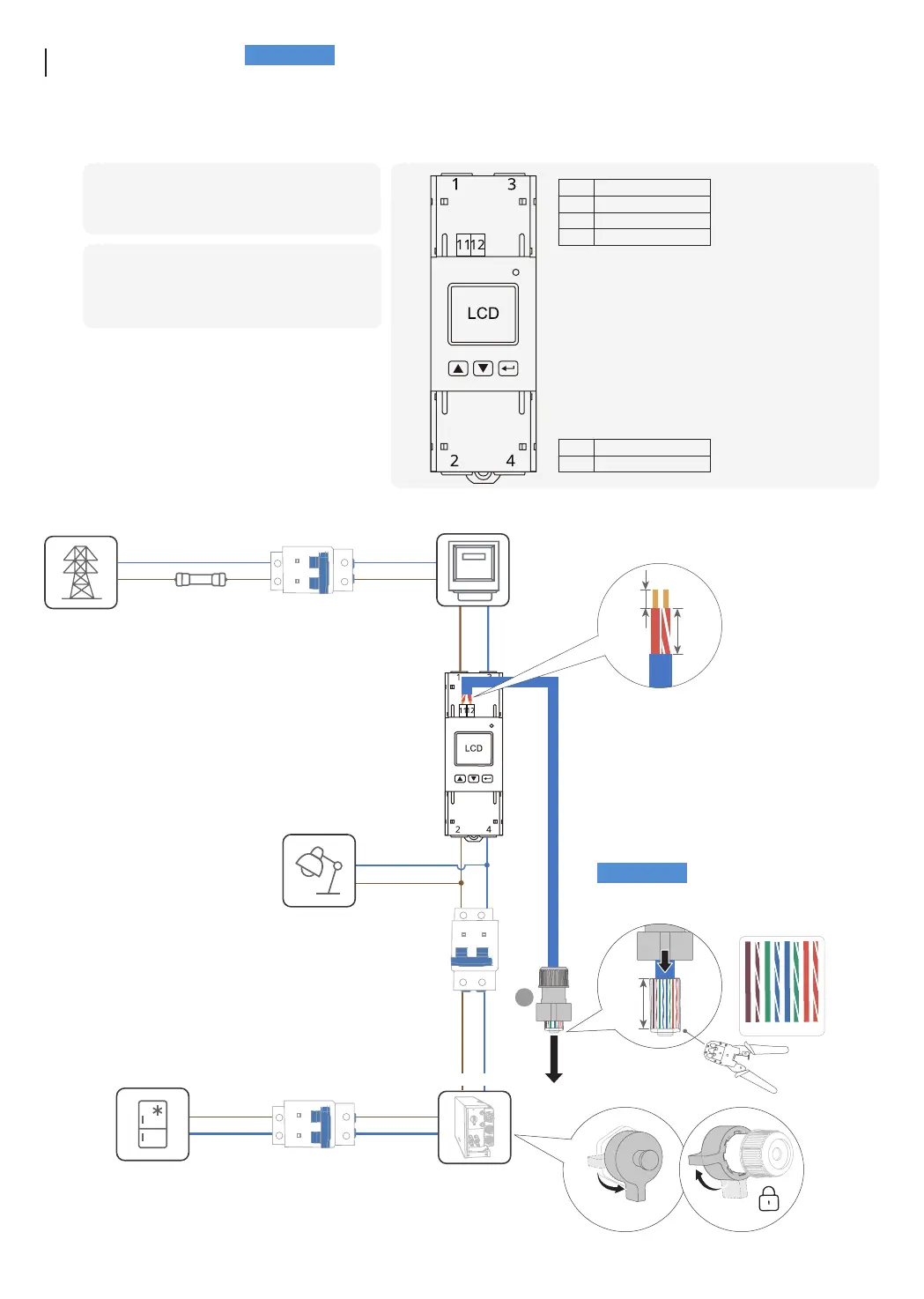
T568B
Connecting
Smart Meter
1
Access the home main road and connect the
smart meter as shown in the diagram.
2
Connect communication port 11, 12 on the meter
to the METER port of inverter.
1 Grid L
3 Grid N
11 RS485 A
12 RS485 B
2 Load L
4 Load N
Utility grid
Utility meter
Fuse AC breaker
AC breaker
AC breaker
Hybrid inverter
• Run the cable through the
waterproof housing to the
RJ45 connector before
crimping.
GRID
BACKUP
Non-controllable load
Backup load
8 7 6 5 4 3 2 1
10-20 mm
METER
A4
Remove protective capRemove protective cap
❶
❷
❸
• It is recommend to use of CAT5 or higher rating network cable.
• Smart meter is sold separately, which has been preset parameters before delivered. Do
not modify the relevant parameters.
• The compatibility of this product with smart meters may vary by regions and versions.
For detailed instructions on the installation and wiring scheme of the smart meter for
this product, please refer to the guide that comes together with the meter.


 To Next Page