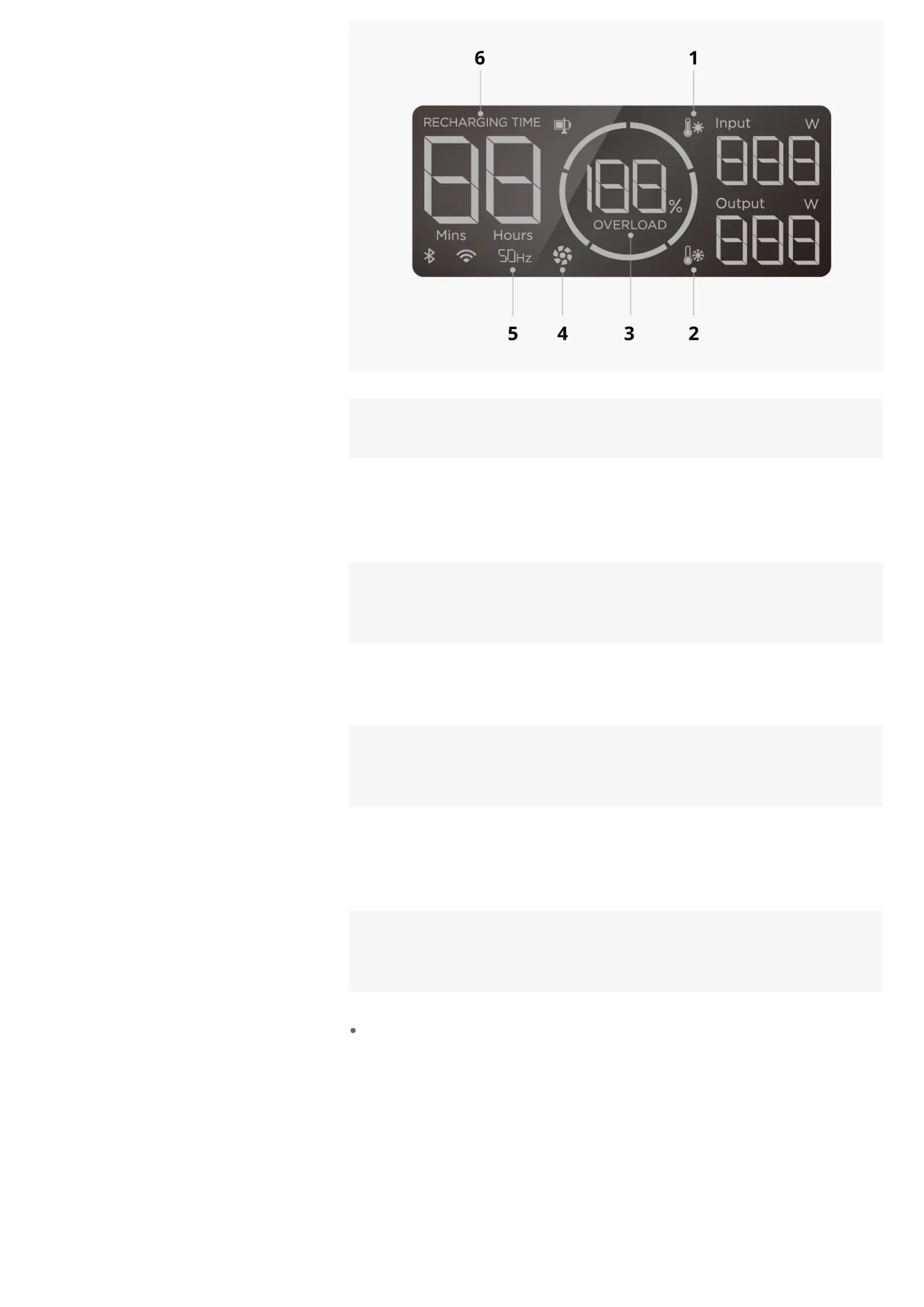
Flashing
Icon
Problem Solution
1
High
Temperature
Stop using the product. Move it to a well-ventilated
place and keep it away from heat source. The error
message will clear when the product's temperature
falls to normal levels.
2
Low
Temperature
Move the product to a warmer place. The error
message will clear when the product's temperature
rises to normal levels.
3, 5, 6
AC Charging
Overload
Remove the AC charging cable. After the error
message clears automatically, connect the AC
charging cable and try to use the product again.
3, 5
AC Discharge
Overload
Remove the device(s) connected to the AC output
port(s). After the error message clears automatically,
try to use the product again.
4 Fan Blocked
Remove all connected charging cables and turn off
the product. Check for and remove any foreign
objects blocking the heat vent before you try to use
the product again.
5
Internal
Communication
Failure
Stop using the product. Remove all connected
charging cables and turn off the product. Wait for 1
min before you turn on the product again.
For error messages not covered in the table, view detailed messages and
solutions in the EcoFlow app. If the problem persists, stop using the product
immediately (do not attempt to charge or discharge it) and consult EcoFlow
customer service.
Get Started








 To Next Page