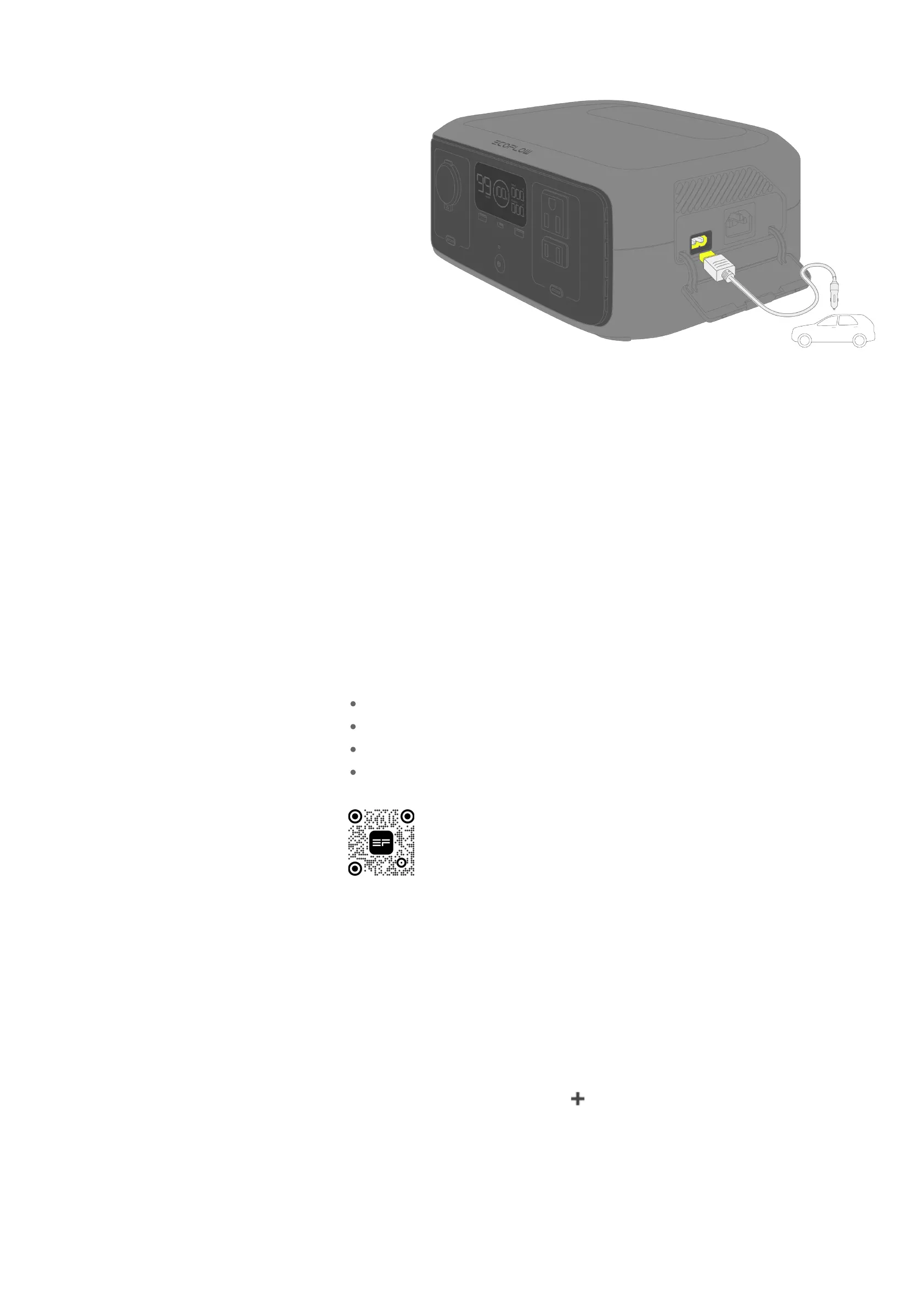
Connect the car input port of the power station to your vehicle’s cigarette
lighter socket using the provided car charging cable.
To avoid failure to start the vehicle due to insufficient car battery, start the
vehicle first before you begin car charging. In addition, make sure that the car
charging cable is securely connected to the cigarette lighter socket.
Management
Download EcoFlow App
EcoFlow offers a companion app for device management. With this mobile
application, you can:
Enjoy all-in-one control of your EcoFlow devices from anywhere.
Monitor power consumption details seamlessly with real-time updates.
Personalize your energy scheme with an array of customizable options.
Promptly receive in-app troubleshooting and firmware updates.
Bind Device and Set Up Internet
After successfully registering an EcoFlow account, bind your EcoFlow devices
to your account to ensure remote access to the device's settings.
To bind a new EcoFlow device:
1.
Visit the EcoFlow app and log into your EcoFlow account.
2.
Tap the Add Device button or icon in the top right corner to search for
new EcoFlow devices.
3.
Select your EcoFlow device and follow the pop-up instructions to complete
device binding and Wi-Fi setup.
Scan the QR code or download it at:
https://download.ecoflow.com/app








 To Next Page