EasyManua.ls Logo

Ecosoft WS1 CE - Installer Display Settings

Ecosoft WS1 CE
104 pages
Print Icon
To Next Page IconTo Next Page
To Previous Page IconTo Previous Page
Loading...
16
CONTROL VALVE PROGRAMMING AND COVER DRAWING MANUAL
This manual is the intellectual property of Ecoso. Copying and reprinng is prohibited. © 2021
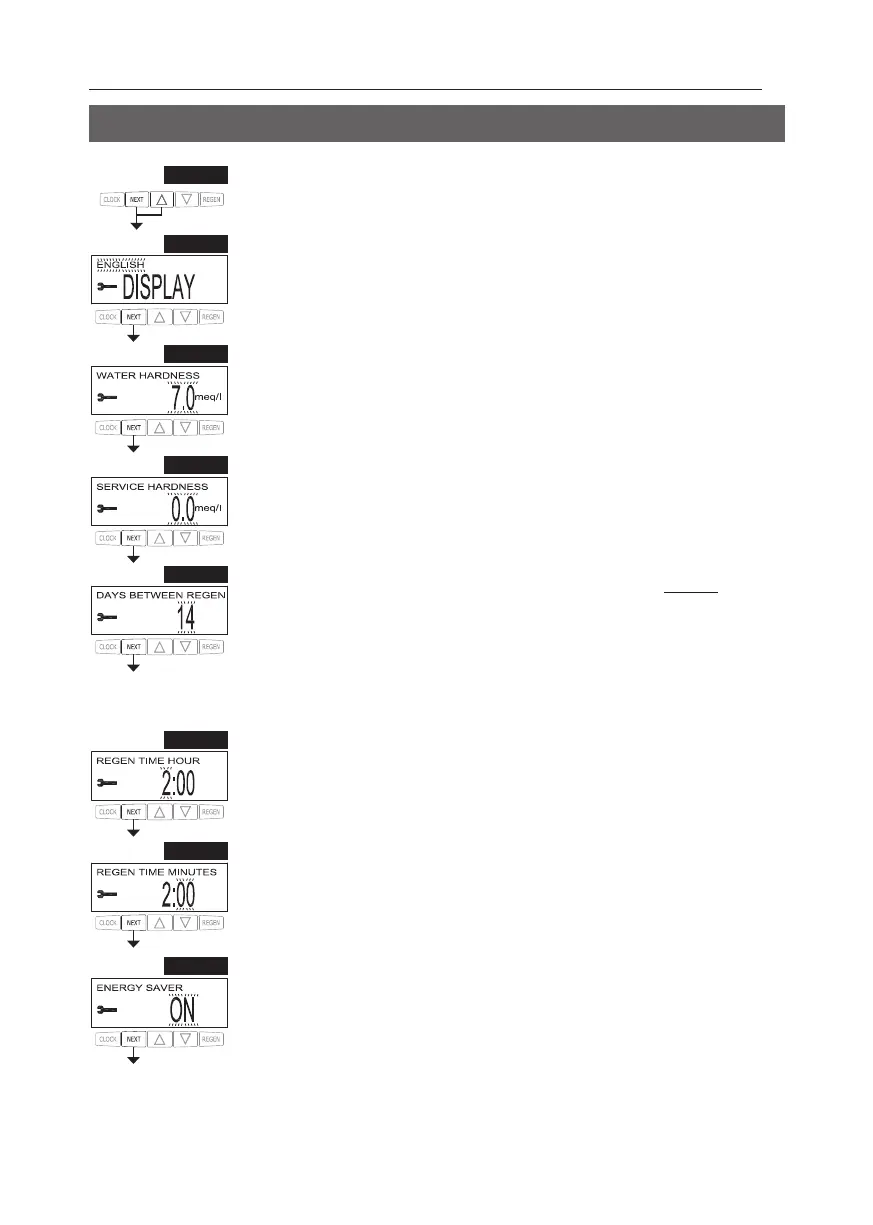
INSTALLER DISPLAY SETTINGS
STEP 1I
STEP 1I - Press NEXT and simultaneously for 3 seconds.
STEP 3I – Hardness: Set the amount of hardness in grains of hardness as calcium carbonate per
meq/l, PPM, or dH° using or . This display will not appear if “FILTERING” is selected in Step
3SS or if OFF or a number is set in Step 9SS. Press NEXT to go to Step 4I. Press REGEN to exit

STEP 5I – Day Override: When volume capacity is set to “OFF”, sets the number of days between
 When volume capacity is set to AUTO or to a number, sets the maximum number of


 
Day Override using or :

“OFF”.
 Table for more detail on setup. Press NEXT to go to Step 6I. Press REGEN to
return to previous step.
STEP 6I  T or . The
 This display will not appear if “IMMEDIA
TT
to return to previous step.
STEP  T or
. This display will not be shown if “IMMEDIA T
T to go to Step 8I. Press REGEN to return to previous
step.
RETURN TO NORMAL MODE
STEP 8I As an ener
y. 
re-illuminate the display for 5 minutes. The Energy Saver feature default is ON.
Press NEXT
STEP 3I
STEP 5I
STEP 6I
STEP 7I
STEP 8I
STEP 2I 
Press NEXT
STEP 2I
STEP 4I – Service Hardness -  VALVE is set
to ON.
Press NEXT to go to Step 5I. Press REGEN to return to previous step.
STEP 4I

Table of Contents

Related product manuals