EasyManua.ls Logo

Ecosoft WS1 CE - OEM System Setup

Ecosoft WS1 CE
104 pages
Print Icon
To Next Page IconTo Next Page
To Previous Page IconTo Previous Page
Loading...
7
ENG
CONTROL VALVE PROGRAMMING AND COVER DRAWING MANUAL
This manual is the intellectual property of Ecoso. Copying and reprinng is prohibited. © 2021
OEM SYSTEM SETUP
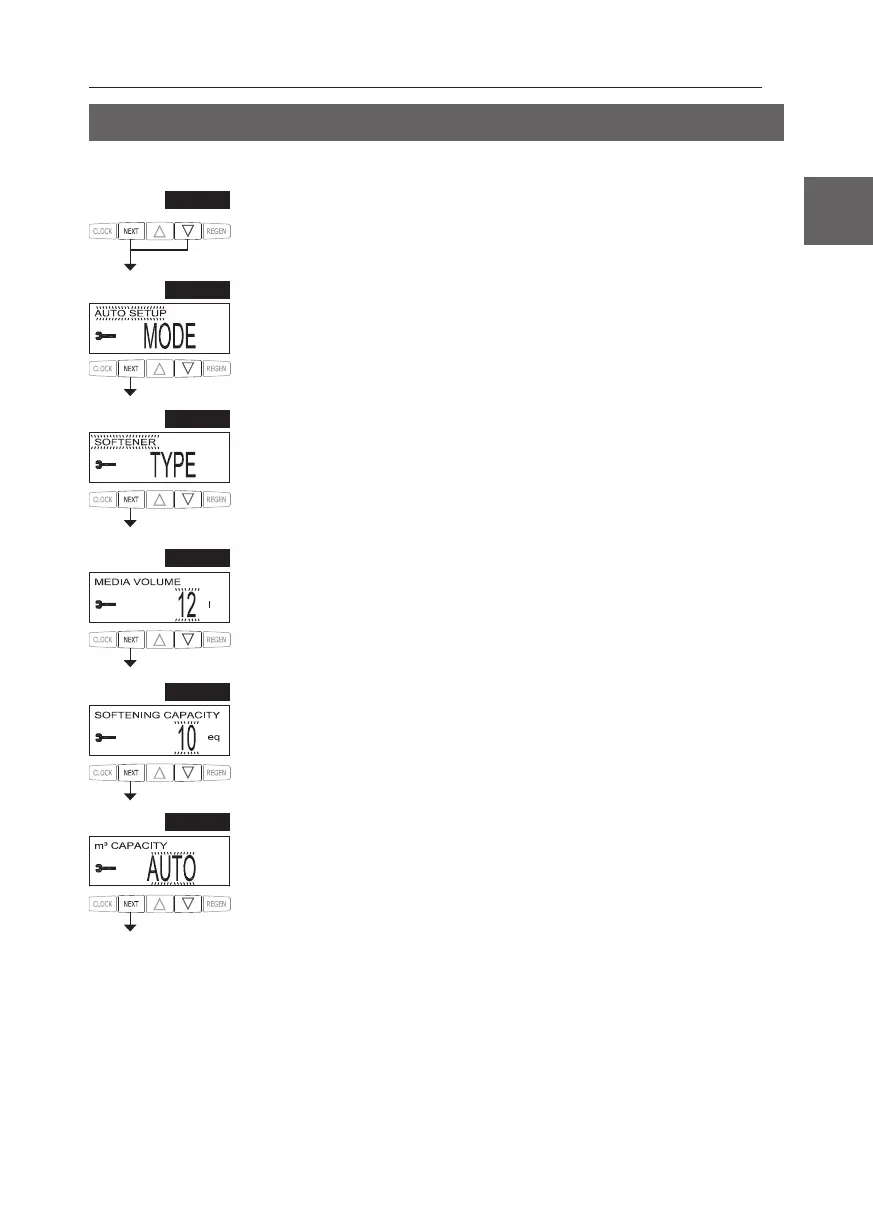
STEP 1SS
Step 1SS – Press NEXT and simultaneously for about 5 seconds and release. If the screen in
Step 2SS does not appear, NEXT, and CLOCK in
sequence, then press NEXT and simultaneously for about 5 seconds and release.
STEP 2SS
Step 2SS – System Setup Mode – Choose between AUTO and MANUAL setup. For AUTO
 T When MANUAL
T
exit System Setup.
STEP
 – System TLT

STEP 4SS
Step 4SS – Media Volume – Set the volume of system capacity in liters of resin. See Table 1 for
T
STEP 5SS
Step 5SS 
ECOMIX, this amount can be adjusted. If mode is set to AUTO, or type is set to FIL
screen will not be viewed. Press NEXT
STEP
 – Set V or . If value is set to:
• “AUT



 ed.

 Table for more details. Press NEXT


Table of Contents

Related product manuals