22
CONTROL VALVE PROGRAMMING AND COVER DRAWING MANUAL
This manual is the intellectual property of Ecoso. Copying and reprinng is prohibited. © 2021
VALVE HISTORY
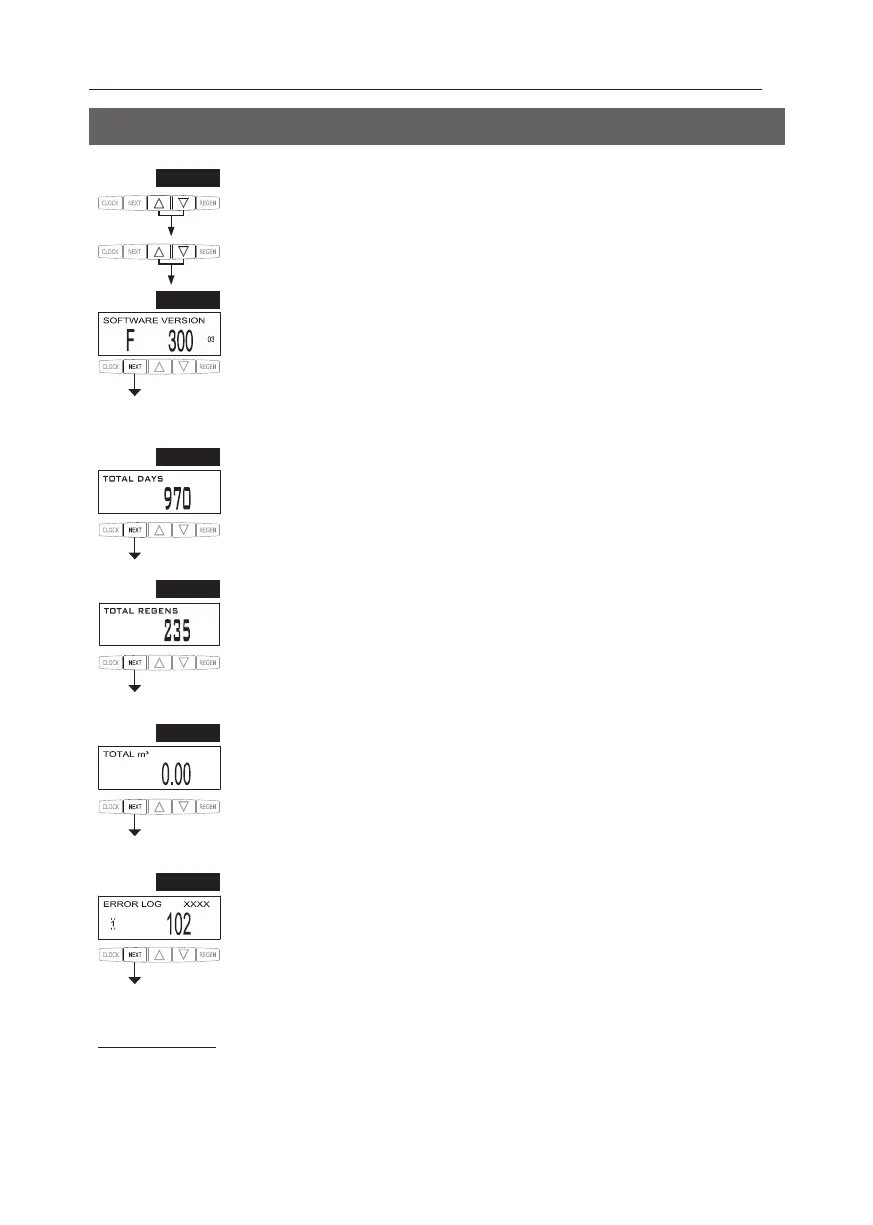
STEP 1VH – Press ▲ and ▼ simultaneously for three seconds and release. Then press ▲ and ▼
simultaneously and release. If screen in step 2VH does not appear in 5 seconds the lock on the
To unlock press ▼, NEXT, ▲, and CLOCK in sequence, then press ▲ and ▼
simultaneously for 3 seconds and release. Then press ▲ and ▼ simultaneously and release.
RETURN TO NORMAL MODE
2
Values in steps 2VH through 6VH cannot be reset.
STEP 3VH
2
– Days, total since start-up: This display shows the total days since startup. Press NEXT
to go to Step 4VH. Press REGEN to return to previous step.
STEP 4VH This display shows the total number of
T to go to Step 5VH. Press REGEN to return
to previous step.
STEP 5VH – Volume, total used since start-up: This display shows the total cubic meters treated since
startup. This display will equal zero if a water meter is not installed. Press NEXT to go to Step 6VH.
Press REGEN to return to previous step.
STEP 6VH – Error Log. This display shows a history of the last 10 errors generated by the control
line of the display. Press ▲ or ▼ to view each error recorded. Press NEXT to exit Valve History. Press
REGEN to return to previous step.
STEP 2VH
Press NEXT to go to Step 3VH. Press REGEN to exit Valve History.
STEP 1VH
STEP 2VH
STEP 3VH
STEP 4VH
STEP 5VH
STEP 6VH


 To Next Page