9
ENG
CONTROL VALVE PROGRAMMING AND COVER DRAWING MANUAL
This manual is the intellectual property of Ecoso. Copying and reprinng is prohibited. © 2021
OEM Conguraon Setup
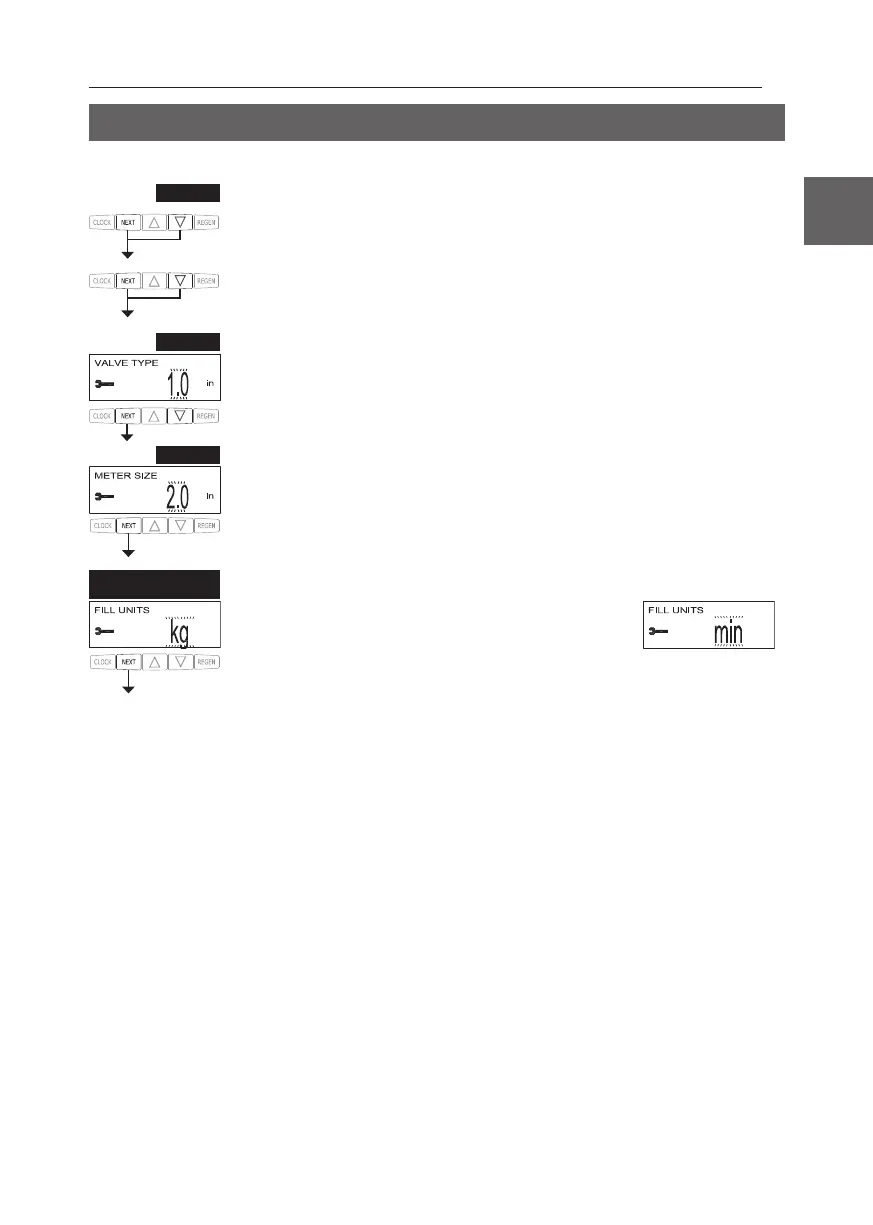
Step 1CS – Press NEXT and ▼ simultaneously for 3 seconds and release. Then press NEXT and ▼
simultaneously for 3 seconds and release. If screen in Step 2CS does not appear in 5 seconds the lock
To unlock press ▼, NEXT, ▲, and CLOCK in sequence, then press NEXT
and ▼ simultaneously for 3 seconds and release. Then press NEXT and ▼ simultaneously for 3
seconds and release.
Step 2CS – Use ▲ or ▼ 1.0 for 1” valve, 1.25 for 1.25” valve, 1.5 for 1.5” valve, 2.0 for 2” valve or
1.0TWIN for twin valve.
Press NEXT to go to Step 3CS.
Press REGEN to exit OEM cycle sequence.
Step 3CS – r. It is used to select which size ow
meter is to be used with the valve, 1.5, 2.0 or 3.0.
Press NEXT to go to Step 4CS.
Press REGEN to return to previous step.
STEP
1CS
STEP
2CS
STEP
3CS
ALTERNATE Step 3CS r, when Step 2CS is set to 1.5 and FILL is
L UNITS of kg or min can be selected. Press NEXT to
go to Step 4CS. Press REGEN to return to previous step.
ALTERNATE
STEP
3CS


 To Next Page