20
CONTROL VALVE PROGRAMMING AND COVER DRAWING MANUAL
This manual is the intellectual property of Ecoso. Copying and reprinng is prohibited. © 2021
DIAGNOSTICS
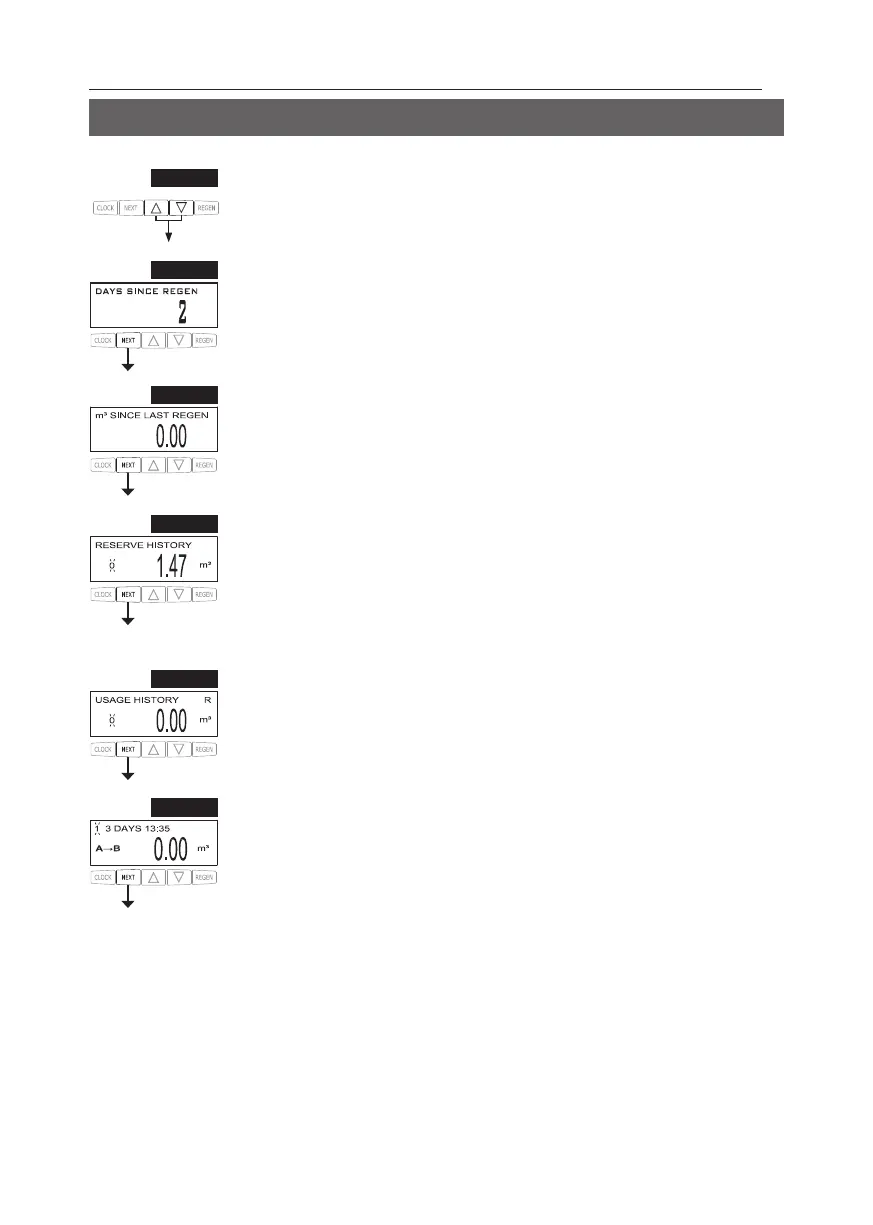
STEP 1D
STEP 1D – Press ▲ and ▼ simultaneously for three seconds. If screen in step 2D does not appear
To unlock press ▼, NEXT, ▲, and CLOCK in
sequence, then press ▲ and ▼ simultaneously for 3 seconds.
STEP 2D
occurred. Press NEXT
STEP 3D – V This display shows the volume of water that has been
This display will equal zero if a water meter is not installed.
Press NEXT to go to Step 4D. Press REGEN to return to previous step.
STEP 4D – Reserve History Vr, a
meter is installed and Set Volume Capacity is set to “Auto,” this display shows 0 day (for today)
and the reserve capacity. Pressing ▲ will show day 1 (which would be yesterday) and the reserve
capacity used. Pressing ▲ again will show day 2 (the day before yesterday) and the reserve
capacity. Keep pressing ▲ to show the capacity for days 3, 4, 5 and 6. ▼ can be pressed to move
backwards in the day series. This screen is not displayed if lter
T
Press REGEN to return to previous step.
STEP 5D - V This display shows day 0 (for today), day 1 (for
yesterday), etc., and the volume of water treated that day. Press ▲ to show the volume of water
displayed. This display will show dashes if a water meter is not installed. Press NEXT
to go to Step 6D. Press REGEN to return to previous step.
STEP 6D - Tank Transfer History. Only displayed when 1.0TWIN is selected in Step 2CS. Use ▲
or ▼ to scroll through the last 10 tank transfers. “1”= transfer number – 10 transfers maximum.
“A” = tank transferring. “3 DAYS” = days ago of transfer – 99 days maximum. “0.00 m
3
” = M
3
rr.
Press NEXT to go to Step 7D. Press REGEN to return to previous step.
STEP 2D
STEP 3D
STEP 4D
STEP 5D
STEP 6D


 To Next Page