Meter Programming & Use
S700 LCD
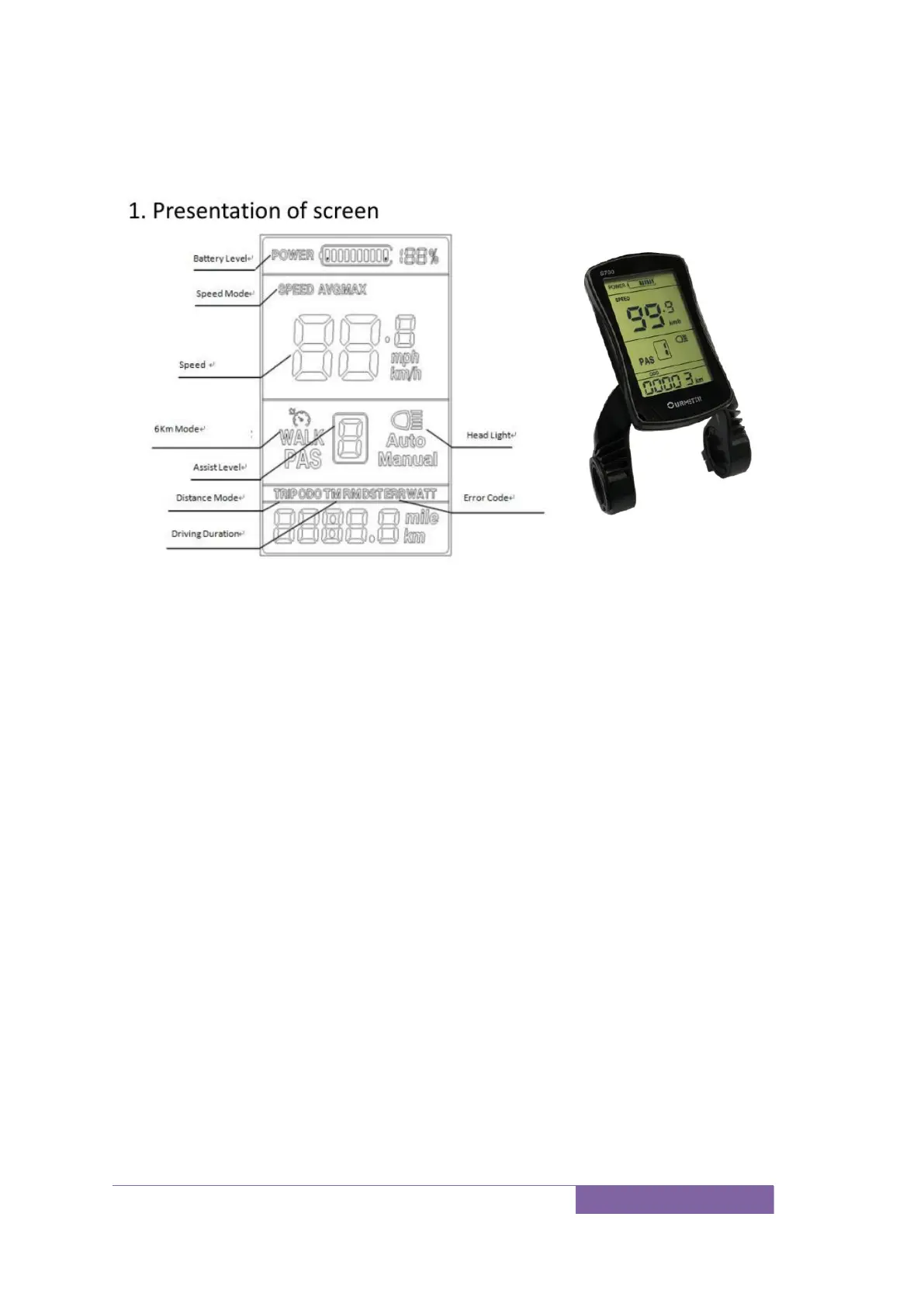
1) Battery level: 5 levels, voltage interval could be customized
2) Speed:Average SPEED/MAX SPEED
3) Speed unit
:
Kmh/MPH
4) 6km mode
5) Assist level:actual assist level 0~5.
6) Head light icon
:
indicates when head light and back light are on
7) Distance
:
Trip/ODO
8) Driving Duration
9) Error code
:“
ERROR
”
and code when there is error
To turn the unit on, press and hold the “M” button to start the display. A long press
again “M” will switch it off. The display switches off automatically if there is no
activity for ten minutes (default).
Display setting:
Long press up and M button to shift between Max speed→Average speed
Short press M button to switch ODO/Trip/Driving Time/Error Code
Short press up or down button to change assist level, default value is level 1
Long press up button for 3 seconds turn on/off the head light when application
Long press down button to enter/quit 6km/h mode, “walk” will show up on
screen
Advanced setting
Long Press and hold the up and down button for seconds to enter the setup interface,
short press up or down button to change the value, short press M button to save
current value and switch to next parameter.



 To Next Page