3. Operating and Programming
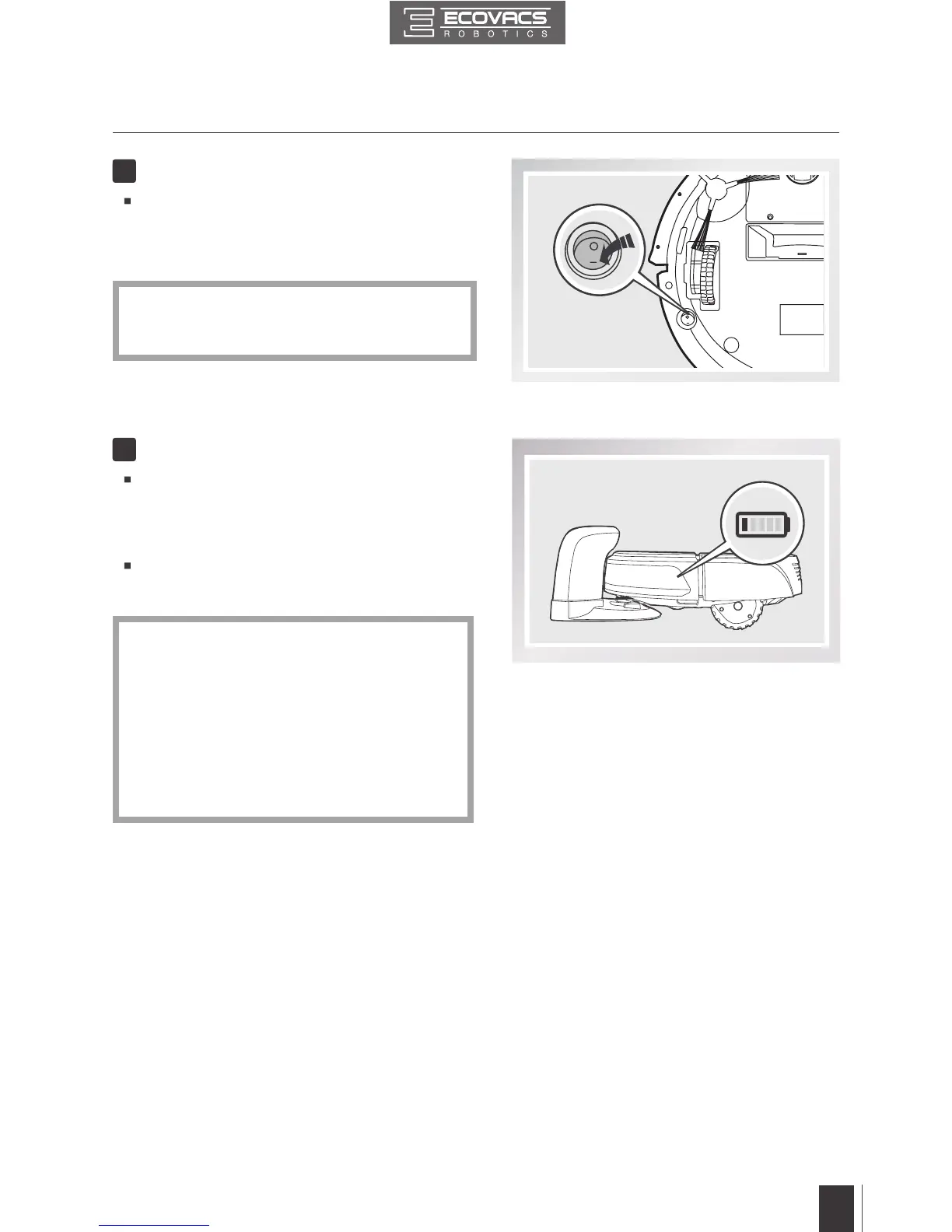
Turn the robot’s Bottom Power Switch to the
ON position. “I”=power ON; “O”=power OFF.
DEEBOT is powered ON when the AUTO
Mode Button glows a continuous BLUE.
Power ON
3
Place DEEBOT on the Charging Dock
making sure the Charging Contacts on
DEEBOT and the Charging Dock Pins make
a connection.
Charge DEEBOT for at least 4 hours before
rst use.
Charge DEEBOT
4
*
*
*
*
When DEEBOT is not cleaning, it is
suggested to keep it powered ON and
charging instead of powered OFF.
Make sure to turn the robot’s Bottom
Power Switch to the ON position before
charging. (“I”=power ON; “O”=power OFF.
The robot’s default setting is “O”.) DEEBOT
is powered ON when the AUTO Mode
Button glows a continuous BLUE.
AUTO Mode Button blinks when DEEBOT
is charging. AUTO Mode Button stops
glowing when DEEBOT is fully charged.













 To Next Page