3. Operating and Programming
MA X
AM
PM
AM
PM
AM
PM
AM
PM
MA X
AM
PM
AM
PM
AM
PM
AM
PM
MA X
AM
PM
AM
PM
AM
PM
AM
PM
MA X
AM
PM
AM
PM
AM
PM
AM
PM
AM
PM
AM
PM
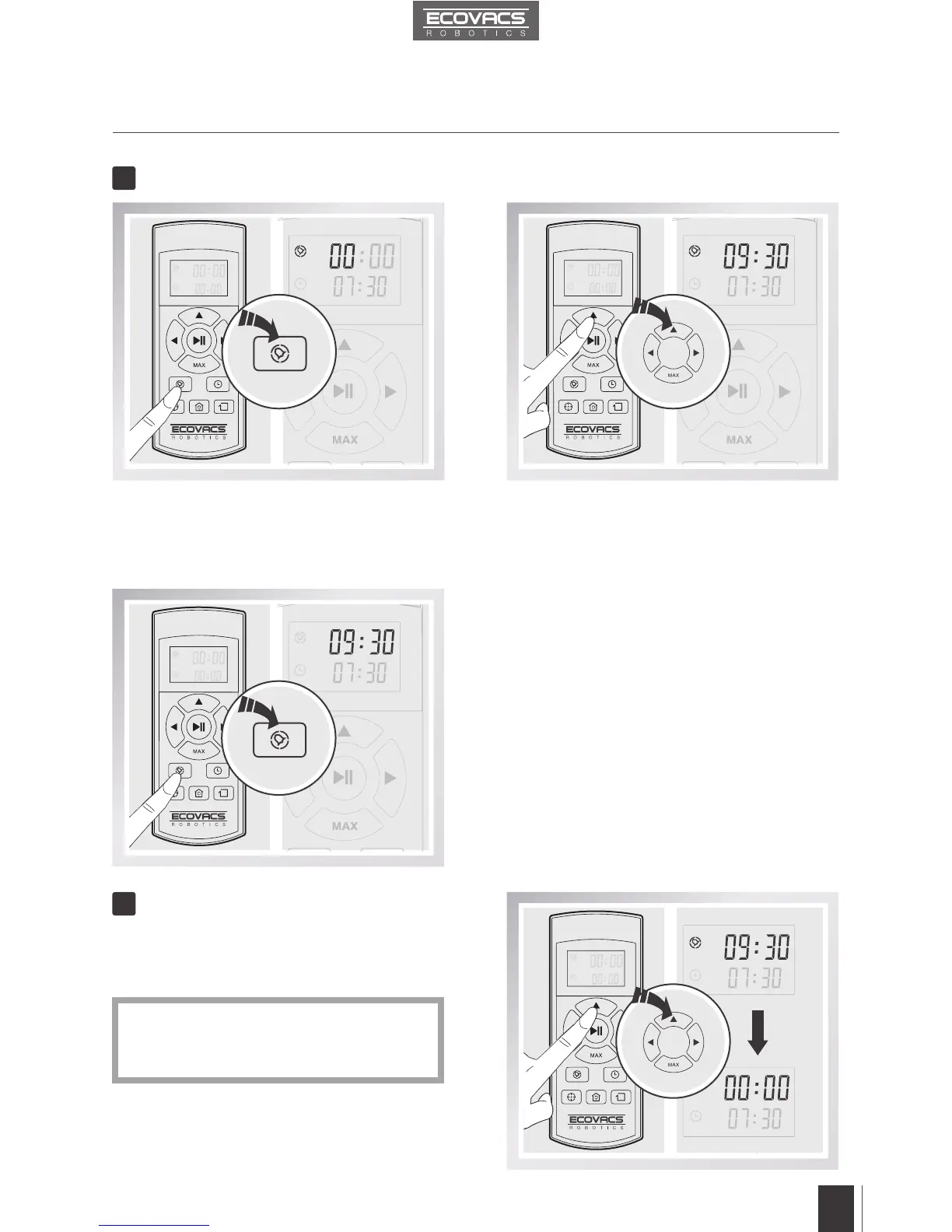
Press the Time Scheduling Button on the
Remote Control to schedule automatic cleaning.
The“hour”intherstlineonthescreenashes.
Press the Time Scheduling Button on
the Remote Control to confirm and save
the scheduled cleaning time. DM82 will
automatically clean at the scheduled cleaning
time every day.
AdjustthetimeintherstlineontheRemote
Control screen to “00:00” and save.
The scheduled cleaning time is cancelled.
Press the up Direction Control Button and
the MAX Button to adjust “hour” and “minute”
number. Press the left and right Direction Control
Buttons to switch between hour and minute.
Schedule the Cleaning Time
Cancel Scheduled Cleaning Time
2
3
* After replacing batteries in the Remote
Control, reset the current time and
scheduled cleaning time.











 To Next Page