3.2 Quick Start
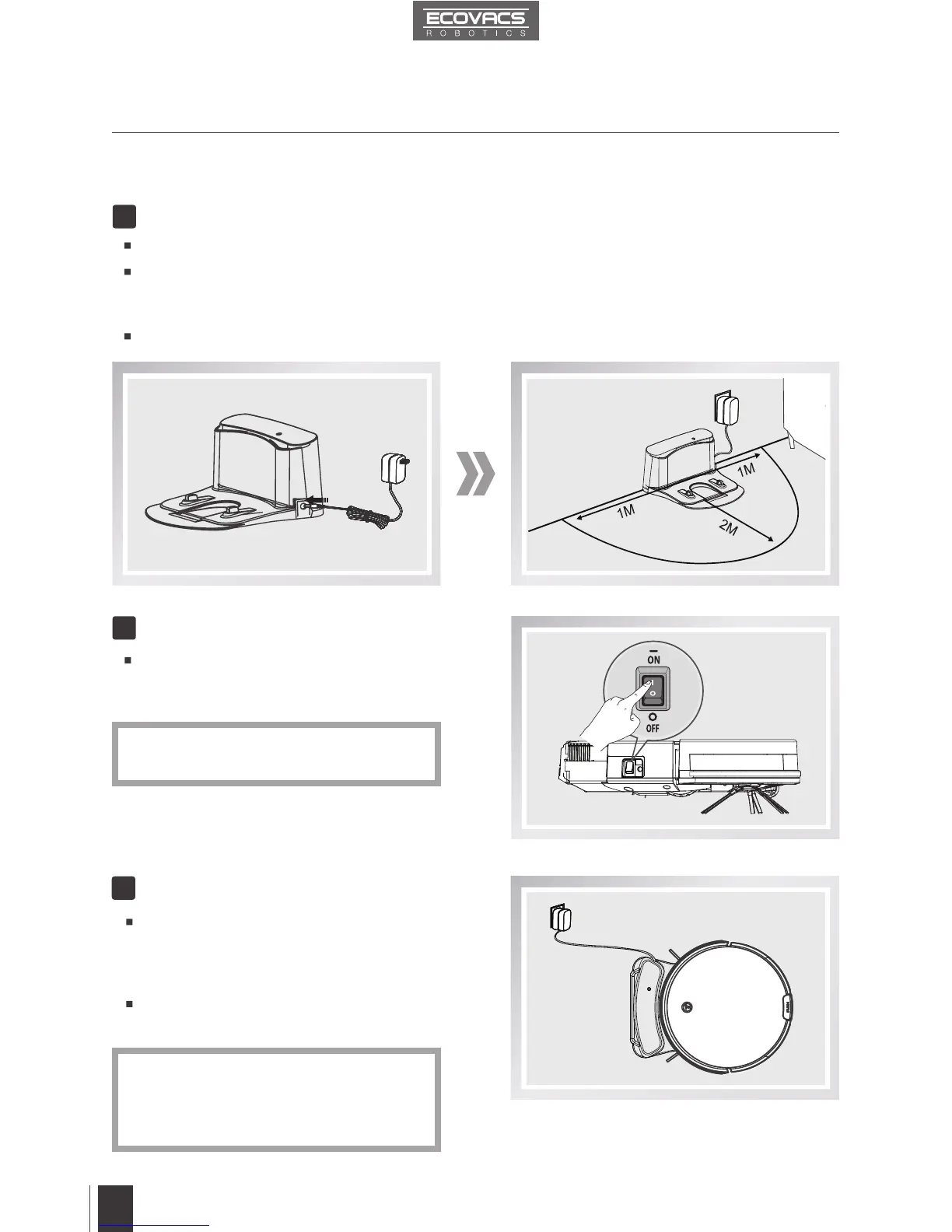
Charging Dock Placement
Connect the Power Adapter to the Charging Dock.
PlacetheChargingDockonaleveloorsurfaceagainstthewallwiththebaseperpendicular
totheground.Keeptheimmediatearea2m(6.6’)infrontofthechargerand1m(3.3’)onboth
sidesofthechargerclearofobjectsandreectivesurfaces.
Plug the Charging Dock in.
1
Power ON
Turn the robot’s Side Power Switch to
the ON position. “l” indicates ON and “O”
indicates OFF.
2
Place DM82 on the Charging Dock making
sure the Charging Contacts on DM82
and the Charging Dock Pins make a
connection.
Charge DM82 for at least 4 hours before
therstuse.
3
Charge DM82
* DM82 is powered ON when the AUTO
ModeButtonontherobotashesGREEN.
* The AUTO Mode Button on the robot
ashesORANGEwhenDM82ischarging
andglowsacontinuousGREENwhenit
is fully charged.
3. Operating and Programming












 To Next Page