EN∣14
Connect Robot with App via Wi-Fi.
Note:
1. Robot should be fully charged and turned on.
2. Wi-Fi indicator is on.
3. Turn off the mobile network.
Wi-Fi Network Requirements:
• You are using a 2.4GHz or 2.4/5 GHz mixed network.
• Your router supports 802.11b/g/n and IPv4 protocol.
• Do not use a VPN (Virtual Private Network) or Proxy Server.
• Do not use a hidden network.
• WPA and WPA2 using TKIP, PSK, AES/CCMP encryption.
• WEP EAP (Enterprise Authentication Protocol) is not supported.
• Use Wi-Fi channels 1-11 in North America and channels 1-13
outside North America (refer to local regulatory agency).
• If you are using a network extender/repeater, the network name
(SSID) and password are the same as your primary network.
• Please enable the WPA2 on your router.
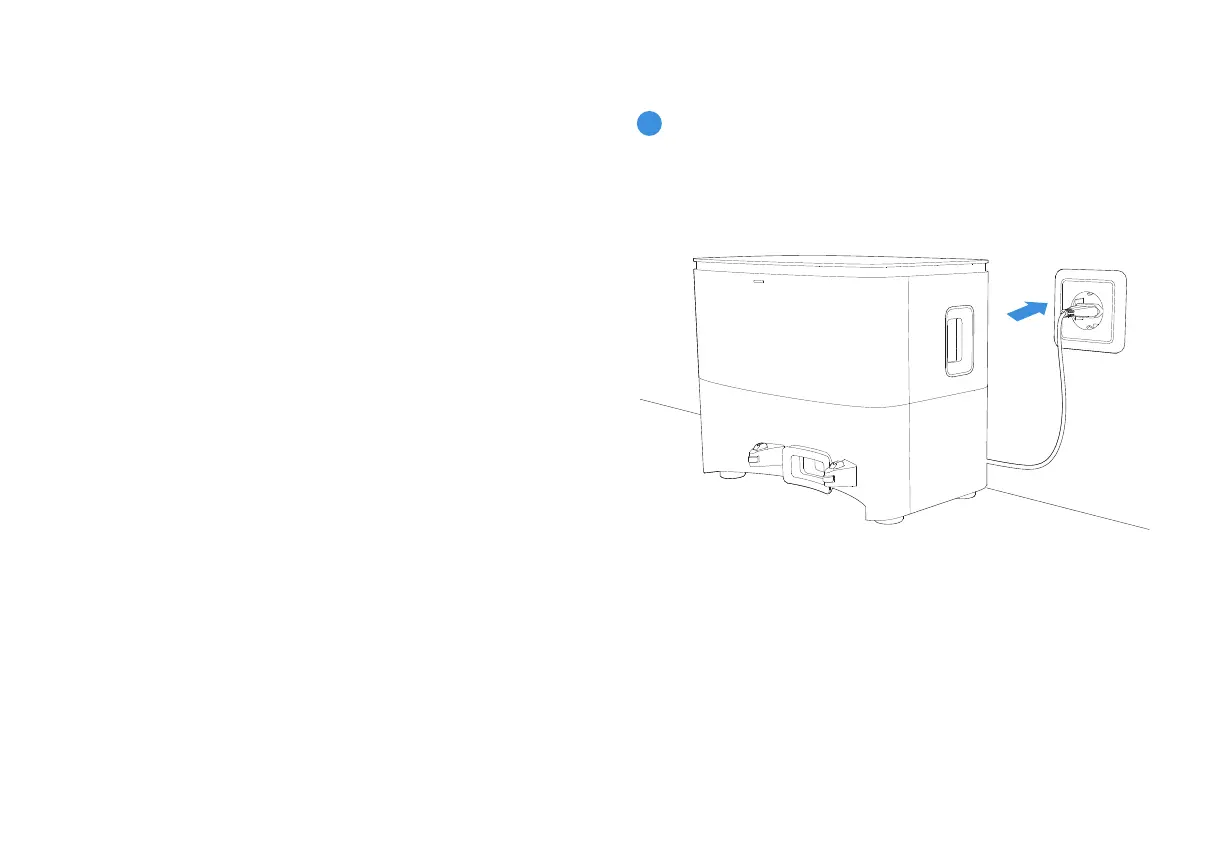
2.4 Charging Robot
Connect the Power Cord.
1
Please be aware that the realization of intelligent functions such as
remote startup, voice interaction, 2D/3D map display and control
settings, and personalized cleaning (depending on different
products) requires users to download and use ECOVACS HOME App,
which is constantly updated. You need to agree to our Privacy
Policy and User Agreement before we can process some of your
basic and necessary information and enable you to operate the
product.If you do not agree with our Privacy Policy and User Agree-
ment, some of the aforementioned intelligent functions cannot be
realized through ECOVACS HOME App, but you can still use the basic
functions of this product for manual operation.













 To Next Page