EasyManua.ls Logo

ECOVACS DEEBOT Y1 PRO PLUS - Product Diagram

ECOVACS DEEBOT Y1 PRO PLUS
255 pages
Print Icon
To Next Page IconTo Next Page
To Previous Page IconTo Previous Page
Loading...
9∣EN
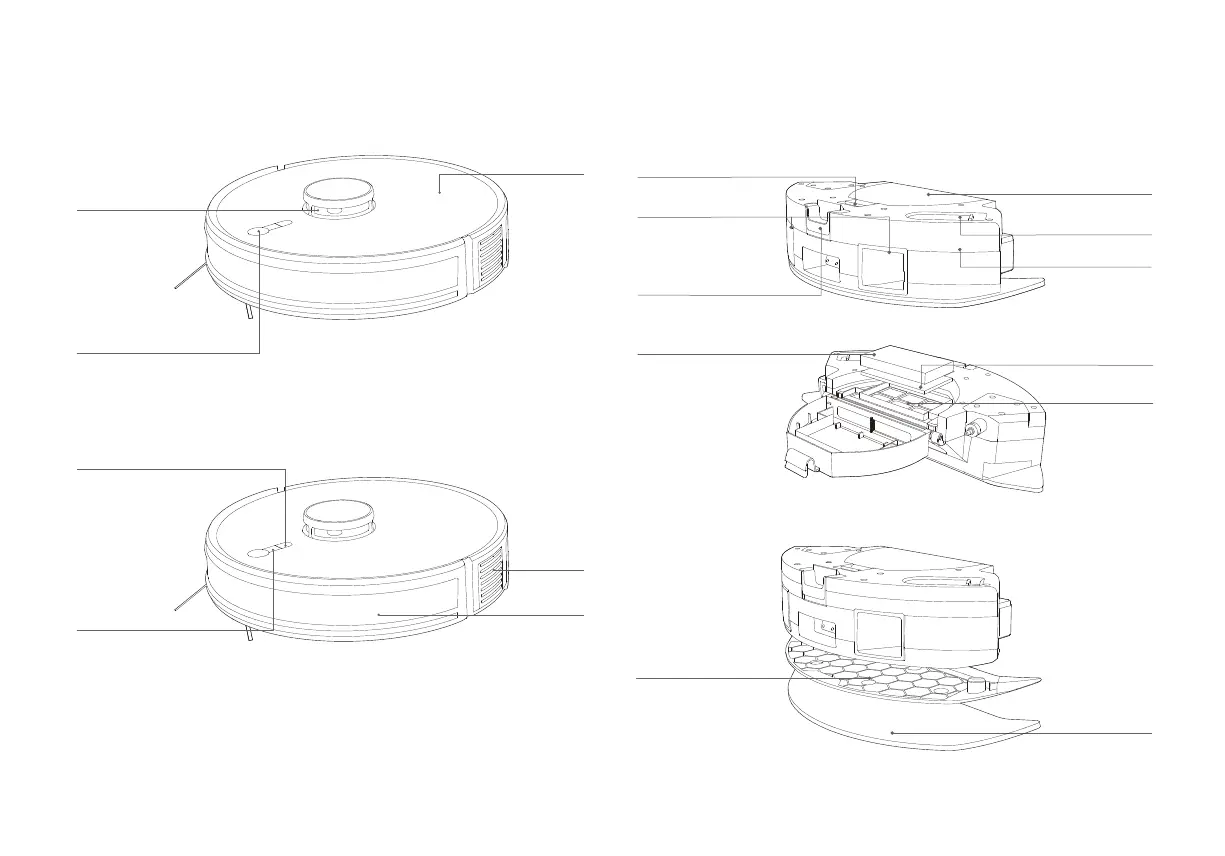
1.2 Product Diagram
Robot
START Button
Short Press:
Start/Pause
Long Press
Power on/off
Up-cover
Bumper
Air outlet
TrueMapping
Distance Sensor
Spot Cleaning
Button:
Short Press:
spot cleaning
Long Press:
turn on/off
Child Lock
Charging Button:
Short Press: Go To Charge
Long Press: Reset
2 in 1 Module
Filling Opening
Charging Contacts
Filter
Filter Sponge
Filter Net
Dust Box Buckle
2 in 1 Module
Release Button
• In Child Lock mode, buttons and smart speakers are disabled,
preventing potential dangers from accidental operations by children.
• Restore to factory settings: Long press the charging Button for
10-15s.
Washable
Mopping Pad
Dust Box
Reservior
Mopping Pad Module
Mopping Pad Plate

Related product manuals