18EN
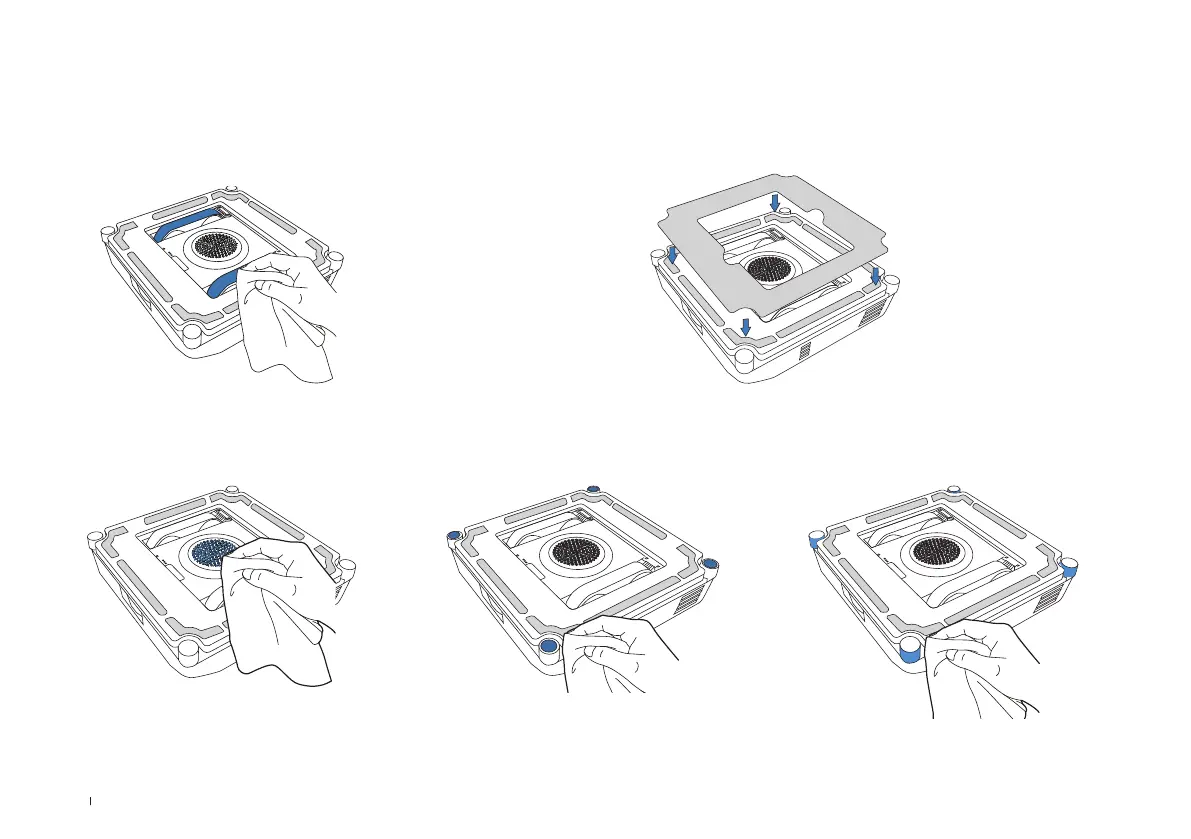
Fan: Wipe clean with a dry cloth to
prevent damage to the suction force
of WINBOT.
Side Rollers: Wipe clean with a dry
cloth to maintain its sensitivity.
Spherical Sensors: Wipe clean with a dry
cloth to maintain its sensitivity.
Bottom Component
* After WINBOT issues a low battery warning, be sure to fully charge WINBOT before using or storing it to avoid reducing the service life of the battery.
* If WINBOT is not used for a long time, fully charge it, turn it off and then store it. Charge it at least every six months to prevent battery damage due to over-discharge
and inability to charge.
Driving Wheel Tracks
Before cleaning, make sure that the fan is not in operation. Inspect
the driving wheel tracks in ECOVACS HOME App. Please stop the
driving wheel tracks if you see dirt on them. Then wipe them clean
with a clean cloth.
After maintenance, you can install the
mopping pad to continue cleaning task.



 To Next Page