21 EN
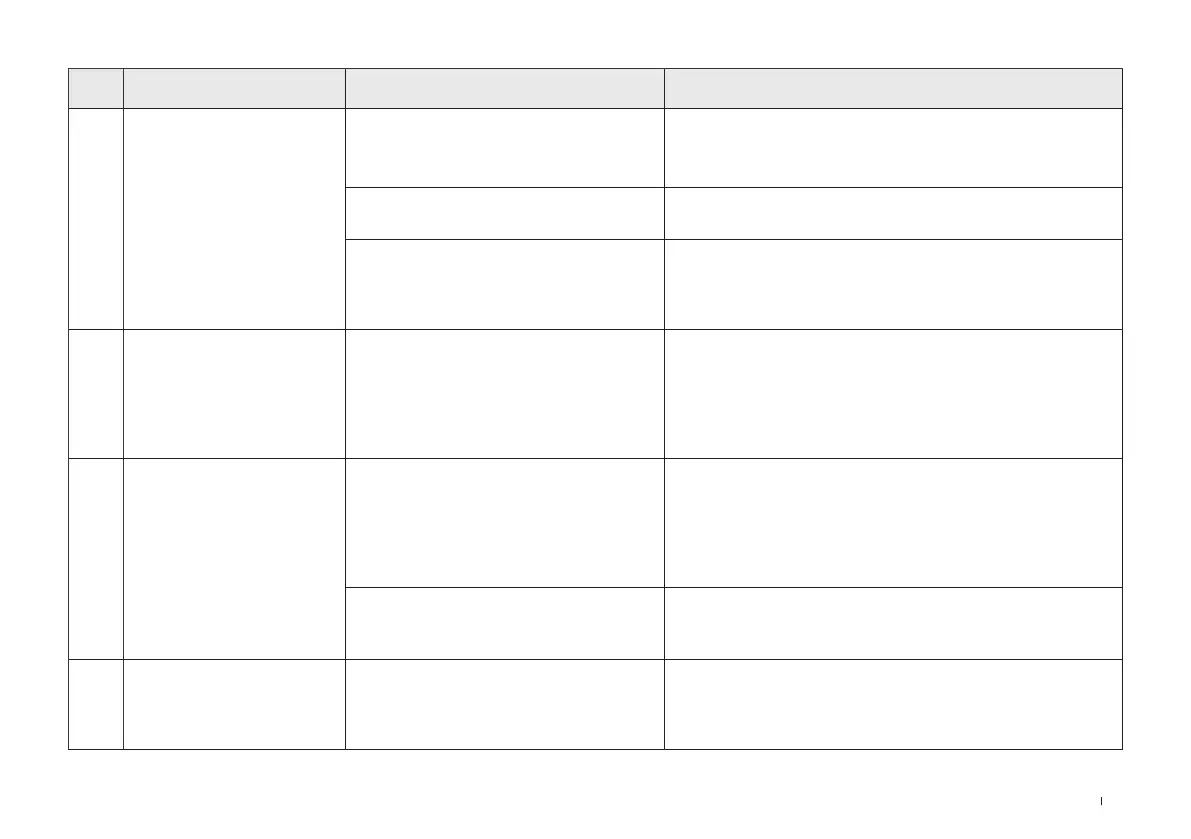
NO. Malfunction Possible Causes Solutions
4
WINBOT does not spray
water.
There is no cleaning solution in the water
tank.
Please add ECOVACS WINBOT cleaning solution in time.
The auto spraying function is turned off
in the App.
Please go to the App and turn on the auto spraying function.
WINBOT is cleaning at low water level.
If the auto spraying function is on in the App and there is
cleaning solution in the water tank, go to the App and follow
the auto spraying precautions to solve the problem. If the
problem persists, please contact customer service.
5
WINBOT voice prompts
"WINBOT encounters an
obstacle".
The internal components are abnormal.
Firmly hold the composite cable and do not stand directly
under WINBOT to prevent being injured by the falling
WINBOT. Slowly drag the WINBOT until it can be reached.
Long press the start button for 2 seconds and then remove
WINBOT. Turn off and power off, then restart. If the issue
persists after restarting, please contact customer service.
6
WINBOT has not returned
to the origin and cannot be
removed.
There is an error in the algorithm.
Affected by the calculation accuracy, there may be a
slight error. The normal error is less than 21cm. If the error
of WINBOT returning to the origin is too large and it is
inconvenient to retrieve WINBOT, please go to the App and
remote control WINBOT to return to a position that is easy to
remove.
The remote control function was used
after WINBOT was adhered, so WINBOT
does not know the origin position.
Go to the App and use remote control to help WINBOT
return to a position that is easy to remove.
7
WINBOT voice prompts
"Please avoid the window
corners."
When cleaning frameless glass, the
adhering position of WINBOT is too close
to the window frame.
Hold the handle of WINBOT, long press WINBOT start
button for 2 seconds, and then remove WINBOT. Re-adhere
WINBOT. It is recommended that the adhering position be
more than 10 cm away from the window corners.



 To Next Page