18
UNPACKING
The EcoWater Systems HydroLink
®
remote is shipped
from the factory in one carton. Thoroughly check for
p
ossible shipping damage and parts loss. Also note
any damage to the shipping carton. Notify the trans-
portation company if damage is present. EcoWater
Systems is not responsible for in-transit damages.
Remove and discard (RECYCLE) all packing materials.
ITEMS INCLUDED WITH SHIPMENT
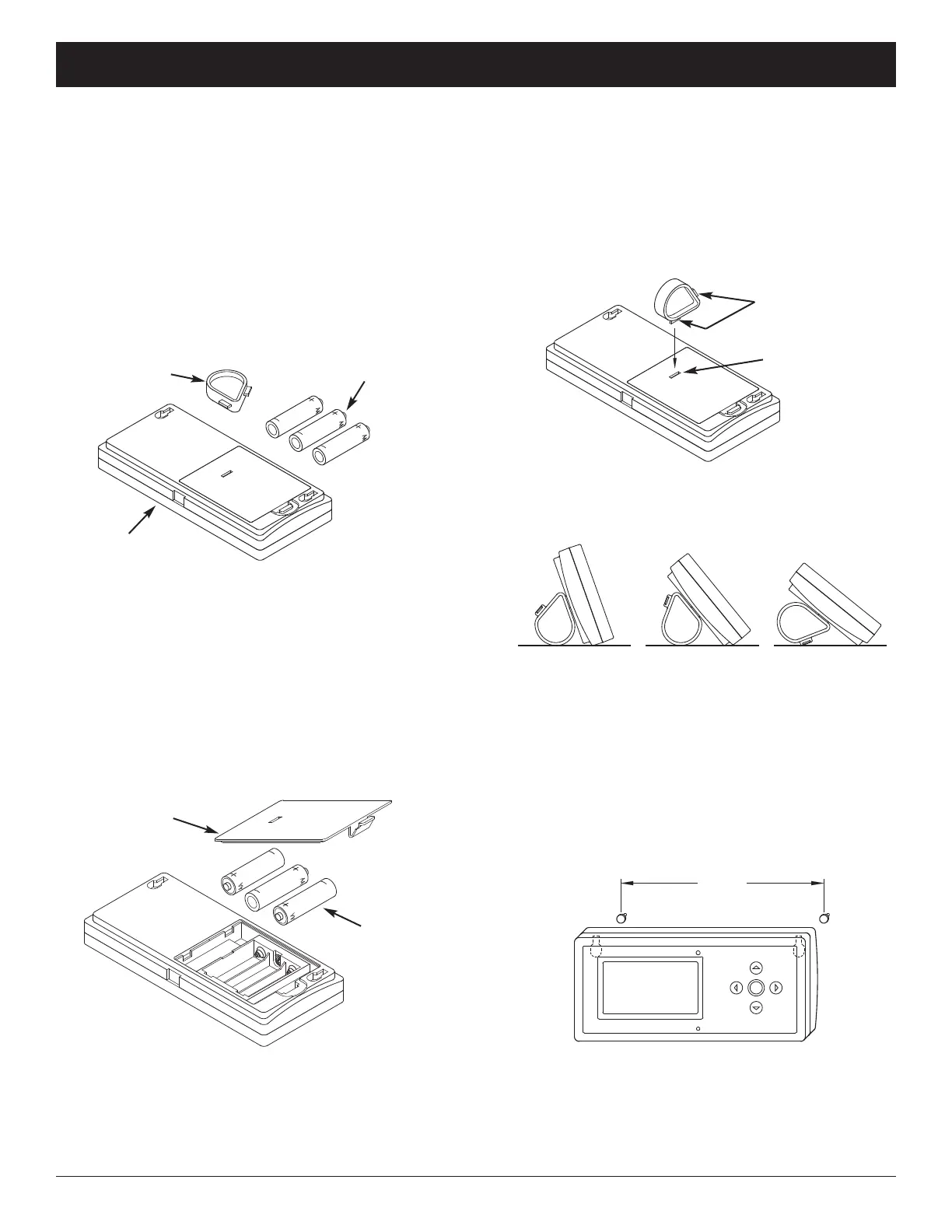
FIG. 35
Remote (including
Battery Cover)
Support
3 Batteries
(AA size)
INSTALLING BATTERIES
1. Remove the battery cover from the back of the
remote.
2. Install three (3) AA size batteries, making sure that
they are oriented to match the Æ and – markings
inside the battery compartment (See Figure 36).
3. Snap the battery cover back in place.
FIG. 36
FIG. 38
INSTALLING THE SUPPORT
The EcoWater Systems HydroLink
®
remote is shipped
w
ith a teardrop-shaped support to hold the unit at an
angle when placed on a horizontal surface.
1. Snap one of the support’s two tabs into the rectangu-
lar slot on the back of the remote’s case (See Figure
37).
OPTIONAL WALL MOUNTING
The EcoWater Systems HydroLink
®
remote (without the
support) may also be mounted on a wall. If this option
is desired, install two fasteners (not included) at a con-
venient height, spaced 6-1/8” (156 mm) apart (See
Figure 39).
FIG. 39
FIG. 37
Support
has 2 tabs
Slot in
battery cover
Battery
Cover
3 Batteries
(AA size)
6-1/8”
(156 mm)
2. The angle may be adjusted by reorienting the sup-
port in the battery cover (See Figure 38).
ECOWATER
S Y S T E M S
Non-Wi-Fi Systems Only: Remote Unpacking & Installation
NOTE: When replacing batteries in a remote that was
previously connected to a conditioner/refiner, it
is not necessary to reconnect the remote and
conditioner/refiner.



 To Next Page