4
MAIN MENU
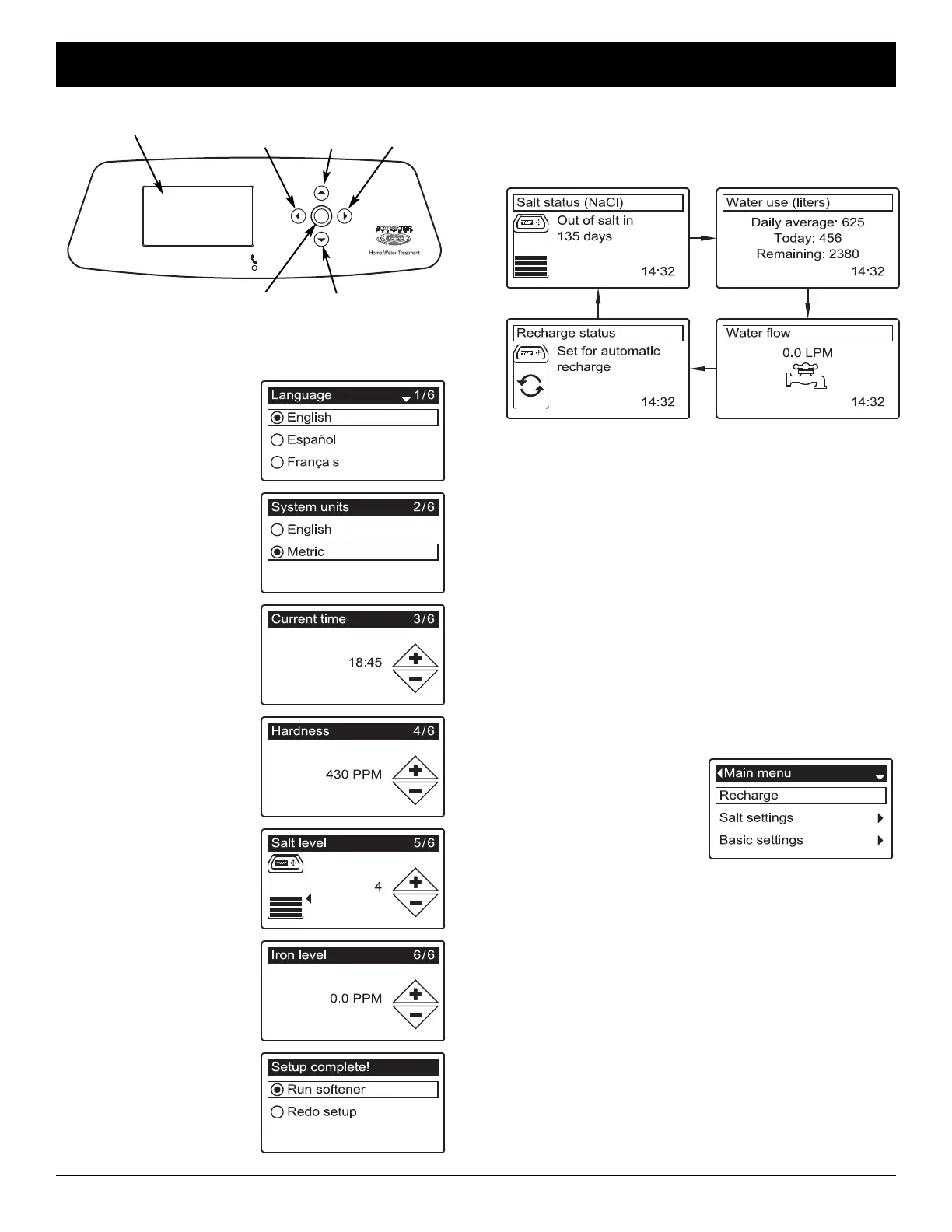
During normal operation,
press SELECT (¡) to
display the Main menu.
This leads to the following:
=Recharge (See Page 5)
=Salt settings
=Salt level (See Page 5)
=Low salt alarm
=Salt type (See Page 5)
=Basic settings
=Current time (See Page 6)
=Hardness (See Page 6)
=Iron level (See Page 6)
=Recharge time (See Page 5)
=Rolling screens
=User preferences
=Language (See Page 6)
=Time format
=Volume units
=Hardness units
=Weight units
=System information
=Advanced settings
SETUP PROCEDURE
When the unit is plugged in
for the first time, you will
be prompted to enter basic
operating information.
After confirming or changing
each setting, press the
SELECT (¡) button to
move on:
1. LANGUAGE Press the
DOWN (6) or UP (5)
buttons to go to the
desired language, then
press SELECT (¡).
2. SYSTEM UNITS Press
SELECT (¡) for metric
or use the UP (5) button
to go to English units
and press SELECT (¡).
3. CURRENT TIME Press
the DOWN (6) or UP
(5) buttons to set the
current time. Hold button
to go faster.
4. HARDNESS Press the
UP (5) or DOWN (6)
buttons to set the value
of your water’s hardness.
5. SALT LEVEL Press the
UP (5) or DOWN (6)
buttons to set the salt
level to match the lowest
number visible on the
decal above the salt.
6. IRON LEVEL Press the
UP (5) or DOWN (6)
buttons to set the value
for iron in your water.
When “Setup complete!”
appears, press SELECT
(¡) and the unit begins
normal operation.
Display
LEFT
Button
RIGHT
Button
UP
Button
DOWN
Button
SELECT
Button
The status screens described above will not be
displayed when one of the following displayed:
=Recharge status (Displayed during recharges,
showing valve position and time remaining)
=Add salt or Out of salt indicates salt needs to be
added (Page 7) and the salt level reset (Page 5)
=Current time setting screen instead of status
screens indicates time needs to be set (Page 6).
=Service reminder (Contact your dealer)
=Error detected (Contact your dealer)
*
*Water remaining before the next recharge.
NORMAL OPERATION / STATUS SCREENS
During normal operation, the unit displays status screens
in an automatic sequence:
OTHER MESSAGES, ALERTS & REMINDERS
Conditioner/Refiner Programming
ECOWATER
S Y S T E M S
English



 To Next Page