EasyManua.ls Logo

EcoxGear EcoBoulder MAX GDI-EXBDR310 - User Manual

EcoxGear EcoBoulder MAX GDI-EXBDR310
12 pages
Print Icon
To Next Page IconTo Next Page
Loading...
24 1
EcoBoulder
Waterproof Outdoor Speaker
User Guide
Model: GDI-EXBDR310
Question and Answer IconNeed help?

Do you have a question about the EcoxGear EcoBoulder MAX GDI-EXBDR310 and is the answer not in the manual?

Summary

Important Safety Information

Important Safety Instructions

Read and follow all safety and operating instructions before use.

Safe Usage Guidelines

Guidelines for proper use, sealing, cleaning, and storage.

Prohibited Actions

Actions to avoid, such as charging while wet or opening the unit.

Care, Maintenance, and Precautions

Instructions for maintaining waterproofness and cleaning the unit.

Regulatory Compliance and Product Use

FCC and IC Statements

Compliance information with FCC and Industry Canada regulations.

Product Use and Protection

Guidelines for using the speaker in various environments and its waterproofing.

Safety Advisories and Warnings

General safety advice, including warnings about water and battery.

Correct Product Disposal

Instructions for environmentally responsible product disposal and recycling.

Specifications Overview

Bluetooth and Wireless Connectivity

Details on Bluetooth version, range, and wireless features.

Power and Battery Performance

Information on power source, charging time, and battery life.

Environmental and Protection Ratings

Operating temperatures and waterproof/dustproof rating.

Speaker Components and Output

Specifications for speaker drivers and output power.

Troubleshooting Common Issues

Audio and Microphone Problems

Resolving distorted sound, whistling noise, and volume issues.

Bluetooth Connectivity Issues

Steps to resolve problems with pairing Bluetooth devices.

Battery and Charging Problems

Troubleshooting battery not charging and replacement.

Radio and General Operation

Tips for AM/FM reception and understanding normal operations.

Connections and Power Management

In;Out Connections

Details on microphone, auxiliary inputs, and USB charging port.

Power and Charging

Safe procedures for connecting and charging the unit.

EcoCast: Multi-Speaker Broadcasting

Setting Up Receiving Speakers

Instructions to activate EcoCast receiving mode on multiple speakers.

Activating Transmitting Mode

How to initiate EcoCast transmitting mode from one speaker.

Connecting Multiple Speakers

Steps to link multiple EcoBoulder Max speakers for synchronized audio.

Controls and Display Functions

Control Panel Overview

Identification and function of all buttons on the control panel.

AM;FM Presets and Radio Tuning

How to store and select favorite radio stations.

EcoTalk Voice Assistant

Activating and using the voice assistant feature.

Party Lights and Backlight Control

Managing the speaker's party light modes and button backlights.

Audio Source and Playback

Audio Source Selection

Switching between Bluetooth, FM, AM, and AUX audio sources.

Bluetooth Music Playback

Instructions for playing music via Bluetooth, including controls.

AM;FM Radio Listening

How to tune and listen to AM and FM radio stations.

LED Screen Icons Explained

Understanding the meaning of various icons on the LED display.

Operational Procedures

Power On;Off

How to turn the EcoBoulder Max speaker on and off.

Pairing a Bluetooth Device

Step-by-step guide to connect a Bluetooth device.

Adjusting Master Volume

How to control the main speaker volume.

Adjusting Microphone Volume

How to control the volume for the microphone input.

Maintaining Waterproofness and Charging

Maintaining Waterproofness

Ensuring the unit remains watertight by properly closing caps.

Waterproof Cap Operation

Instructions on how to lock and unlock the waterproof caps.

Qi Wireless Charging

How to use the Qi wireless charging feature for compatible devices.

Audio Equalization and Features

Equalization (Audio Source: Bluetooth)

Using EQ modes to adjust audio output for Bluetooth audio.

Preset EQ Modes Explained

Descriptions of Normal, Classical, Pop, Jazz, and Rock EQ presets.

Overview

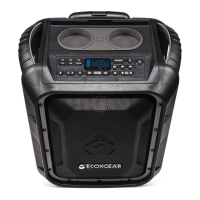
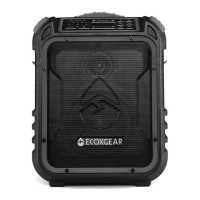
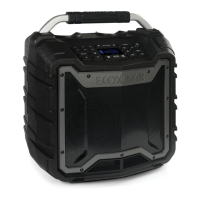
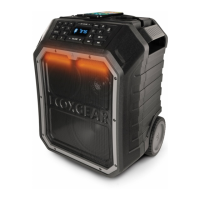
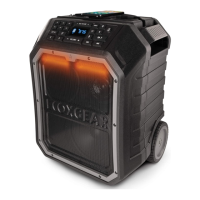
The EcoBoulder MAX is a waterproof outdoor speaker designed for robust use in various environments. It features a durable, rugged design with carrying handles and wheels for easy portability. The speaker supports Bluetooth connectivity, AM/FM radio, and auxiliary input, making it versatile for different audio sources.

Function Description:

The EcoBoulder MAX serves as a portable audio system capable of playing music from Bluetooth-enabled devices, AM/FM radio, and auxiliary input. It also includes a microphone input for instruments or vocals, and a USB charging port for external devices. A key feature is its EcoCast technology, which allows users to wirelessly connect multiple EcoBoulder MAX speakers (up to 50) to create a synchronized audio system, broadcasting music from a single source. The speaker is designed for outdoor use, boasting a waterproof and dustproof rating of IP67, meaning it can be submerged in up to 3 feet of water for 30 minutes without damage. It also incorporates Qi wireless charging for compatible devices, allowing for convenient, cable-free phone charging. Party Lights with multiple modes (White Light, Red Light, Green Light, Music Sync, and Fading) add to the entertainment experience. The EcoTalk button activates voice assistants like Siri or OK Google on connected devices.
Important Technical Specifications:

  • Model: GDI-EXBDR310
  • Bluetooth Compliance: Bluetooth V 5.0
  • Bluetooth Frequency Band: 2.402-2.480GHz ISM Spectrum
  • Bluetooth Range: Up to 100 ft / 30m
  • EcoCast Range: 30 ft / 9.1 m between Casting speaker and Receiving speakers
  • Compatibility: Mobile phone/device supporting Bluetooth V1.1 (and above)
  • Tweeter: 3" (76.2mm)
  • Passive Woofer: 7.4" x 5.9" (188mm x 150mm) elliptical passive woofer
  • Woofer: 8" (203.2mm) full range woofer
  • Output Power: 120 W (peak)
  • Power Source: 12V, 7.0Ah SLA Battery
  • Power Supply Input Voltage: 100-240V-50/60Hz
  • USB Output: 5V, 2.1A
  • Charging Time: Approximately 8 hours (from empty)
  • Radio Frequency Range (US): AM 500 - 1710 kHz, FM 87.5-107.9 mHz
  • Fuse: Glass tube (slow-blow) Ø5.2x20mm; 250V, 1A
  • Storage Temperature: -40°F to 122°F / -40°C to 50°C
  • Operating Temperature: 23°F to 95°F / -5°C to 35°C
  • Waterproof / Dustproof Rating: IP67
  • Play Time: Up to 100hrs in standby, 50hrs play time, 10hrs play time at max. volume
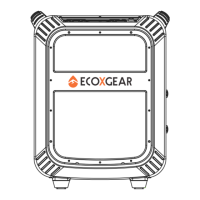
  • Dimensions: 19 in / 484 mm (Height), 15.7 in / 398 mm (Width), 11.5 in / 293 mm (Depth)

Usage Features:

  • Power On/Off: Press and hold the Power button for 3 seconds.
  • Audio Source Selection: Cycle through Bluetooth, FM, AM, and AUX using the SOURCE button.
  • Bluetooth Pairing: Press the Bluetooth button to enter pairing mode. The Bluetooth icon will flash on the LED screen. Once connected, the icon will be solid. Press and hold for 3 seconds to clear all pairing records.
  • Volume Control: Adjust master volume and microphone volume using dedicated +/- buttons. Press and hold for continuous adjustment.
  • AM/FM Radio: Tune stations using the Tune buttons. Press and hold to "seek" (jump to the next available station). Store up to 6 preset stations by pressing and holding a preset button (P1-P6).
  • EcoCast:
    • Transmitting Mode: On Speaker A (connected to your Bluetooth device), press the EcoCast button to initiate transmitting. The icon will flash.
    • Receiving Mode: On additional EcoBoulder MAX speakers (B, C, D, etc.), press the EcoCast button to cycle to receiving mode. The icon will flash.
    • Once connected, receiving speakers will announce "Connection Successful" and play music from Speaker A.
    • EcoCast works only with Bluetooth audio source and within 30 feet between speakers.
  • Qi Wireless Charging: Press the Qi button to enable. Place compatible devices on the charging pad with the screen facing up. The Qi icon will be lit solid. The Qi icon will flash if a metal object is detected.
  • Equalization (EQ): Press the EQ button to activate Preset EQ modes (Normal, Classical, Pop, Jazz, Rock). Cycle through modes using the Tune buttons. Settings are saved even after power off.
  • Party Lights: Cycle through 5 modes (White, Red, Green, Music Sync, Fading) or turn off using the Party Lights button. Press and hold for 3 seconds to turn button backlights on/off.
  • EcoTalk: Press the EcoTalk button to activate your device's voice assistant (Siri, OK Google).
  • Microphone Input: Connect a microphone, guitar, or other musical instrument via the 1/4" (6.35 mm) port.
  • Auxiliary Input: Connect external audio devices (CD player, MP3 player) via the AUX-IN port.
  • USB Charging Port: Charge external USB devices (5V, 2.1A). Only functions when the speaker is powered on.

Maintenance Features:

  • Waterproofness: Ensure all caps on the back panel are properly closed by turning them clockwise until the arrow aligns with the locked symbol. The unit is NOT watertight if caps are not closed.
  • Cleaning: Clean the unit with a dry cloth. After use in salt water or swimming pool, rinse with tap water. Periodically clean rubber seals with a soft moist cloth, ensuring no dirt, hair, or sand is present. Do NOT use oily solvents or chemicals.
  • Battery Charging: Fully charge the battery prior to first use (4-8 hours) and for extended storage. Recharge every 3 months if stored unplugged. Do NOT leave plugged in and charging continuously for more than 8 hours after full charge.
  • Battery Replacement: The battery is replaceable. Refer to www.ecoxgear.com for instructions on obtaining and replacing the battery. Improper handling may cause shock or injury.
  • Troubleshooting:
    • Distorted Sound: Lower volume on connected device or speaker.
    • Pairing Issues: Ensure Bluetooth mode is selected, turn off/on both devices, and reconnect. Clear pairing records if needed.
    • Whistling Noise (Microphone): Point microphone away from the speaker (feedback).
    • Poor AM/FM Reception: Move the speaker to adjust reception.
    • Microphone Volume Low: Increase Master Volume on the speaker and decrease music volume on the Bluetooth device.
    • USB Port Not Playing Music: USB ports are for charging only.
    • Water Draining: Normal from drain holes at the base.
    • Low Volume: Increase volume on speaker and/or Bluetooth device.
    • Battery Not Charging: If battery indicator flashes top-to-bottom after 20 minutes of charging, contact customer support. Do NOT attempt to fix.
  • General Care: Do NOT open the unit for repair. Refer servicing to qualified personnel. Do NOT charge if wet or suspected water ingress. Avoid excessive force on wet surfaces. Do NOT use or store in high temperatures. Avoid prolonged exposure to UV radiation and strong magnetic fields.

EcoxGear EcoBoulder MAX GDI-EXBDR310 Specifications

General IconGeneral
BrandEcoxGear
ModelEcoBoulder MAX GDI-EXBDR310
CategorySpeakers
LanguageEnglish

Related product manuals