C
C
h
h
e
e
c
c
k
k
i
i
n
n
g
g
J
J
u
u
m
m
p
p
e
e
r
r
S
S
e
e
t
t
t
t
i
i
n
n
g
g
s
s
Use the mainboard jumpers to set system configuration options. Jumpers with
more than one pin are numbered. When setting the jumpers, ensure that the
jumper caps are placed on the correct pins.
The illustrations below show a 2-pin jumper.
When the jumper cap is placed on both pins,
the jumper is SHORT. If you remove the
jumper cap, or place the jumper cap on just
one pin, the jumper is OPEN.
This illustration shows a 3-pin
jumper. Pins 1 and 2 are SHORT.
Short Open
1
2
3
Setting Jumpers
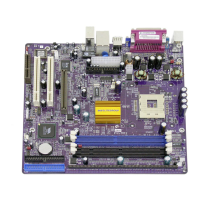
The following illustration shows the location of the mainboard jumpers. Pin 1 is
labeled.
11


 To Next Page