11
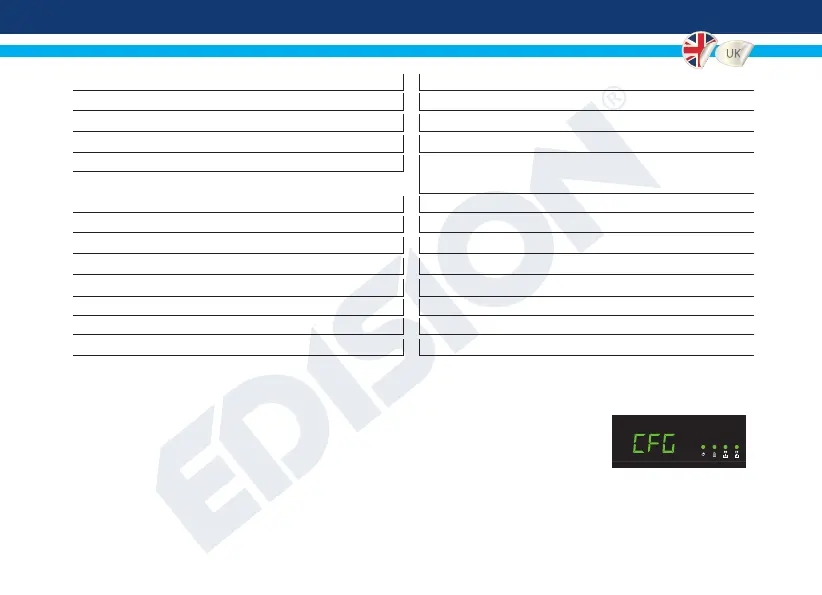
►CONFIGURATION IMPORT (CFG)
To import the conguration le jedi_cong.txt, you must save the le within
the root directory* of a USB drive, insert the drive to the USB slot and power
cycle your HDMI modulator Xtend. When you see this message CFG, press
the MENU/OK button to conrm the import process. When the process is
completed, the unit will reboot with the new conguration!
*IMPORTANT: Use only FAT32 partitions. In any other case, the conguration le will not be read and the
device will reboot normally!
<LCN>1<\LCN> LCN: 1 to 999
<TSID>1<\TSID> Transport Stream ID: 1 to 65534
<ONID>1<\ONID> Original Network ID: 1 to 65534
<NetworkID>1<\NetworkID> Network ID: 1 to 65534
<audio
_
bitrate>3<\audio
_
bitrate> Audio Bitrate: 0=64kbps, 1=96kbps, 2=128kbps,
3=192kbps, 4=256kbps, 5=320kbps
<PCR
_
GAP>0<\PCR_GAP> PCR Gap: Audio/Video sync max +-5
<audio
_
format>0<\audio
_
format> Audio format: 0 MPEG2 L2, 1 AAC MPEG2
<videopid>1002<\videopid> Video PID: 1 to 8000
<audiopid>1001<\audiopid> Audio PID: 1 to 8000
<pmtpid>1003<\pmtpid> PMT PID: 1 to 8000
<serviceID>1000<\serviceID> Service ID: 1 to 9999
<video
_
bitrate>18000<\video
_
bitrate> Video Bitrate: 0 to 27000
<Netname>EDISION<\Netname> Network Name, Max 10 characters allowed


 To Next Page