Electronic device DMU2000 - DMU3000 - DMU3000 PLUS
Electronic device DMU2000 - DMU3000 - DMU3000 PLUS
39
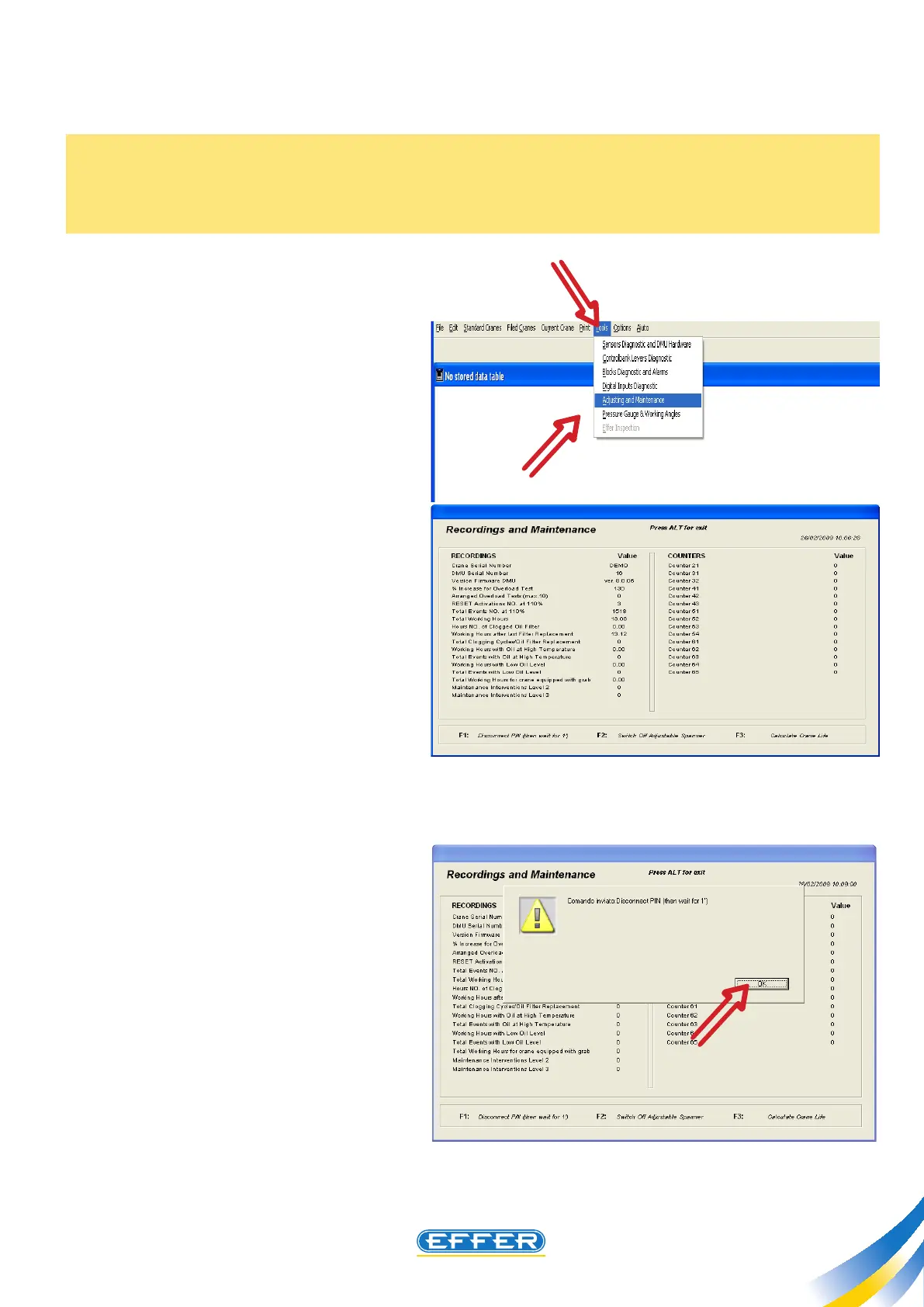
15. Quick Turning Off the “Pin” code
u Press the button F1 on the PC
keyboard.
A screen of conrmation of the requested
operation appears.
u CLICK OK
The operation requires about one
minute.
After this time, to reuse the crane you
must shutdown and start the DMU
again. You can now move the crane and
if necessary reset the PIN code following
the instructions on the DMU manual.
A PIN code can be stored as a safety anti-theft device for the crane (see DMU instruction manual). Upon
crane delivery, the PIN code is not stored.
If the PIN code is not known, follow the instructions given below in order to turn o the set code and
be able to move the crane again.
u Click on the icon “Tools”
u Click on the icon “Adjustments
and Maintenance”
u “Adjustments and
Maintenance” window appears.



 To Next Page