4. Installation
30
4.9
Connecting the Remote Control
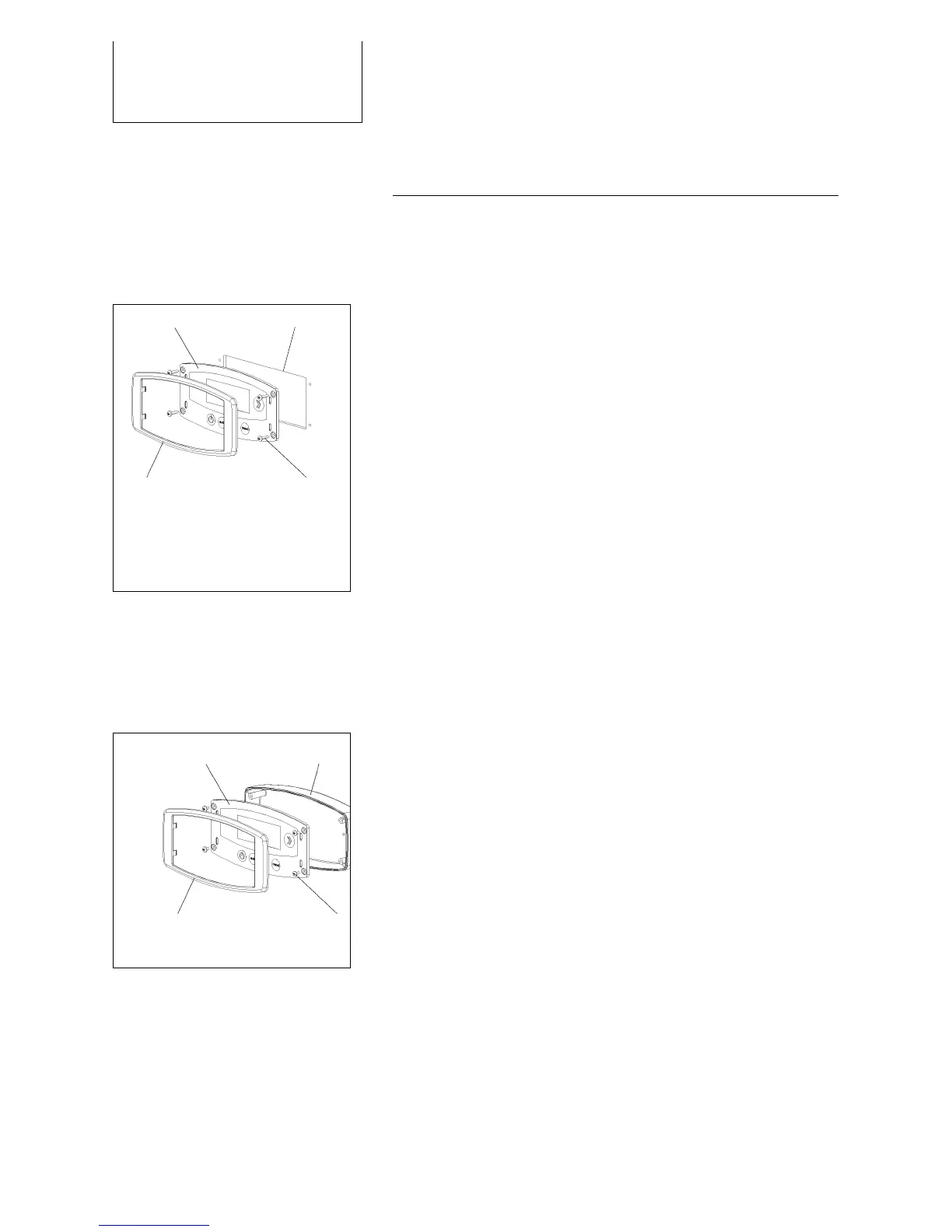
The remote control (1) displays the current status and
is used to control the device. Mount the panel where it
is easily accessible such as in the cockpit.
1 2
3 4
If installing the panel flush with the surface of the
unit, make sure that there is a sufficient opening for
the electronic components behind the opening.
Use templates for drilling and sawing when flush or
surface mounting (2). Use a drill to start the opening
and then cut out the rest of the opening with a keyhole
or compass saw.
The secure the control panel (1) with four suitable
screws (4) and place the frame (3) over the control
panel.
Flush mounting:
1 remote control
2 opening
3 frame
4 screws
1 2
3 4
Surface mounting (optional)
Secure the surface mount with two screws.
Connect the remote control with the DL 1 data line
(included).
Then secure the control panel (1) with four suitable
screws (4) and place the frame (3) over the control
panel.
Surface mounting:
1 remote control
2 surface mount
3 frame
4 screws



 To Next Page