11
Update multiple pictures to ePaper display with slideshow
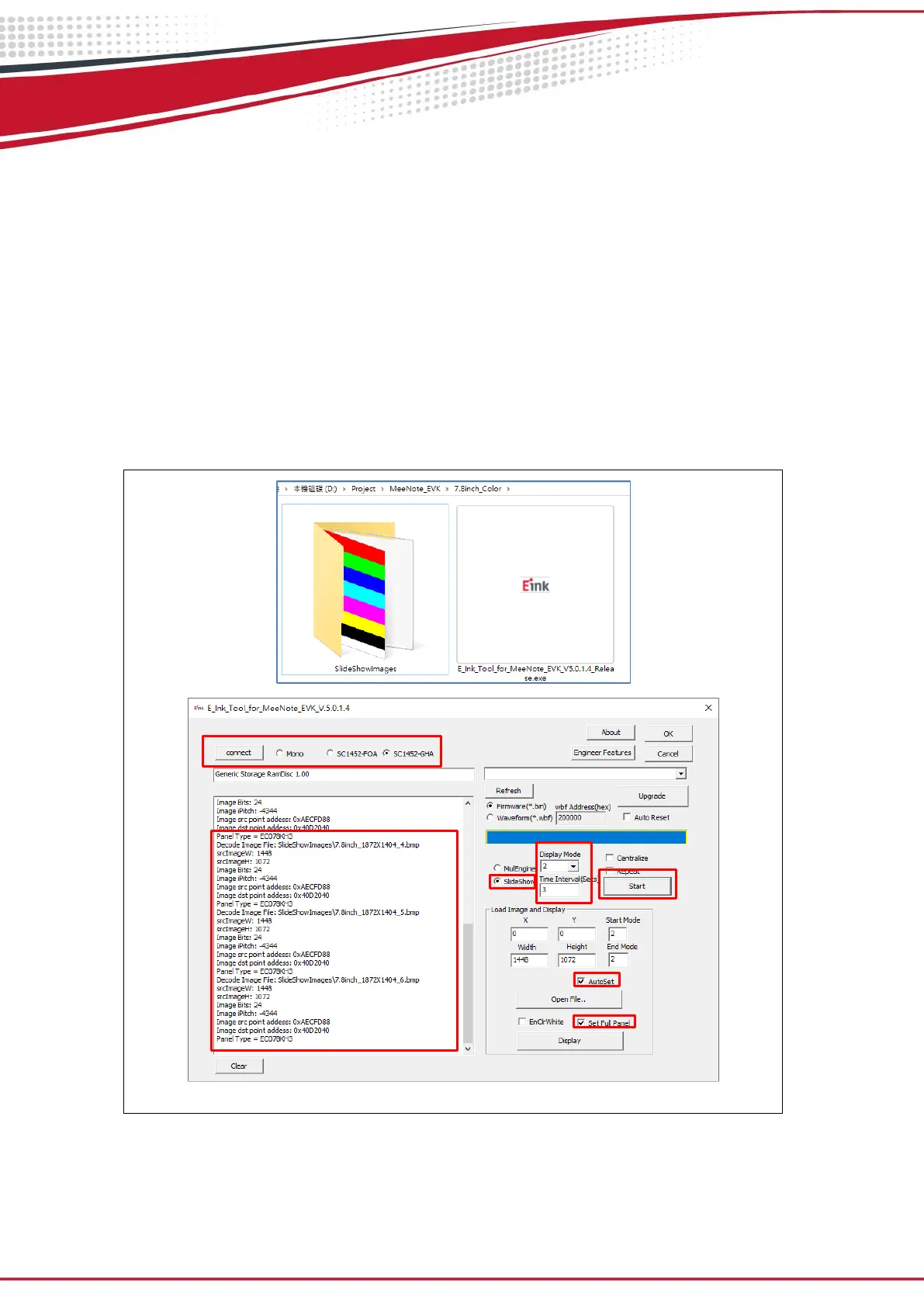
Execute E_Ink_Tool_for_MeeNote_EVK_V5.0.1.4.exe (refer to Figure 3.3)
Upload all images under the folder name as “SlideShowImages”
Select SC1452-FOA or SC1452-GHA and click the “connect” button (step 1)
Set “Display Mode” and “Time Interval” (step 2&3)
Enable “ AutoSet” and “Set full Panel” (step 4&5)
Select “SlideShow” option and click “Start” button (step 6&7)
Note: If the E_Ink_Tool_for_MeeNote_EVK_V5.0.1.4.exe put in a Demo AP folder, the
SlideShowImages folder also needs under Demo AP folder.
Figure 3.3 Update multiple pictures to ePaper display


 To Next Page