Battery Inquiry: After connecting to the phone via Bluetooth, you can see the power icon on the phone side.
Reset: It will automatically power off while charging and can be used while charging after powering on.
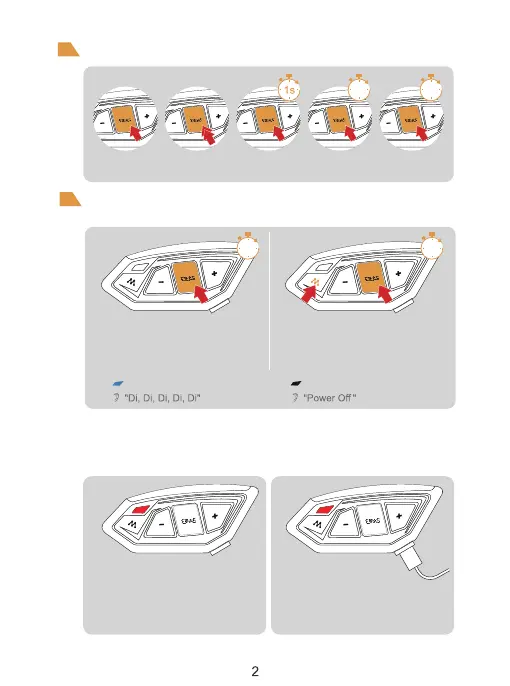
2s 5s
Product Operation
Operation Diagram
Click Double-click Long-press Long press
for 2 seconds
Long press
for 5 seconds
Power ON/OFF
Please charge it before using
Basic Operation
ON
Long press <Phone/Power Button > for 1 second,
until the blue light flashes with a voice prompt.
Long press <Phone/Power Button > + <
M Button >, until the voice prompt
says "Power off"
Blue light flashes slowly Indicator light off
OFF
Low Battery Indication Charging Indication
When the battery is low, the red light
flashes twice with a voice prompt “Low
Battery”.
When the battery is extremely low,
the device will automatically power off.
The red light is always on when
using USB charging.
1s 1s


 To Next Page