7
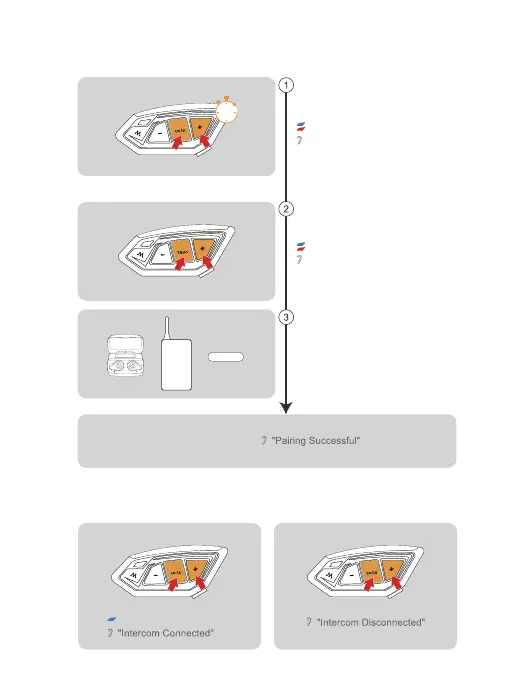
Pairing With Headsets or Other Branded Bluetooth Intercoms Search
Intercom Connection
Blue light flashes rapidly
Intercom Disconnection
Long press <Phone/Power Button> + <Volume +>
(approx. 5s) until the red and blue lights flash
alternately and the prompt "Intercom pairing" is
displayed.
Click again on <Phone/Power Button> + <Volume +>.
The voice prompts "Intercom Searching". The red
and blue lights flash alternately.
At this point the intercom is searching for other
intercoms in the pairing state, and when it finds
another intercom, it will initiate the pairing.
Successful Pairing
Red light and blue light flash alternately
“Intercom Pairing”
“Intercom Searching”
Red light and blue light flash alternately
Note: It is not guaranteed to be compatible with all Bluetooth headsets or
intercoms on the market.
HFP-enabled
intercoms
Others
5s


 To Next Page