Voice
Assistants
“Open QQ Music”
“Music on a song”
“Music next”
“Call EJEAS”
“Open navigation”
10
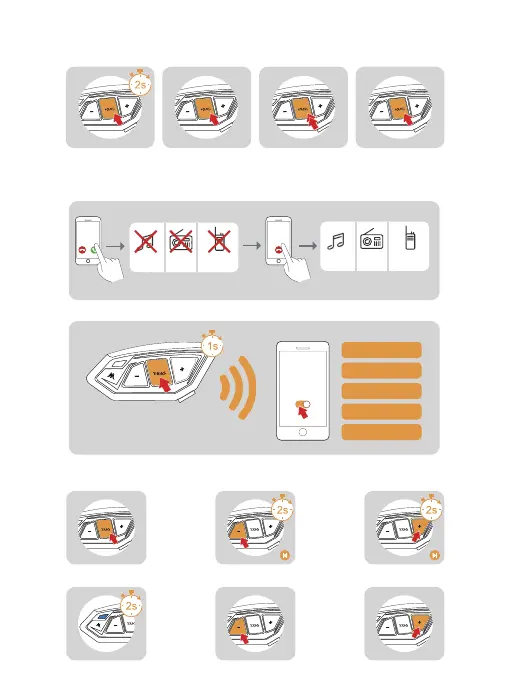
Reject the phone
Telephone priority
When the call comes in,
Press and hold <phone/
power button> for about 2s
While on a call, Click on
the <phone/power
button>
Interrupts Bluetooth music, FM radio and intercom when
a call comes in, resumes after ending up.
Voice assistant
Music control
When in standby/playing music, press and hold <phone/power button>,
requires mobile phone support.
Press and hold <phone/power button> for
1 second.Turn on the voice assistant.
Playback Pausing Previous song Next song
Music playing Volume - Volume +
Incoming calls
Interruptions
End
Recovery
Music Intercom Music IntercomFM FM
On standby or with music,
Quick double click on<
phone/power button>
Redial in progress,
Click on <phone/power key>
End the phone Last call recall Cancel Recall



 To Next Page