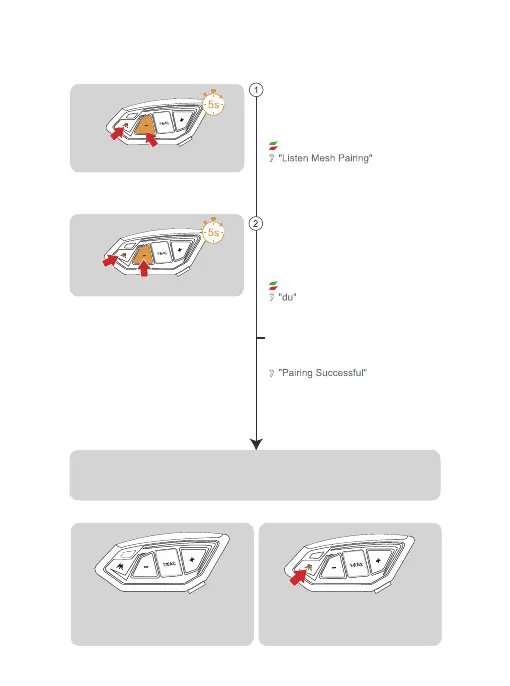
Take an intercom that has been paired in sport mode as a
pairing server, enter listening mode pairing, press and hold
<Intercom Button> + <Volume -> (about 5s), the prompt will
be "Listen Mesh Pairing", then press <Intercom Button>
briefly, you will hear a beep and the red light and green light
will flash alternately.
Wait for a moment and hear the message "pairing
successful", which means that the pairing has been
successful.
5
Take the walkie-talkie to be paired, enter listening
mode for pairing, press and hold the <Messenger key>
+ <Minus key> (about 5s), "Listen Mesh Pairing" will be
displayed and the red light and green light will flash
alternately.
Red light and green light flashing alternately
Red light and green light flashing alternately
Click on <intercom Button> to mute the
microphone.Microphone Mute" is displayed.Click
on the <intercom Button> again to unmute the
microphone.The prompt is "Microphone Unmute".
Listening mode
Listener
Creator
Other intercoms have been paired to form a team via sport mode,
pick any of the paired intercoms as the creator.
Mesh Intercom Reconnect
If the intercom mode is not turned off and the
devices are turned off directly, the devices will
automatically resume the intercom mode when
they are turned on next time.
Mesh Microphone Mute
Wait a few moments and hear all the intercoms saying "Join the Mesh".
At this point you can talk to each other and hear each other's voices.


 To Next Page