- 7 -
INSTALLATION GUIDE
STEP 1
Before you start to assemble the Holder with the GPU
to the motherboard, make sure that your computer is
powered off and the PSU power cable unplugged. It is
also recommended that you put your computer with the
motherboard in a horizontal position before you continue
with the installation process.
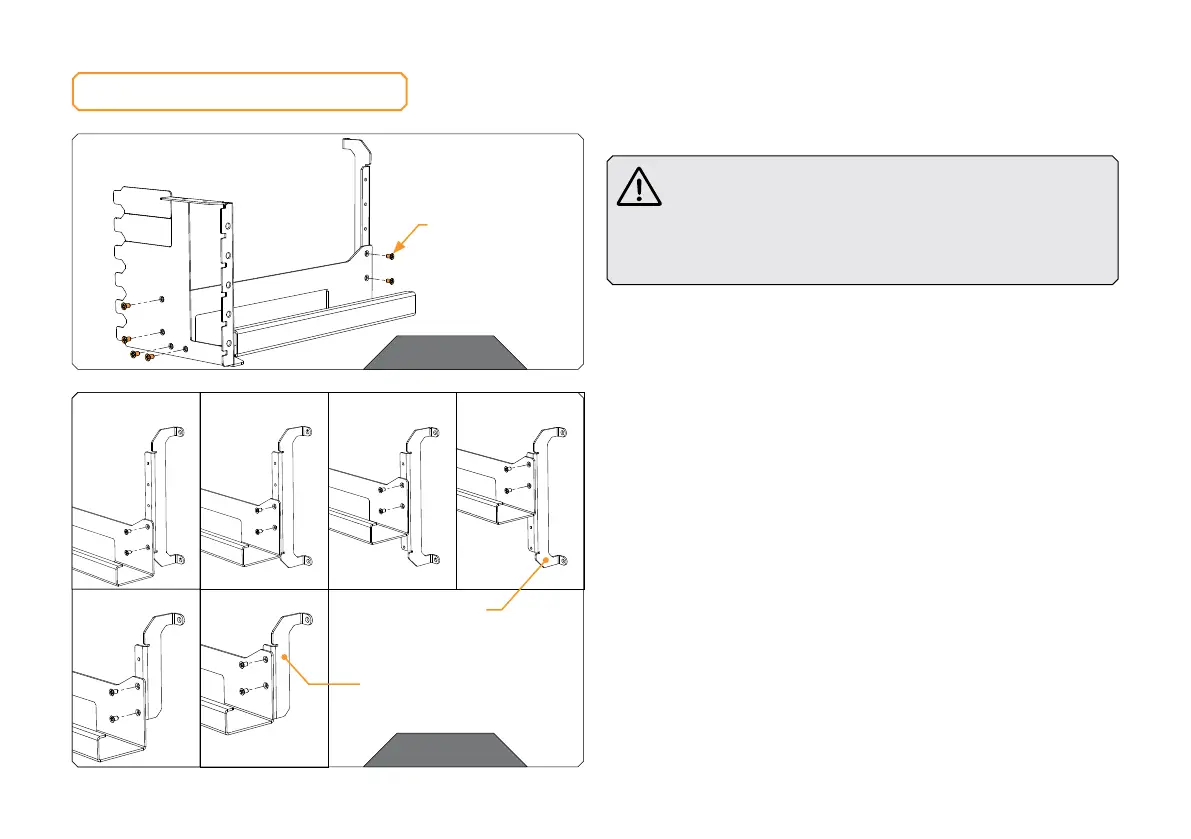
Assemble the three steel brackets with the six M3x5 countersunk
screws. Depending on how you want to position the GPU holder inside
your PC, you may choose between different options and Bracket 3 or
Bracket 4:
STEP 2
Plan how you will mount the GPU holder in the PC case. There are
several options:
STEP 1
STEP 2
M3x5
COUNTERSUNK
SCREW (6x)
BRACKET 3
BRACKET 4
OPTION 1 OPTION 2 OPTION 3 OPTION 4
OPTION 5 OPTION 6




 To Next Page