E L A N H O M E S Y S T E M S
Page 12 © ELAN Home Systems 2009 • All rights reserved.
A6 INSTALLATION MANUAL
Bridged
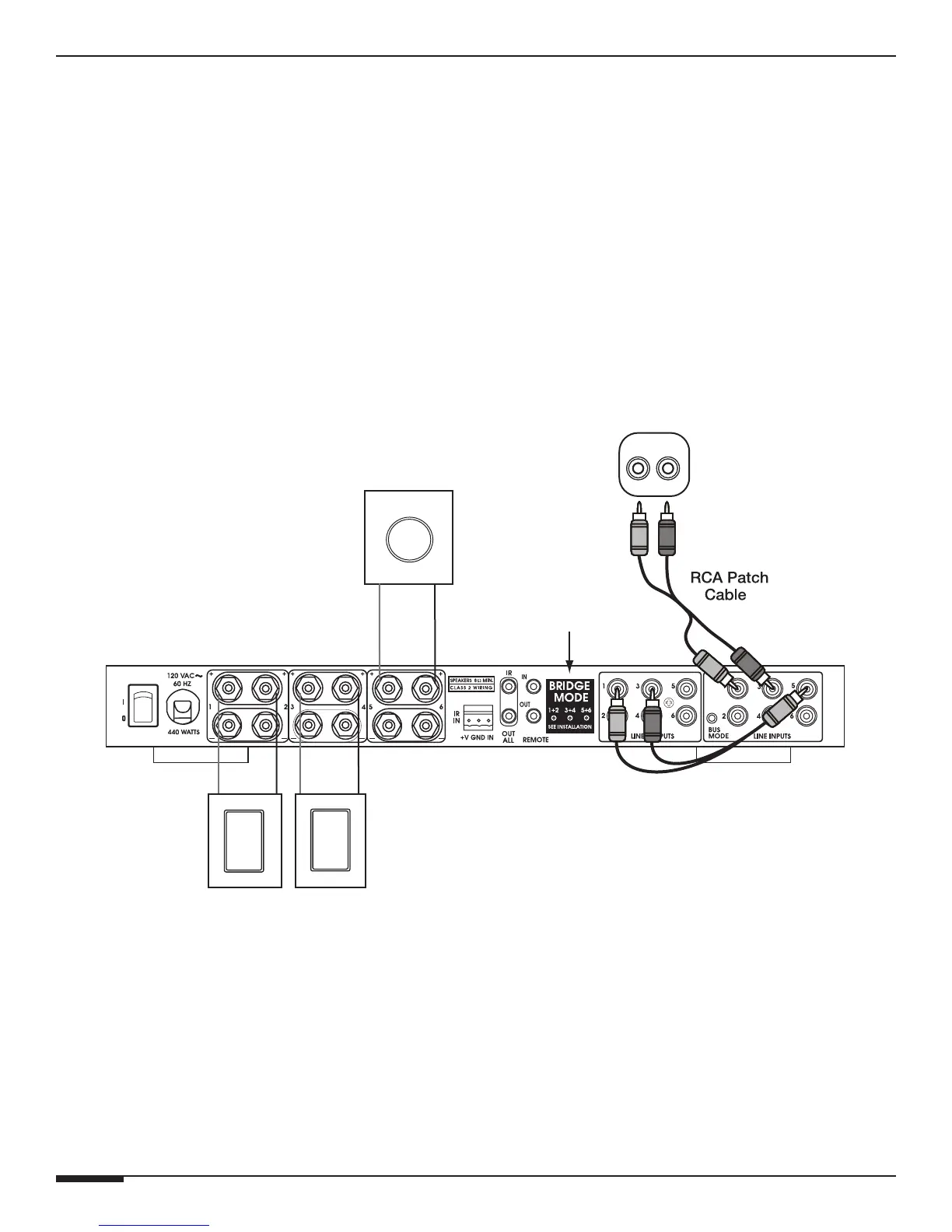
ELAN’s A6 can also be "bridged" providing 3 channels at 120WPC for high power applications. The recessed
Channel Bridging buttons located on the back panel make custom configuration easy
NOTE: Make sure the A6 is OFF before engaging Channel Bridging buttons.
NOTE: DO NOT use Volume Controls when in Bridged Mode.
NOTE: Make sure to maintain a minimum 8 Ohm load.
Bridged Stereo Zone
• Stereo Output to Line Inputs 1 & 3
• Line Outputs 1 & 2 to RCA ‘Y’ Cable to Line Input 5
• Bridge Buttons 1-2, 3-4, 5-6 Engaged
All Speakers Volume Ramps Up & Down Together
A6
RL
Right
Speaker
Line Level
Analog Audio
Output
RCA ‘Y’
Patch Cable
Left
Speaker
Passive
Sub-Woofer
Bridge Mode
Buttons
Figure 2-9: 3 Channel Bridged


 To Next Page