2 3
SYSTEM MENU
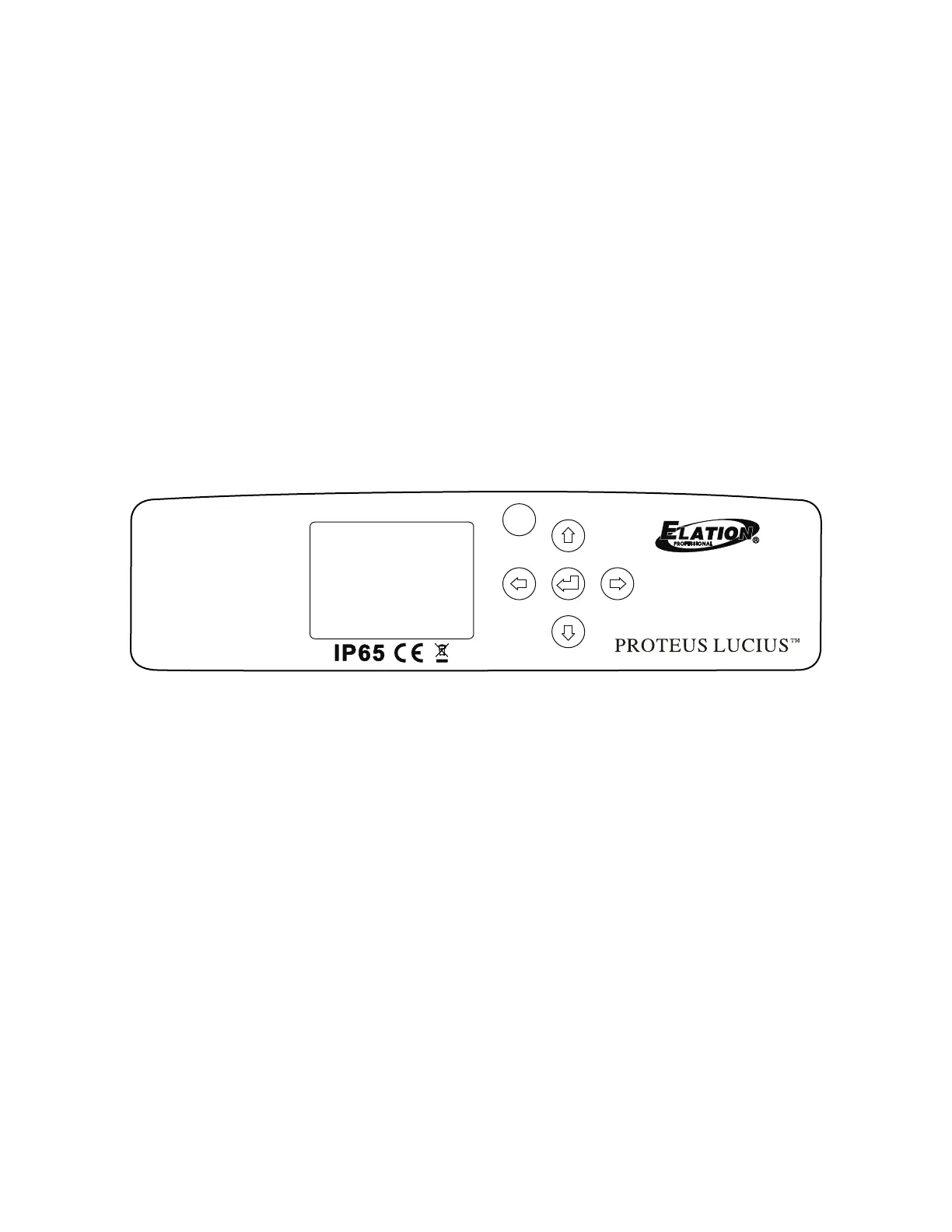
The xture includes an easy to navigate system menu. The control panel (see image below)
located on the front of the xture, provides access to the main system menu and is where all
necessary system adjustments are made to the xture. During normal operation, pressing
MODE/ESC button once will access the xture’s main menu. Once in the main menu you can
navigate through the dierent functions and access the sub-menus with the UP, DOWN,
RIGHT, and LEFT buttons. Once you reach a eld that requires adjusting, press the ENTER
button to activate that eld and use the UP and DOWN buttons to adjust the eld. Pressing
the ENTER button once more will conrm your setting. You may exit the main menu at any time
without making any adjustments by pressing the MODE/ESC button.
NOTE: To access the LCD Menu Control Display via the internal battery, press and hold the
MODE/ESC button for 10 seconds. The LCD Menu Control Display will shut OFF automatically
about 1 minute from the last button press.
Press <Mode>10 seconds to activate display!
MODE
/ESC



 To Next Page