www.elcometer.com
en-19
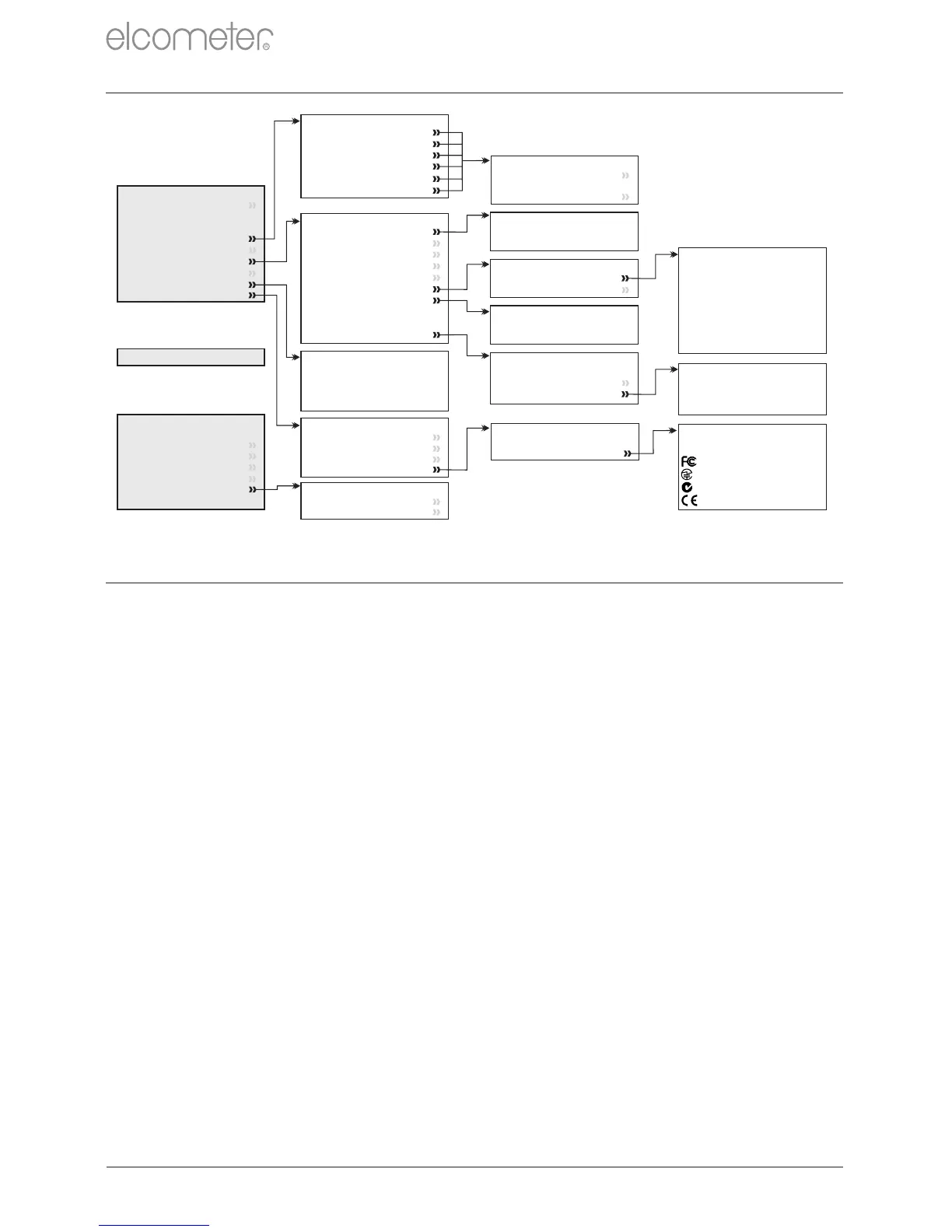
13 MENU STRUCTURE - MODEL T
R
Menu
Delete Last Reading
Backlight
Thermometer Mode
Set Limits
View Time & Date
Setup
Reset
Bluetooth
About
SET LIMITS
RH
Ts
Ta
Td
TΔ
SH
SETUP
Units
Languages
Auto Switch Off
Time & Date
Beep Volume
Display
Manual Logging
Softkeys Locked
User Screen
Setup Backlight
BLUETOOTH
Enable
Gauge ID xxxxxx-xxx
Authentication xxxxx
○
○
○
High Limit on
High Limit
Low Limit on
Low Limit
○
○
UNITS
°C, g/kg
°F, gr/lb
○
○
DISPLAY
Select Readings
Main Reading
SELECT READINGS
RH
Ts
Ta
Td
TΔ
Tdb
Twb
SH
MANUAL LOGGING
Save Only
Hold & Save
○
○
○
○
ABOUT
Gauge Information
Contact
Help
Legal
BATCH
Exit Batching
New Batch
Open Existing Batch
Review Batches
Copy Batch
Delete
Free Memory xx.x%
○
DELETE
Single Batch
All Batches
Stats
SETUP BACKLIGHT
Backlight
Backlight Timeout
Backlight Brightness
○
BACKLIGHT BRIGHTNESS
Low
Medium
High
○
○
○
14 DOWNLOADING DATA - MODEL T
14.1 DOWNLOADING DATA USING ELCOMASTER
®
®
Using ElcoMaster - supplied with each gauge and available as a
free download at elcometer.com - gauges can transmit readings to a
PC for archiving and report generation. Data can be transferred via
® ®
USB or Bluetooth . For more information on ElcoMaster visit
www.elcometer.com
14.2 DOWNLOADING DATA USING ELCOMASTER MOBILE
®
APPS
®
Ideal when out in the field or on-site, using the ElcoMaster
Android™ or iOS Mobile App users can:
Store live readings directly on to a mobile device and save
them into batches together with GPS coordinates.
Add photographs of the test surface.
Inspection data can be transferred from mobile to PC for further
analysis and reporting.
®
For more information on ElcoMaster Mobile Apps visit
www.elcometer.com
LEGAL
Legal Notices
Regulatory
REGULATORY
QDID xxxxx
xxxxx
xxxxx
xxxxx



 To Next Page