10
G
ETTING
STARTED
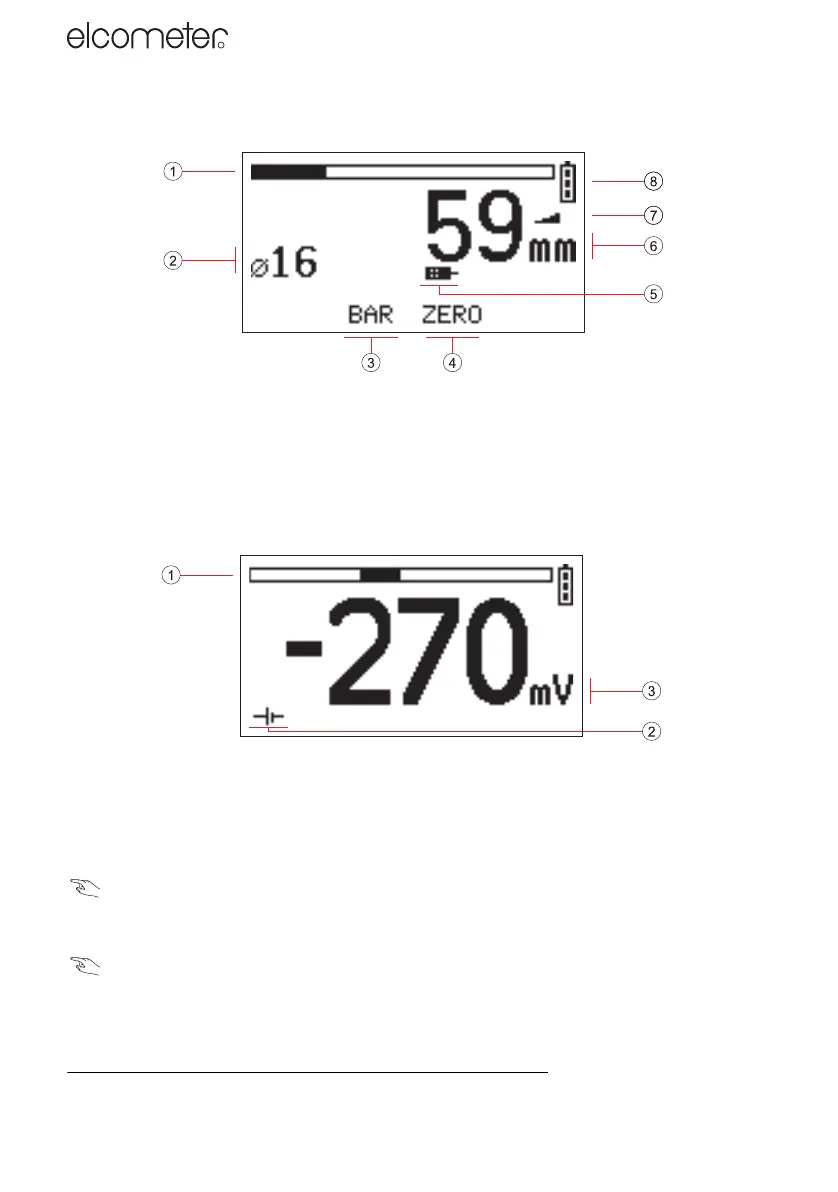
Reading screen (when measuring depth of cover)
1. Signal strength indicator bar (14) 5. Search head type (5)
2. Bar size/number (20) 6. Depth of cover (18)
3. Bar softkey 7. Sensitivity (22)
4. Zero softkey 8. Battery condition indicator (5)
Refer to page numbers in brackets ( ) for more information.
Reading screen (when measuring half-cell potential)
e
1. Half-cell potential - bar graph (zero at centre) 3. Half-cell potential - numerical
2. Half-cell reading indicator
Symbols
A wide range of symbols is used on the display. The meaning of all these symbols is stored in the
Covermeter.
MENU / ABOUT / HELP
LCD contrast
Adjust the contrast of the display to suit lighting conditions.
MENU / SETUP / LCD CONTRAST
Backlight
The display includes a backlight which illuminates the display for 10 seconds after any key is
pressed and during measurements. Switch the backlight on or off as required. Switching the
e. Half-cell mode is not included on the Elcometer 331 Model B.
331.book Page 10 Thursday, March 12, 2009 9:51 PM



 To Next Page