8
en
3 GETTING STARTED
3.1 FITTING BATTERIES
The Model CG60/CG60DL may be used with dry cell batteries or rechargeable batteries.
2 x LR6 (AA) alkaline batteries are supplied in the kit.
When the battery voltage is low the entire display will start to flash. When
this occurs the batteries should be replaced.
To fit or replace batteries:
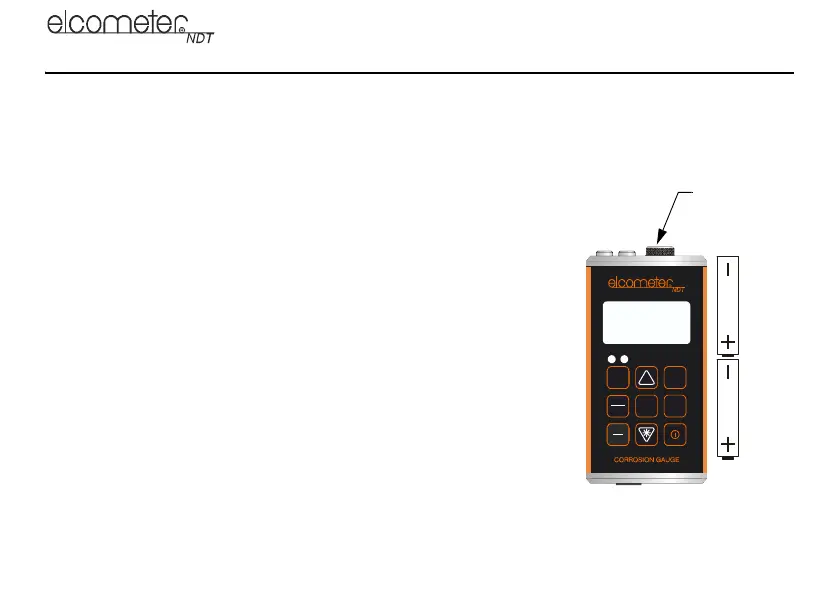
1. Locate battery compartment cover (Figure 2) at top of gauge.
2. Unscrew battery compartment cover.
3. Referring to battery polarity instructions on rear of gauge, insert
batteries into gauge ensuring correct polarity.
4. Replace battery compartment cover.
Note: Remove the batteries from the gauge if it is to remain unused for a
long period of time. This will prevent damage to the gauge in the event of
malfunction of the batteries.
Elcometer 208 DL
Ultrasonic Thickness Gauge
R
CLR
MEM
SEND
MODE
CAL
PRB
0
Data Logger
ON
OFF
CAL
PRB
0
SEND
LRM
IN
MM
IN
MM
DUAL
MULTI
SCAN
Battery
compartment
cover
Figure 2. Fitting batteries
CG60_CG60DL_TMA_0498_00_01_23225_A6L.fm Page 8 Tuesday, November 22, 2011 12:19 PM



 To Next Page