9-2
HOW TO USE YOUR CAMPERVAN’S EQUIPMENT
CONTROL PANEL
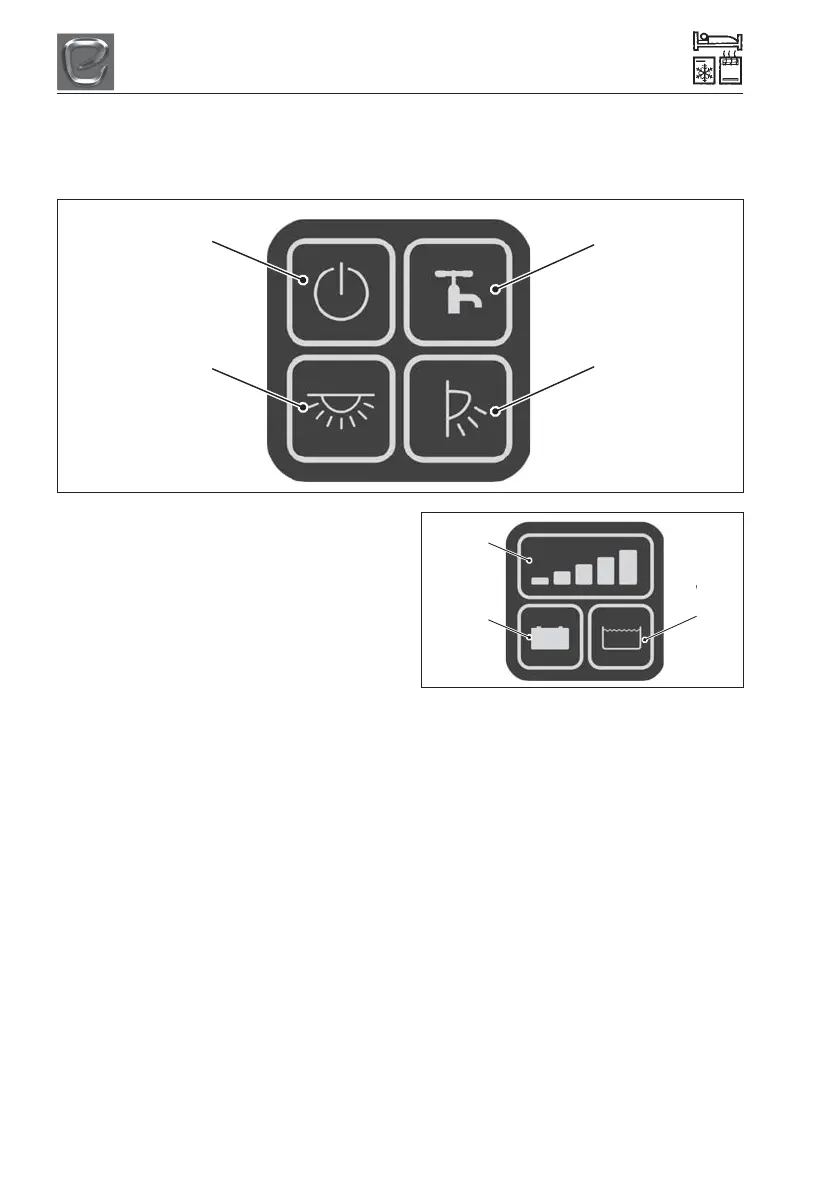
Your new campervan is fitted with the control panel shown below.
Vegas Button Control Panel
Master Button
Pump Button
Lights Button
Awning Button
Master Button
When the Master Button is pressed, the
control panel will switch power to all non-
essential accessories.
• Some features, such as lights, will need
the Master Button to be switched on to
work.
Lights Button
When the Lights Button is pressed, the
control panel will switch power to all the
interior lights.
• If the Master Button is switched off then
this button will not function.
Pump Button
When the Pump Button is pressed, the
control panel will switch power to the water
pumps.
• Holding down the Pump Button forces the
internal pump to run regardless of tank
level. This is so that the user can purge
their water pipes.
Awning Button
When the Awning Button is pressed the
control panel will switch power to the exterior
awning light.
Display Indicator
The Display indicator on the Vegas Voltmeter
Panel is used to display the Leisure Battery
voltage and the Water level, depending on
which button is pressed.
• If a waste tank is fitted, the lowest
indicator will illuminate when the waste
tank is full.
• When the pump is running the 5th
indicator (Green) will illuminate to indicate
that the pump is currently running.
Leisure Battery Voltage Button
When the Leisure Battery Voltage Button is
pressed, the Display Indicator will light up and
display the voltage level of the Leisure
Battery.
Water Level Button
When the Water Level Button is pressed, the
Display Indicator will light up and display the
water level reading inside the water tank.
Display
Indicator
Leisure
Battery
Voltage
Button
Water
Level
Button




 To Next Page