9-12
HOW TO USE YOUR CAMPERVAN’S EQUIPMENT
Refrigerator
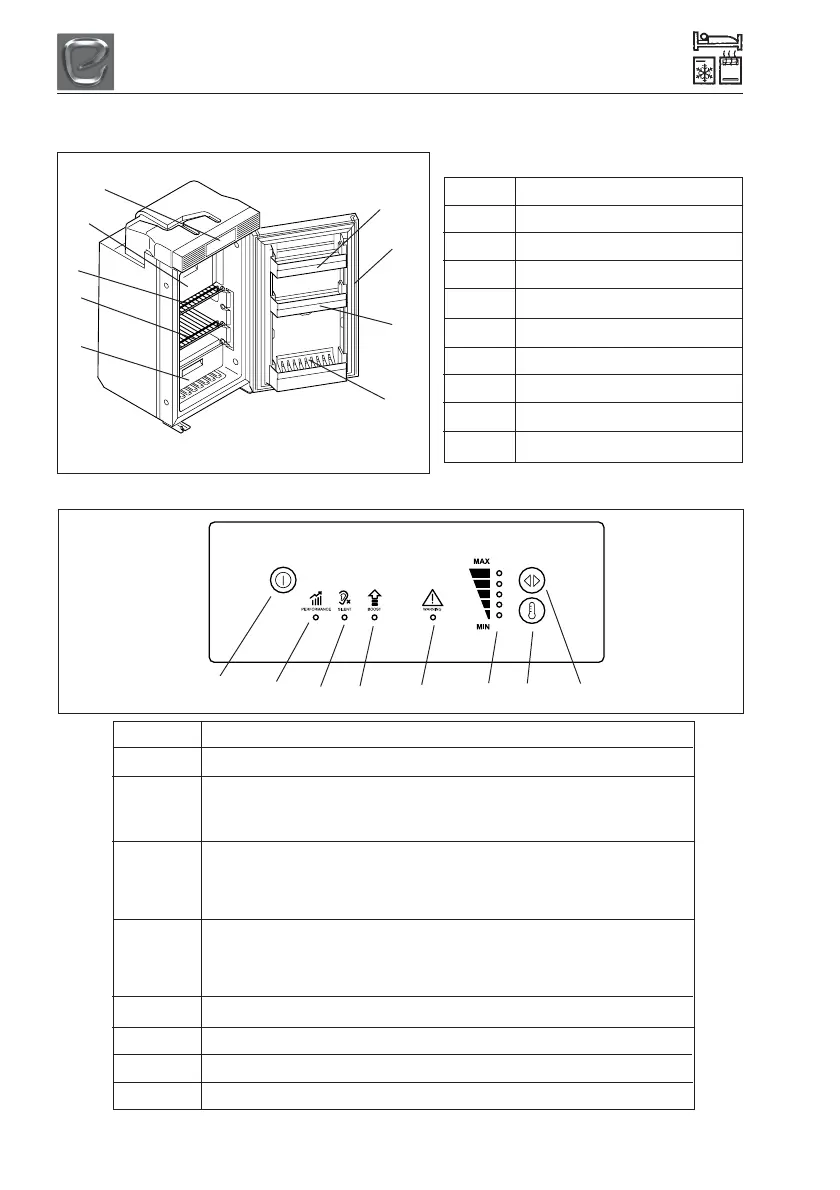
Figure 1 Description
1 Top door tray
2 Refrigerator door
3 Middle door tray
4 Bottom door tray with bottle holder
5 Fruit and vegetable section
6 Refrigerator compartment
7 Refrigerator shelf
8 Freezer compartment
9 Control and display elements
Description of the device
Figure 2 Explanation
1 Power button
2 LED PERFORMANCE mode:
Standard mode
Selection of all temperature levels (1 to 5)
3 LED SILENT mode:
Decreased fan and compressor speed with reduced noise, e.g. if the user
wants to relax or sleep
Selection of three temperature levels (1 to 3)
4 LED BOOST mode:
Maximum performance, e.g. for an immediate cool down or after a larger
amount of uncooled foodstuff has been put in the refrigerator
No selection of temperature levels
5 LED error
6 LEDs temperature level
7 Temperature selection button
8 Mode selection button
Figure 1
Figure 2
1
2
3
4
5 6
7
8
9
8
7
6
5
1
2
3
4




 To Next Page