9-24
HOW TO USE YOUR CARAVAN’S EQUIPMENT
once the emptying spout is pointing downwards.
Prepare the toilet for re-use if required. Slide the
Waste Holding Tank into the toilet and close the
access door.
Emptying with Optional Features
19. Waste Holding Tank Multi-Level Indicator:
The lower lamp indicates that the Waste
Holding Tank is almost empty; the middle
lamp indicates that it is more than half full;
when the upper lamp lights up, the tank
needs emptying as it can only take 2 - 3
further uses.
Note: The Waste Holding Tank Level Indicator
will flash when the holding tank is not present. In
this case the toilet will not flush.
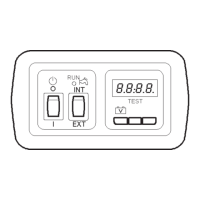
20. Waste Pump-Out System: When activating
the control panel this feature automatically
lights up. When the Waste Holding Tank Level
Indicator illuminates, press the Waste
Pump-Out button to pump out the waste
from the holding tank into the vehicle’s
waste tank. The button will flash while the
waste is being pumped and will stop
automatically (after approximately 5 minutes)
when all waste has been transferred. If the
vehicle’s waste tank is full, the Waste
Pump-Out light will flash rapidly and no
pump-out will be possible until the central
tank is emptied. (Check the level of the
vehicle’s waste tank on the vehicle’s central
console). After the Waste Holding Tank has
been emptied, there will be approximately
1.5 litres of waste left in the tank. This is
normal. Add 2 litres of water and a correct
dosage of Thetford toilet fluids to the Waste
Holding Tank.
Caution: It is vital that the correct amount of
toilet fluid is added to ensure the proper
breakdown of the waste in the holding tank. Only
use the system when the tank is full. Using the
system too often on an empty tank can cause
damage to the pump, which could cause the
system to fail.
Cleaning and Maintenance
The toilet should be cleaned and maintained
regularly, depending on the amount of use. To
clean Thetford toilets, we advise using water and
Thetford Bathroom Cleaner.
Caution: Never use bleach, vinegar or other
powerful household cleaners that contain these
substances. These may cause permanent damage
to the seals and other toilet components.
Toilet Bowl
- Squirt Thetford Bathroom Cleaner into the
toilet bowl.
- Flush the toilet bowl with water and wipe
down the rest of the toilet with a damp
cloth.
- Clean seat and lid The seat and lid can easily
be removed: Lift the seat and lid assembly
and pull the round pins (inside the assembly)
outwards from the pin holes. After cleaning,
replace the seat and lid by positioning the
round pins in front of the pin holes and push
the lid and seat down-
ards.
-To keep your flush water fresh and to
prevent deposits from forming in your toilet
bowl, add a correct dosage of Aqua Rinse in
your flush water tank, if present, on your
toilet.
Tip! For a really shining toilet, dry with a soft
dry cloth after cleaning.
Waste Holding Tank
To k eep your Waste Holding Tank fresh and
clean, Thetford has developed a number of
different toilet fluids. Thetford toilet fluids
suppress smells, reduce formation of gas,
promote breakdown of toilet waste and increase
the life span of a mobile toilet. We advise a
thorough cleaning of the Waste Holding Tank
once each season. Next to using Thetford’s
Cassette Tank Cleaner, the powerful cleaning
agent for the periodical cleaning of the Waste
Holding Tank of your toilet, we suggest the
following:-
- Remove the removable mechanism from
the Waste Holding Tank by turning it
anti-clockwise and rinse it under a tap.
- Remove the cover plate from the
Automatic Pressure Release Vent by prising
it up using a small screwdriver. Use one hand
to push the Automatic Pressure Release Vent
open while holding the float of the
Automatic Pressure Release Vent on the
inside of the tank with the other hand. Push





 To Next Page