12-27
CONTROL SYSTEM
SM ALPHA 1-E.3 GB
12.12.2 By Remote Control Settings:
a. 1: TURNING ON THE POWER.
Turn ON the power, make sure that the unit is in operation.
b. STEP 2 : ENABLE SELF-TEST MODE
• Use the remote control to send the fi rst settings to display / indoor unit
HEAT mode, HIGH IFAN, set temperature to 16 ºC, no I-FEEL Sleep or
any other timer settings are needed.
• Cover the IR transmitter components in the remote control so that it will
not transmit the signals to the indoor unit display.
• Use the remote control to send the second settings to display / indoor unit
COOL mode, LOW IFAN, no I-FEEL Sleep or any other timer settings.
• Uncover the remote control IR transmitter and change the temperature
settings. If the display/indoor unit receive the settings properly the
following steps will start:
c. STEP 3: MODEL SETTING CONFIRMATION
• The STAND-BY and COOL LEDS will indicate the operation mode as
follows:
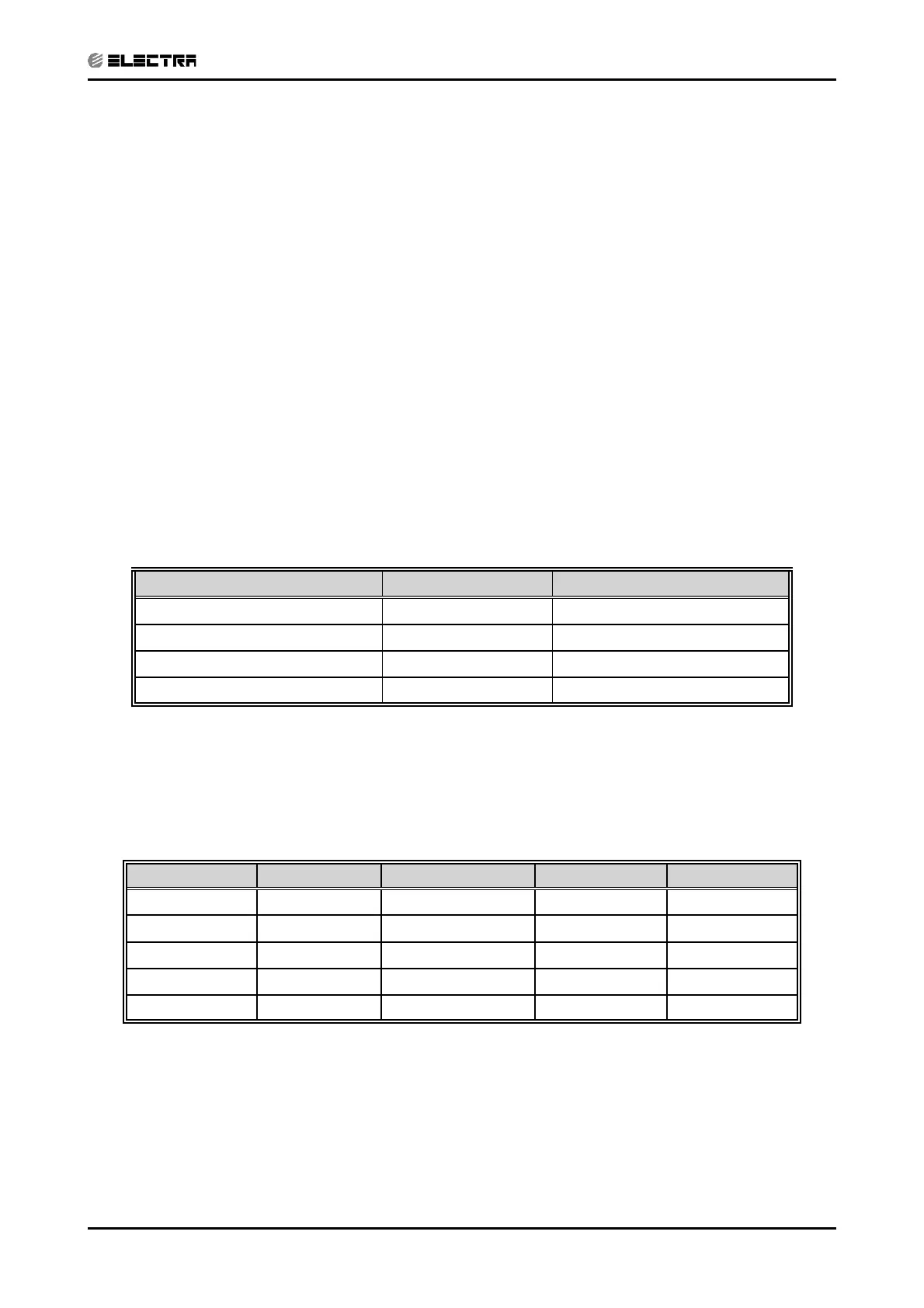
OPERATION MODE STAND-BY LED COOL LED
ST ON OFF
RC OFF OFF
SH OFF ON
RH ON ON
• Testing the Model confi guration. Selected by the COMP, STAND-BY,
TIMER LEDS and FILTER will indicate the model confi guration as follows
(the relevant line for this manual is highlighted):
MODEL COMP OPERATE LED TIMER LED FILTER LED
WNG ON OFF OFF OFF
WMZ ON ON OFF ON
WMN4 OFF OFF ON OFF
WMN2/WHX OFF ON OFF ON
WMN3 OFF ON ON ON
In this term the step motor will turn to HOME POSITION.



 To Next Page