14-7
SERVICING
SM OU12HP 2-E.2 GB
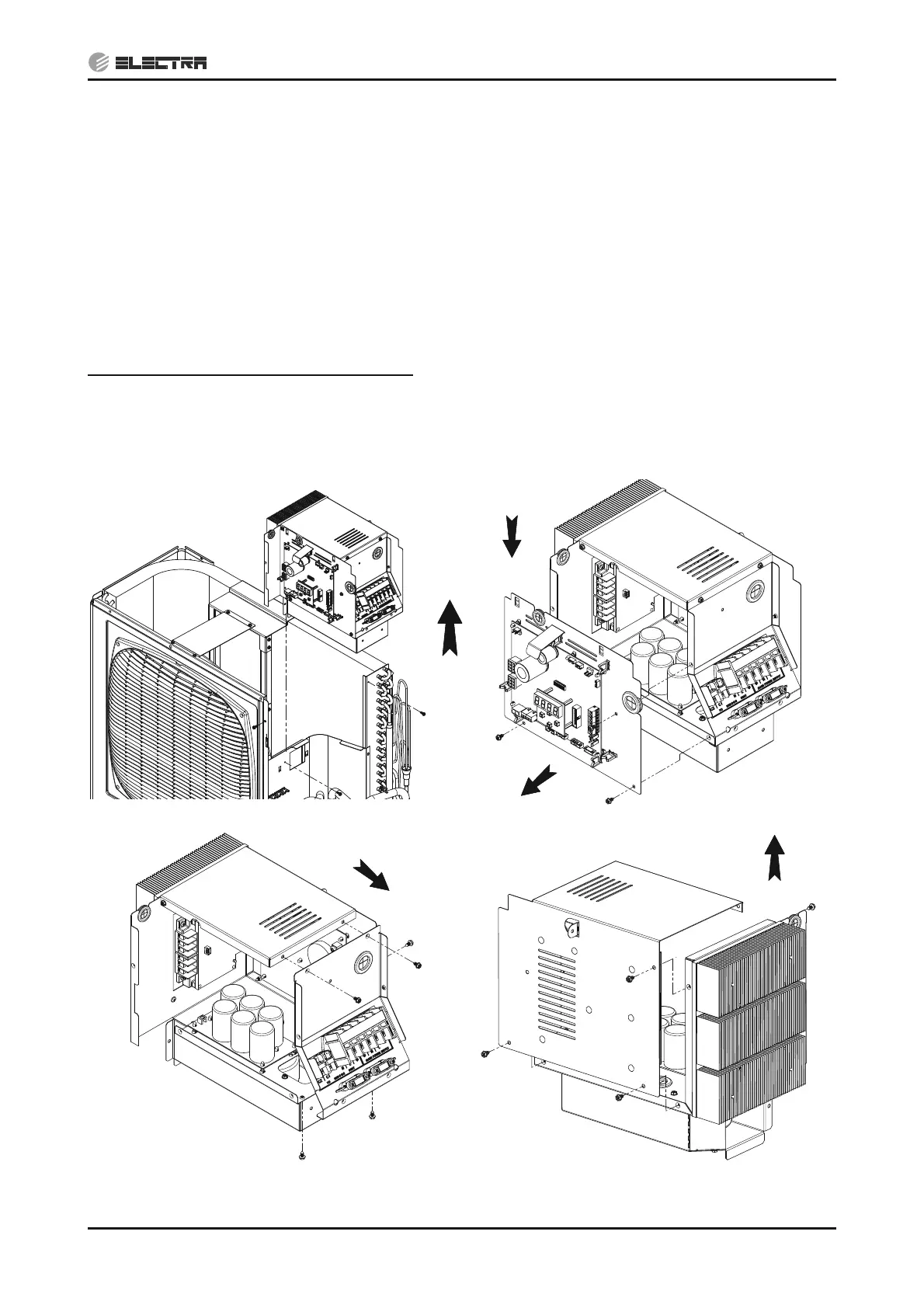
14.1.14 Removing Electrical assembly
1. Remove the service front panel according to 14.1.1.
2. Remove the side and top panels according to 14.1.2, 14.1.3.
3. Check to ensure that LEDs and display board are OFF.
4. Disconnect the following connectors from the main board: RV, thermistors (4), HPS and EEV.
5. Remove the compressor electrical cover. Use flat screw driver if required.
6. Remove the compressor wires from the terminals.
7. Remove the three (3) screws fixing the electrical box to the front fan panel, the partition and the
coil plate.
8. Pull up the box.
Notes for re-assemble the Electrical assembly:
1. Make sure to connect all the connectors into the right locations. If incorrectly connected,
malfunction or damage to the electrical parts may occur.
2. Hold the wires to the cable holders.
Removing Electrical assembly Removing main board Panel
Removing Terminal Panel Removing Electrical assembly Cover


 To Next Page