ANSWERING THE CALL
Handset pick-up Talk is initiated.
TALK
The talk duration is max. 2 min.
TALK CLOSING
without access
Close the handset.
S3 red
The battery is during charging
or defect.
2.
The system works OK.
S1 green
S2 green
S3
PROG
System OK.
S3 green
With battery (max. 7 Ah) connected to
the central unit (SCU).
The battery must be replaced if the S3
LED doesn`t turn green after 5 hours.
3.
The system works without
video, for a limited time.
The system has no power supply from
the 230 Va.c./ 50 Hz network or the
fuses are burned (the systems works
only on battery, with the basic features:
door opening and talk).
Check the power supply of SCU from
the 230 Va.c./ 50 Hz network or the
fuses status.
Check FUSE on the entry in SCU.
S1
S2
S3 green
PROG
No battery (max. 7 Ah) connected
to the central unit (SCU).
7
No.
Problem
SCU signals
Possible causes Potential solutions
1.
The system doesn`t work.
S1
S2
S3
PROG
The system has NO power supply from
the 230 Va.c./ 50 Hz network and there
is no battery connected to the SCU.
Check the power supply of SCU from
the 230 Va.c./ 50 Hz network or the
fuses status. Check FUSE on the
entry in SCU.
TROUBLESHOOTING
EN
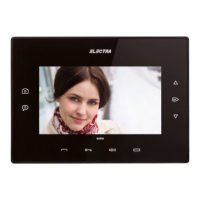
CALL
When called from the outdoor panel, the terminal rings – 3 x Ding-dong.
The LED is blinking red.
The terminal has 2 volume levels and they can be adjusted by short successive
BEEP
touches of key. The maximum level is signaled with 2 x [ ].
RINGING VOLUME
ADJUSTMENT
Terminal during call
RINGER OFF (MUTE)
Terminal in stand-by
BEEEEP
Long press of [ ] and LED turning red.
The terminal has the ringer off and the LED remains red.
The call will be signaled by LED blinking red.
BEEEEP
For reversing mute status, short touch of [ ] and LED turning off.
ACCESS GRANTING
Terminal in stand-by or
during call, talk or monitoring
From stand-by or monitoring Long press of .
During call or talk Short touch of any time.
The access is signaled acoustically also, with a specific confirmation
song and the bidirectional audio communication remains opened
10 more sec.
AUDIO MONITORING
Terminal in stand-by
Short touch of Bidirectional talk for max. 10 sec.
48


 To Next Page