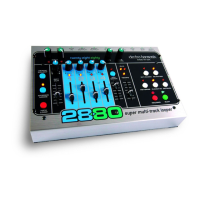
13. MIXDOWN Track: The Mixdown Track is a stereo track that records the audio from the 4 Recording tracks
through their Pan Pots and Faders. There are two different modes of Mixdown: Normal Mixdown and Constant Tempo
Mixdown.
MIXDOWN Button and LED: If the 2880 is idle, press the MIXDOWN button once and the MIXDOWN LED
will light up solid. You are in the normal Mixdown mode. Normal Mixdown is the mode to use when you want to
make a stereo mix of the 4 tracks. Press the MIXDOWN button again and the MIXDOWN LED will blink. You are in the
Constant Tempo Mixdown mode. Constant Tempo is a special mode that you can use to put flanging, pitch-bending
effects onto your Mixdown track, see below for more information on both modes. To exit either Mixdown mode, press
the Mixdown button while in idle mode, until the Mixdown LED turns off.
NORMAL MIXDOWN Mode: MIXDOWN LED lit solid. In this mode the 2880 is set up to produce a clean mix
of the 4 tracks. Press the RECORD button to begin mixdown. You can move the track faders and pan pots during the
mixdown and the audio will be recorded onto the Mixdown track just as you hear it when recording the Mixdown
track. The Mixdown Fader will act like a Feedback control during Overdubbing, just like the track faders. You can
record onto the Mixdo
wn track as many times as you like, keeping what was previously recorded.
CONSTANT TEMPO Mode: MIXDOWN LED blinks rapidly. In this mode the Mixdown track is recorded at a
constant speed or tempo but the TEMPO Slider will allow you to vary the speed of the 4 Recorded tracks. As the
Mixdown track is recorded, speed variations you perform with the TEMPO Slider will be recorded onto the Mixdown
track. This allows you to make subtle effects such as flanging or more drastic effects like radically bending the pitch of
an instrument. You can also engage the Reverse function to reverse a track that was recorded forwards. In some cases
of drastic TEMPO Slider use, the tracks you are mixing will become delayed with respect to their original timing.
14. TEMPO Slider and LED: The TEMPO Slider sets the tempo for the 2880 at all times except when the
EXT.CLOCK is activated (then the 2880 looks to the MIDI IN jack for its tempo). The TEMPO normally ranges from 60
BPM to 240 BPM. If the OCTAVE LED is lit, the tempo will range from 30 BPM to 120 BPM. The tempo gets faster as
the slider is pushed up. The total range of the Tempo slider is +/- 1 Octave + 1 step. When moving the TEMPO Slider,
it will increment the Pitch and Tempo in semitone (1/2) steps. After recording a New Loop, the TEMPO LED lights up
solid when the TEMPO Slider is set to the original tempo the loop was recorded at.
Pitch Changing and Bending with the Tempo Slider: After you have recorded a New Loop, on subsequent tracks you
record, you can move the TEMPO Slider and/or press the OCTAVE button to record notes at different pitches when
played back at the loop's original speed. F
or example, record T
r
ack 1 with some guitar chords. Move the TEMPO Slider
up one octave and record some single low notes with the same guitar. When you play both tracks back at normal
speed you will have guitar and bass tracks. While recording, try moving the TEMPO Slider, when you play the loop
back at a set tempo, the notes will bend according to how you moved the TEMPO Slider when recording.
15. CLIX LEDs: The CLIX LEDs blink on the beat, at the same tempo the 2880 is set to. The left LED lights briefly on
every beat, the right LED blinks only on beat 1. When the 2880 is using its internal tempo, the TEMPO Slider will set
the tempo the LEDs blink at. When the EXT. CLOCK is activated, the CLIX LEDs will blink at the MIDI Sync tempo.
16. CLIX LEVEL Knob: The CLIX LEVEL knob adjusts the volume of the Clix metronome. When you are recording a
New Loop, this knob will vary the volume for the metronome from 0 to 100%. After you record a New Loop and you
are either Playing back or Overdubbing, the CLIX LEVEL knob acts more like a switch for the metronome. If you have
the C
LIX LE
VE
L knob set to above 7
5%, you will hear the metronome, otherwise it is silent. When the 2880 is idle, the
metronome is off. The metronome beat is output through the Headphone jack and the L
eft/Right Output jacks but will
not be recorded.
10


 To Next Page
 Loading...